








:quality(80)/m/filters:format(webp))
:quality(80)/m/filters:format(webp))
Remote Desktop Manager tools help IT professionals organize remote connections, credentials and administrative workflows across servers and endpoints. This comparison examines Devolutions Remote Desktop Manager and several alternatives, then considers an equally important question: when does an apparent need for a connection manager actually point towards a different remote access architecture?
Why Is Remote Desktop Management Needed?
For a sysadmin responsible for dozens of servers or an MSP moving between customer environments, individual Remote Desktop Protocol connections quickly become difficult to manage. An RDP connection manager can centralize sessions, while broader platforms add credentials, multiple protocols, automation and team governance.
Devolutions Remote Desktop Manager has become a prominent reference point in this category. However, teams looking for a Remote Desktop Manager alternative may have very different reasons for doing so. Some need a simpler connection manager. Others may not need connection management at all.
What Is a Remote Desktop Manager?
A remote desktop manager is software used to organize and launch connections to remote computers and infrastructure. The category ranges from relatively simple RDP connection managers to wider administration workspaces supporting SSH, VNC, web consoles, VPNs and other technologies.
A note about the terminology:
Indeed, Devolutions uses Remote Desktop Manager, commonly abbreviated RDM, as the name of its product. In this article, "remote desktop manager" describes the general connection-management category unless Devolutions Remote Desktop Manager is named specifically. RDM can also mean Remote Device Management, which covers the monitoring, administration and security of endpoints and other devices rather than the organization of remote connections.
If your objective is to explore remote device management, go ahead to our device management guide.
Connection Management
For connection management, the requirement is different. An administrator may need to manage multiple RDP connections, group systems by customer or environment, reuse configuration settings and handle credentials without maintaining a large collection of separate .rdp files.
Additionally, connection manager should be distinguished from the RDP client which actually establishes the session. Here is our best of native RDP clients, cross-platform clients, connection managers and browser-based access options.
What Should IT Teams Consider in a Remote Desktop Manager?
The right Remote Desktop Manager alternative depends on the administrative workflow rather than simply the number of features available.
Protocol coverage
Protocol coverage is one useful starting point. A Windows-heavy infrastructure may need little beyond RDP. An MSP managing heterogeneous customer systems may also require SSH, VNC, web interfaces, VPN connections and other technologies.
Credentials Management
Credential management can be equally important. Some tools mainly store connection definitions. More advanced products can centralize credentials, inject them when sessions start and control how access is shared between administrators.
Overall, IT teams should compare the following areas:
- connection grouping, search and inheritance;
- RDP and additional protocol support;
- credential storage and injection;
- team sharing and role-based permissions;
- auditing and privileged access controls;
- gateways, tunnelling and jump-host options;
- automation and scripting;
- supported administrator operating systems;
- local versus centrally managed data;
- licensing and deployment complexity.
The priority given to each area should reflect the size of the environment and how many people administer it.
When Should You Look for an Alternative to Devolutions RDM?
Devolutions Remote Desktop Manager provides a broad IT administration workspace rather than simply an RDP launcher. Current versions centralize connections, credentials, secrets and audit information while supporting a large range of remote technologies and integrations.
That scope can make Devolutions RDM particularly suitable for MSPs and IT departments managing varied infrastructure, shared credentials and controlled administrative access.
However, the same breadth can lead some organizations to consider an alternative. A team may require only a straightforward way to manage multiple RDP connections. Another may want multi-protocol access without wider privileged access management capabilities. Cost, deployment model, administrator platform and the amount of governance required can also influence the decision.
Consequently, the comparison extends from "which product does everything Devolutions does?" to "which parts of the Devolutions RDM model do we actually need?". Let us develop the alternative opened by this dual perspective.
How Do Devolutions Remote Desktop Manager Alternatives Compare?
The following tools represent three different responses to the Devolutions RDM model rather than a list of superficially similar remote desktop products.
| Tool | Best Fit | Scope | Why Consider It Instead? |
|---|---|---|---|
| Devolutions Remote Desktop Manager | MSPs and larger IT teams | RDP, SSH, VNC, VPN, web and many integrations | Broad connection, credential and governance workspace |
| mRemoteNG | Individual admins and smaller, Windows teams | Common remote protocols | Lightweight and open source |
| Microsoft RDCMan | Windows admins with many RDP sessions | Primarily RDP | Focused management of Windows RDP connections |
| Royal TS | Multi-protocol admin environments | RDP, SSH, VNC, web and more | Strong connection, credential and automation features without identical Devolutions architecture |
1. mRemoteNG: A Lightweight Open-Source Alternative
mRemoteNG is a free, open-source connection manager for Windows. Its documentation includes support for RDP alongside other remote connection protocols and provides features for organizing connections and reusing common settings.
Its attraction is largely its narrower scope. An administrator who needs tabbed access to common infrastructure connections may not require the credential governance, auditing and privileged access functionality of a broader platform.
mRemoteNG therefore represents a genuine Devolutions RDM alternative where basics and connection organization matter more than centralized enterprise governance.
2. Microsoft RDCMan: An RDP-Focused Alternative
Microsoft Remote Desktop Connection Manager, usually called RDCMan, is more stripped-down still.
Microsoft describes RDCMan as a tool for managing multiple Remote Desktop connections, including environments such as server labs and data centers. Servers can be organized into groups, connected or disconnected collectively and displayed as live session thumbnails. Current versions also support inherited logon settings and credential stores.
For Windows administrators predominantly using RDP, this focused model may be enough. It avoids introducing a multi-protocol administration platform when the estate does not require one.
For that reason, RDCMan is less a reduced version of Devolutions RDM than an alternative for a specialised requirement.
3. Royal TS: A Multi-Protocol Administration Alternative
Royal TS returns to a broader connection-management model. It supports connection types including RDP, VNC, SSH, S/FTP and web interfaces, alongside credential management, task automation and secure gateway functionality.
Consequently, Royal TS is relevant where administrators need to manage mixed infrastructure but do not necessarily want to adopt the wider Devolutions ecosystem.
Royal TS also illustrates why protocol support alone should not determine the choice. IT teams should compare how connections, credentials, shared configuration, automation and administrative workflows fit their operational model.
When Is a Remote Desktop Manager Not the Right Solution?
Some organizations searching for an alternative to Devolutions Remote Desktop Manager need another connection manager. Others may be trying to solve a different problem entirely.
For instance, the distinction becomes important when the people connecting are business users rather than administrators.
Administrator Connections and User Access Solve Different Problems
Consider an MSP whose technicians need administrative access to 200 customer servers. The challenge is organizing infrastructure, credentials and technical sessions. A remote connection manager is a logical fit.
Now consider an organization where 200 employees need access to an ERP application hosted on Windows servers. Creating and maintaining individual remote connection profiles does not solve the fundamental requirement. The organization needs to provide authorized users with controlled access to the application.
The first architecture manages where administrators connect while the second manages what resources users can access, as described here.
Application Publishing Changes the Architecture
Application publishing moves the focus away from individual remote desktop connections.
Rather than giving every user a server connection and expecting the endpoint to manage it, IT can publish approved Windows applications through a centralized access layer. Users authenticate and receive only the applications or desktops assigned to them.
Browser delivery can further reduce endpoint requirements. A secure HTML5 portal can provide access to Windows applications and desktops without requiring each endpoint to maintain a traditional RDP client.
Our article on browser-based Windows access examines such architecture in greater detail.
At this point, finding a Remote Desktop Manager alternative may actually mean choosing a different way to deliver access rather than yet another connection manager.
Where Does TSplus Remote Access Fit?
Simplify Access
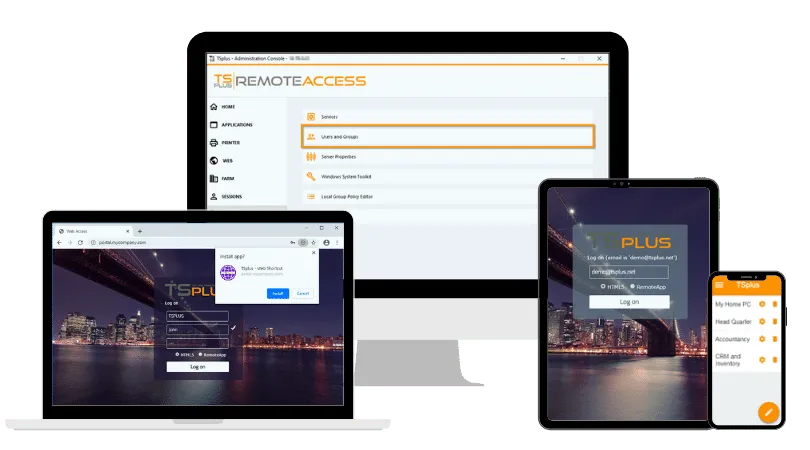
Start as you mean to go on, with tools made simple for hastle-free infrastructure: TSplus Remote Access is an indirect replacement for Devolutions Remote Desktop Manager, mRemoteNG, RDCMan or Royal TS. Our software addresses the matter of centrally delivering Windows desktops and applications to users. Do IT need to manage connections or rather how users reach centralized Windows resources?
Administrators can publish full desktops or specific Windows applications, assign applications to users and groups and provide connections through HTML5 or RDP-compatible clients. TSplus therefore becomes relevant when an organization initially considers a connection manager because it needs to distribute user access rather than organize administrator sessions.
For an MSP, ISV or IT department, both categories can also coexist. A connection manager may organize infrastructure administration while TSplus Remote Access provides controlled desktop and application access to employees, contractors or customers.
Step-up Security
Once access has been centralized through Remote Access, Advanced Security can add controls around who may connect, when they may connect, which endpoints are permitted and what users can access within Windows sessions.
Keep eye on essential workings
A connection manager organizes how administrators reach systems. Remote Access controls how users reach centralized applications and desktops. Server Monitoring provides visibility into the servers, sessions and resource usage behind that access.
And make sure it all keeps running smoothly
While Remote Access delivers centralized applications/desktops to users, TSplus Remote Support lets technicians intervene on remote Windows endpoints, maintain server environments from a distance and work together as well as train collaborators.
How Should You Choose: Connection Manager or Remote Access Platform?
Start by identifying who is connecting, what they need to reach and how much of the underlying infrastructure they should see.
If administrators need to move efficiently between many Windows servers, an RDP connection manager such as RDCMan may be sufficient. If the environment includes several protocols but remains relatively lightweight, mRemoteNG may fit. Where multi-protocol administration, shared credentials and broader governance become important, Royal TS or Devolutions Remote Desktop Manager deserve closer evaluation.
If employees, customers or contractors need controlled access to centralized Windows applications or desktops, examine the access architecture instead. Application publishing, user assignment, browser delivery and concurrent sessions become more relevant than maintaining a large connection catalogue.
This also applies when deciding between browser access and broader network connectivity, especially for business applications.
The decision can ultimately be reduced to two questions:
- Do administrators need a better way to manage a variety of connections to many systems?
- Or do users need a better way to reach applications and desktops hosted on those systems?
For the first problem, compare Remote Desktop Manager alternatives. For the second, investigate remote access and application delivery platforms.
Conclusion
Devolutions Remote Desktop Manager sets a broad benchmark for centralized connections, credentials and administrative workflows. mRemoteNG, Microsoft RDCMan and Royal TS provide credible alternatives where IT teams need a different balance of simplicity, protocol coverage or administration features.
When the requirement shifts from organizing administrator connections to delivering Windows applications or desktops to users, the search should also shift. In that scenario, the TSplus software suite represents an bespoke architecture rather than simply another connection manager.
TSplus Remote Access Free Trial
Ultimate Citrix/RDS alternative for desktop/app access. Secure, cost-effective, on-premises/cloud
:quality(80)/m/filters:format(webp))
:quality(80)/m/filters:format(webp))
:quality(80)/m/filters:format(webp))
