










)
)
What Is ScreenConnect?
ScreenConnect is a remote support and access platform operated by ConnectWise. It is designed for managed service providers (MSPs), helpdesks and internal IT teams that need to connect to managed computers or assist users remotely.
ScreenConnect Remote Support combines attended assistance, unattended access and technician tools in a configurable environment. Technicians can control systems, transfer files, run commands, record sessions and use administrative tools without always interrupting the end user.
ScreenConnect supports Windows, macOS, Linux and mobile environments. Its main capabilities include:
- Multi-monitor control, file transfer and session recording
- Background troubleshooting through Backstage and remote command-line access
- Shared technician toolboxes, Wake-on-LAN and mobile camera sharing
- Custom triggers, reports and extensions
- IT service management (ITSM), professional services automation (PSA) and identity integrations
ScreenConnect therefore goes beyond basic screen sharing. It is a configurable support platform for organisations with advanced technical and service-delivery workflows.
What ScreenConnect Does Well
ScreenConnect is particularly effective when remote support forms part of a larger IT service operation.
Advanced background troubleshooting
ScreenConnect Backstage lets technicians use PowerShell, Command Prompt, Registry Editor, Event Viewer, Windows Services and file-management tools without taking control of the user’s active desktop. Experienced technicians can therefore investigate or correct problems while minimizing disruption.
Extensive customization and automation
Administrators can customise host and guest interfaces, configure session behaviour, create triggers and install extensions that adapt ScreenConnect to existing processes. The platform also advertises more than 100 integrations and extensions.
This flexibility benefits larger MSPs with established procedures and teams that want remote support closely connected to their operational tools.
Broad platform coverage
ScreenConnect supports Windows, macOS, Linux, and mobile devices, making it suitable for organisations responsible for mixed endpoint environments.
Enterprise-oriented access controls
ScreenConnect publishes security capabilities that include AES-256 encryption, two-factor authentication, granular permissions and consent controls. The platform also supports identity sources and single sign-on technologies such as LDAP, SAML and OAuth.
Auditing and technician oversight
Session recording, video auditing, custom reports and detailed activity tracking can support training, quality assurance and compliance processes.
Integration with the wider ConnectWise ecosystem
Organizations already using ConnectWise PSA, ConnectWise Automate or ConnectWise RMM can keep remote support within the same vendor ecosystem. ScreenConnect also integrates with third-party service-management tools such as Zendesk and Freshdesk.
These capabilities make ScreenConnect a credible choice for advanced MSP operations. However, they may also introduce more functionality, configuration and licensing complexity than a smaller support team needs.
Why Businesses Look for a ScreenConnect Alternative?
Looking for a ScreenConnect alternative does not necessarily mean that ScreenConnect is unsuitable. In many cases, the organisation simply has narrower remote support requirements than the platform is built to address.
The team needs remote support, not a large support ecosystem.
Many helpdesks mainly need to:
- Start attended sessions and control the remote keyboard and mouse
- Transfer files, communicate with users and record sessions
- Access and organise unattended computers
- Run remote commands when maintenance is required
These teams may not need extensive triggers, identity integrations, reporting layers or connections with several ConnectWise products. For a lean IT department, additional flexibility can also create more options to evaluate, configure and maintain.
Licensing may not match technician usage patterns
ScreenConnect Remote Support plans are generally licensed per concurrent technician. Its Standard and Premium plans also place different limits on how many simultaneous sessions each technician can operate.
This model may work well for a defined group of full-time support technicians. It can be less convenient when many employees provide occasional assistance but only a few support sessions occur at the same time.
TSplus uses a different model based on concurrent remote connections, with unlimited users and managed devices under the account. For MSPs with rotating technicians or shared support responsibilities, this can make capacity planning more straightforward.
Some advanced features require higher ScreenConnect plans.
ScreenConnect distributes capabilities across several plans Backstage, session recording and Wake-on-LAN are available from the Standard plan, while remote camera sharing, video auditing and the remote diagnostics toolkit are listed under Premium.
Organizations should therefore compare the plan containing the features they need rather than focusing only on entry-level prices.
The business wants predictable support capacity
Some companies prefer to calculate remote support costs according to the maximum number of simultaneous customer sessions rather than the number of technicians or endpoints.
TSplus Remote Support follows this approach. A business selects the number of connections that can run at once, while users and managed devices remain unlimited within that concurrency limit.
The existing integration requirements are limited
ScreenConnect’s integration catalogue is valuable for teams with complex ITSM, PSA, remote monitoring and management (RMM), or identity workflows. A smaller helpdesk working mainly through email, a lightweight ticketing system or Freshdesk may not need such a large extension ecosystem.
TSplus provides a documented Freshdesk integration that allows agents to associate remote support sessions with support tickets.
Cloud dependency is not the only consideration
Both products offer cloud-hosted and self-hosted deployment options. ScreenConnect has an on-premises edition for local data ownership and private-network access, while TSplus is cloud-hosted by default but also offers self-hosting for organizations that need greater local control.
Businesses should compare how updates are managed, which infrastructure is required, what the self-hosted edition includes and whether its pricing differs from the published software-as-a-service plans.
When Is TSplus a Strong ScreenConnect Alternative?
TSplus Remote Support is strongest when an organization needs reliable remote assistance without unnecessary platform overhead.
MSPs with many technicians but limited simultaneous sessions
TSplus licenses concurrent connections rather than individual users. Any number of agents can use the account, while the license controls how many remote sessions can be active at the same time.
For example, an MSP may have 20 employees who occasionally help customers but rarely exceed five active sessions. In this case, a five-connection model may align more closely with actual usage than licensing every potential technician.
This does not make one model less expensive in every situation. It means that each vendor calculates capacity using a different operational metric.
Helpdesks focused on essential remote support workflows
TSplus includes the capabilities commonly needed for customer and employee support:
- Attended and unattended remote access
- Keyboard, mouse and multi-monitor control
- File transfer, chat and clipboard controls
- Remote system information and command access
- Session recording and screenshots
- Wake-on-LAN and multi-agent sessions
Together, these features cover most everyday desktop troubleshooting, maintenance and user assistance workflows.
Teams supporting Windows and macOS endpoints
TSplus agents can control Windows and macOS computers from Windows, macOS or Android devices. For organisations whose endpoints are concentrated on these platforms, TSplus can meet the main support requirement without introducing a broader platform.
Organizations that need to support Linux computers directly should consider ScreenConnect or another cross-platform product because TSplus does not currently document Linux endpoint support for Remote Support.
MSPs that want a branded customer experience
TSplus allows service providers to customise the connection client with their company name and logo, simplify its interface and host the download through their own domain. Customers therefore interact with the MSP’s branding rather than an unfamiliar third-party identity.
Organizations that want simple end-user onboarding
During attended support, the end user downloads and runs a small client before sharing an ID and password with the technician. The process does not require a traditional installation or reboot, which can make support easier for non-technical users.
Teams that want cloud convenience with a self-hosting option
In software-as-a-service mode, TSplus manages the relay infrastructure and software updates. Connections use a worldwide relay network, and the application can update automatically when launched.
Organizations that require more infrastructure control can instead discuss the self-hosted deployment option with TSplus.
When ScreenConnect May Still Be the Better Fit
TSplus is not intended to reproduce every ScreenConnect workflow. ScreenConnect may remain the stronger choice when an organization needs broader platform support, deeper administration or extensive integration capabilities.
You manage Linux or highly diverse endpoint environments
ScreenConnect documents support for Windows, macOS, Linux and mobile devices. TSplus Remote Support focuses on Windows and macOS remote computers, with Android available for technician access.
ScreenConnect is therefore the safer choice when native Linux support is an essential requirement.
You need extensive ITSM, PSA, RMM or identity integrations.
ScreenConnect offers a much broader documented integration and extension ecosystem. It supports several third-party identity sources and single sign-on technologies, together with integrations for major service-management and ConnectWise platforms.
TSplus provides Freshdesk integration and command-line connection options, but it is not positioned as an equivalent integration marketplace.
You rely heavily on silent background administration.
TSplus includes an unattended remote command shell, while ScreenConnect Backstage provides a wider range of background Windows administration tools.
Teams that frequently use Registry Editor, Event Viewer, Computer Management and file-management functions without opening the user’s desktop may therefore prefer ScreenConnect.
You need remote camera support
ScreenConnect View allows technicians to access an end user’s mobile camera through a secure link or SMS workflow. This can help diagnose routers, printers and other physical equipment that cannot be inspected through desktop control.
TSplus does not currently document an equivalent camera-assisted support workflow.
You have demanding audit or compliance workflows
ScreenConnect publishes extensive identity, auditing and compliance-oriented capabilities, including granular permissions, two-factor authentication, single sign-on integrations, custom reporting and video auditing.
TSplus provides encrypted connections, access authorisation and session recording. However, organisations with formal governance requirements should compare the available controls carefully before selecting either product.
You are already standardized on ConnectWise
MSPs using ConnectWise PSA, Automate or RMM may reduce integration work by keeping ScreenConnect within the same ecosystem.
Moving to a separate support product should therefore provide a clear operational or financial benefit before replacing an established integration.
How Do These Solutions Compare?
The most useful comparison is based on business requirements rather than claiming direct feature parity.
| Business requirement | TSplus Remote Support | ScreenConnect | Likely best fit |
|---|---|---|---|
| Attended desktop support | Remote control, chat, file transfer, system commands and multi-monitor support | Comprehensive attended support with extensive session controls | Both |
| Unattended computer maintenance | Managed computer lists, grouping, search, command shell and Wake-on-LAN | Unattended access, Backstage, command line and advanced machine-management tools | TSplus for essential maintenance; ScreenConnect for deeper administration |
| Licensing many occasional technicians | Unlimited users, limited by concurrent connections | Remote Support plans generally licensed per concurrent technician | TSplus |
| Supporting unlimited endpoint inventories | Unlimited devices under the concurrent-session model | Standard and Premium include unlimited unattended access agents | Depends on technician and session patterns |
| Linux endpoint support | Not currently documented | Windows, macOS, Linux and mobile support | ScreenConnect |
| Technician access from mobile | Android technician access | Mobile technician support, including iOS and Android capabilities depending on workflow | ScreenConnect for broader mobile coverage |
| Branding the customer experience | Branded client, simplified interface and custom download domain | Customisable host and guest interfaces, themes and domains | Both |
| Freshdesk-based workflow | Native documented Freshdesk ticket integration | Freshdesk is included among supported integrations. | Both |
| Broad ITSM and PSA integration | Focused integration set | Extensive extensions and integrations, including major ITSM and ConnectWise products | ScreenConnect |
| Background command-line work | Remote command shell for unattended machines | Command line plus full Backstage administrative environment | ScreenConnect |
| Remote camera troubleshooting | No equivalent currently documented | ScreenConnect View mobile camera sharing | ScreenConnect |
| Session recording | Included | Included from the relevant plan, with additional video-auditing options at higher tiers | Both |
| Enterprise identity controls | Built-in session authorization and access controls | 2FA, granular permissions, LDAP, SAML, OAuth and other SSO options | ScreenConnect |
| Cloud-hosted deployment | Available by default with managed relays and updates | Available | Both |
How to Choose the Right ScreenConnect Alternative?
Before replacing ScreenConnect, document how your team actually delivers support. Real usage patterns provide a more useful basis for comparison than feature lists alone.
Measure actual concurrency
Start by determining:
- How many people may provide support and how many usually work at once
- How many simultaneous sessions each technician needs
- The highest session volume reached during peak periods
These figures will show whether per-technician or per-connection licensing better reflects your organisation’s usage.
Separate essential features from advanced features
Divide the capabilities into three categories:
- Required features without which support cannot operate
- Useful features that improve productivity but are not essential
- Unused features that are licensed but rarely needed
A team may discover that unattended access, file transfer, command-line tools and recording are essential, while mobile camera sharing, extensive triggers or a large extension marketplace are not.
Audit endpoint platforms
Confirm whether the organization supports:
- Windows, macOS or Linux computers
- Android and iOS devices
- Servers that do not have an active user
- Physical equipment requiring camera-assisted support
- Platform requirements can quickly eliminate products that do not cover the required devices.
Review security and compliance controls
Compare encryption, authentication, permissions, session consent, logging, recording, data residency and identity-provider integration.
An encrypted remote support connection does not automatically satisfy every security policy. The chosen product must also fit the organisation’s access governance and auditing requirements .
Map integrations before migration
Document every connection between remote support and other systems, including:
- Ticketing, PSA and RMM platforms
- Identity providers and customer portals
- Reporting tools and automation scripts
TSplus may suit a standalone or Freshdesk-based support workflow, while ScreenConnect generally fits better when remote control is deeply embedded in a larger ConnectWise or third-party service stack.
Test real support cases
A product trial should reproduce the situations technicians encounter regularly:
- Attended support for a non-technical user
- Unattended maintenance and administrative elevation
- Multiple sessions or multi-monitor computers
- File transfers, clipboard use and session recording
- Remote access over a slow network or from outside the office
The trial should also test branded client deployment and the retrieval of recorded sessions. Reproducing everyday workflows provides a clearer picture than comparing marketing claims alone.
Conclusion
Choosing between ScreenConnect and TSplus Remote Support depends on the depth of support operations, endpoint diversity, integration needs and licensing preferences. ScreenConnect suits complex, highly integrated environments, while TSplus offers a simpler, cost-conscious option for essential remote assistance. The best choice is the one that matches workflows and growth plans.
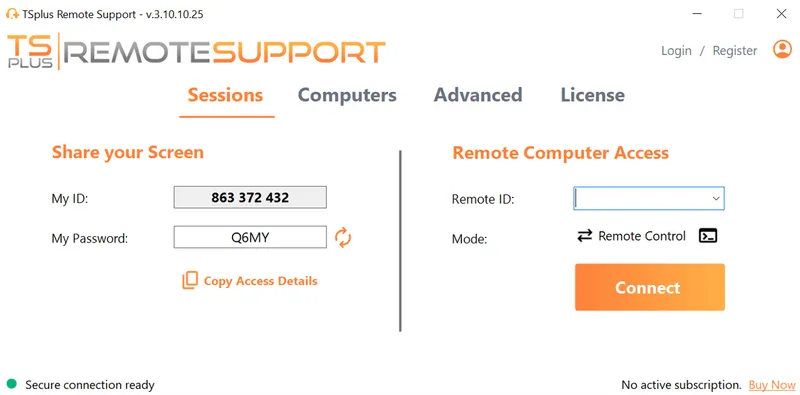
TSplus Remote Support Free Trial
Cost-effective Attended and Unattended Remote Assistance from/to macOS and Windows PCs.
Frequently Asked Questions
What is the best ScreenConnect alternative for MSPs?
The best alternative depends on the MSP’s workflow. TSplus Remote Support is a strong option for MSPs that need attended support, unattended access, unlimited users and devices, branded support clients and licensing based on concurrent sessions.
ScreenConnect may remain better for MSPs that require Linux support, extensive PSA or RMM integrations, enterprise identity controls, remote camera sharing or advanced background administration.
Is TSplus cheaper than ScreenConnect?
TSplus uses a lower-cost concurrent-connection model, while ScreenConnect Remote Support is generally priced per concurrent technician with different session allowances and feature tiers. Based on currently published SaaS pricing, TSplus can be substantially less expensive for teams with many potential technicians but relatively few simultaneous support sessions.
The accurate comparison will depend on concurrency, technician behaviour, required ScreenConnect plan and deployment model.
Does TSplus support unattended remote access?
Yes. Technicians can add unattended computers, organise them into groups, search the device list, connect without the end user being present, open a command prompt and use Wake-on-LAN for compatible machines.
Can TSplus replace ScreenConnect Backstage?
Not completely. TSplus includes an unattended remote command shell and lets technicians switch between command-line and full-control modes. ScreenConnect Backstage provides a broader background administration environment with tools such as Registry Editor, Event Viewer, Computer Management and Windows Services.
Teams that mainly need command-line troubleshooting may find TSplus sufficient. Teams that rely extensively on the complete Backstage toolkit may prefer ScreenConnect.
Can TSplus Remote Support be self-hosted?
Yes. TSplus is cloud-hosted by default, but a self-hosted option is available for organisations that require local infrastructure control. Self-hosted pricing and deployment requirements should be confirmed with TSplus.
ScreenConnect also offers a dedicated on-premises deployment option.
Does TSplus integrate with helpdesk software?
TSplus Remote Support includes a documented Freshdesk integration that links remote support sessions with Freshdesk tickets.
ScreenConnect currently provides a broader integration ecosystem and may be more appropriate when support sessions must connect with several ITSM, PSA or RMM platforms.
Does TSplus support Linux computers?
TSplus Remote Support currently documents remote support for Windows and macOS computers, with agent access from Windows, macOS and Android devices. Linux endpoint support is not currently listed.
ScreenConnect documents support across Windows, macOS, Linux and mobile environments.
Is TSplus suitable for an internal IT helpdesk?
Yes. TSplus can support employees through attended sessions and maintain company computers through unattended access. Its unlimited-user licensing can be useful when support responsibilities are shared across multiple IT administrators, provided the purchased concurrent-connection capacity matches peak demand.
)
)
)
