










)
)
Introduction
Technology is meant to simplify work. Yet employees regularly lose time to failed logins, unreliable applications, slow devices, and support processes that seem almost as difficult as the original problem.
For small and medium-sized businesses, these interruptions rarely remain isolated. A delayed support request can stop an employee, occupy a technician, and affect a customer-facing process at the same time. Reducing digital friction therefore means more than deploying better software. It requires examining the complete journey from the first sign of an issue to its final resolution.
What Is Digital Friction in IT Support?
Digital friction describes technology-related obstacles that make it harder for people to complete their work. A 2025 TeamViewer report defines the broader concept as any workplace technology problem that prevents an employee from working or working efficiently, including failures affecting systems, applications, and devices.
In IT support, however, friction is not limited to the technical failure itself. It also includes the extra effort created by the process used to obtain help.
A useful definition is:
Digital friction in IT support is any avoidable step, delay, or complication between the emergence of a technology problem and its complete resolution.
It can be divided into three connected categories.
Technology Friction
- device and application problems, including slow computers, unstable software, and interrupted updates
- access problems, such as failed authentication, forgotten credentials, and unreliable connectivity
- infrastructure failures affecting servers, business applications, or system configurations
These problems may look unrelated, but each one interrupts the employee’s work and can generate additional support activity if the underlying cause remains unresolved.
Help-Seeking Friction
The difficulty often begins before IT knows that a problem exists. An employee may search through old emails, contact several colleagues, or complete a lengthy form before reaching the right technician.
By the time support begins, the employee has already spent time navigating the support process rather than resolving the original issue.
Resolution Friction
This imbalance becomes especially visible when the technical repair is straightforward. A technician may need only five minutes to correct the problem but spend another twenty gathering information, obtaining permissions or establishing a remote connection.
The support experience is therefore shaped as much by the surrounding process as by the repair itself.
Why Does Digital Friction Matter to SMB IT Teams?
Digital friction affects organizations of every size, but SMBs have less capacity to absorb the resulting inefficiency.
A small IT team may be responsible for user support, infrastructure, cybersecurity, backups, applications, and vendor management. Time spent repeating questions or reconnecting to a workstation is time not spent on maintenance and improvement.
The cumulative effect can appear in several areas:
- longer employee downtime
- more interruptions for technicians
- delayed operational tasks
- repeated support requests
- employee frustration and workarounds
- increased use of unapproved devices or applications
- limited time for preventive IT work.
The scale of the wider problem is significant. TeamViewer commissioned Sapio Research to survey 4,200 managers and employees across nine countries in August and September 2025. In that study, 80% of respondents said they had lost time to dysfunctional IT, with an average reported loss of 1.3 workdays per month.
The same survey found that 48% believed digital friction had delayed critical operations or projects during the previous year. Connectivity, software crashes, hardware failures and authentication problems were among the most commonly reported causes.
These figures come from vendor-sponsored research and are not specific to SMBs, but they illustrate why apparently minor technology problems should not be dismissed. When friction recurs among many users, small delays become an operational issue.
Where Does Friction Enter the IT Support Journey?
The support process should be examined from the user’s first encounter with a problem through to follow-up and prevention.
| Support stage | User-side friction | Technician-side friction |
|---|---|---|
| Recognising the issue | Unsure whether to report it or attempt a workaround | No visibility into unreported problems |
| Requesting support | Unclear contact channel or lengthy intake form | Incomplete or inconsistent ticket information |
| Triage | Repeated questions and ticket transfers | Missing device, user, or error context |
| Establishing access | Downloads, codes, permissions, or scheduling delays | Connection failures and privilege restrictions |
| Diagnosis and repair | Limited visibility into progress | Switching between support, monitoring and documentation tools |
| Closure | Unclear resolution or repeated problem | Weak documentation and no root-cause follow-up |
Before the User Contacts IT
Low ticket volume can therefore be difficult to interpret. It may reflect a stable environment, but it may also mean that employees find the reporting process inconvenient or do not expect a fast response.
When that happens, users often create their own workarounds. Moving files to personal devices, installing alternative software or bypassing an approved process may help someone continue working, but it can also turn a productivity issue into a security or governance problem.
During Ticket Intake and Triage
To make the request actionable, the technician usually needs to establish three points:
- what is affected, including the user, device, and application
- how the problem behaves, including its timing, scope, and error messages
- what has already been tried and how seriously the issue is disrupting work
Some clarification will always be necessary. The process becomes frustrating when users must repeat the same information, tickets move between technicians without context or the intake method fails to collect basic details consistently.
When Establishing a Remote Session
The connection process becomes difficult when users must identify the correct download, install software without sufficient permissions or communicate lengthy credentials over the phone. Technicians may face similar delays when different devices, customers or session types require separate tools and procedures.
A predictable process reduces uncertainty on both sides. During attended support the user should understand who is connecting, what access is being requested and when the session ends. For approved unattended support, technicians should be able to reach managed systems without repeatedly arranging access with an employee.
During Resolution and Follow-Up
The technician may have spent most of the session collecting information or reproducing the failure rather than correcting it. Even after the ticket closes, the employee may encounter the same issue again because the immediate symptom was resolved without addressing its cause.
Useful documentation prevents the next technician from starting over. A clear record of the diagnosis, actions and outcome makes repeated incidents easier to recognise and gives the IT team a stronger basis for investigating recurring problems.
How Can SMBs Identify Digital Friction?
Ticket counts alone do not provide a complete picture. They measure reported demand, not every technology problem employees experience.
SMBs should combine operational metrics with direct user feedback and infrastructure data.
Useful measurements include:
- time between a request and the first technician response
- time required to establish a remote connection
- average resolution time
- first-contact resolution rate
- number of technician handoffs
- reopened tickets
- recurring incidents affecting the same system
- abandoned or incomplete support requests
- employee satisfaction after support
- server, application, and website alerts preceding incidents
The purpose is not to build an enterprise-scale digital employee experience programme. A simple monthly review can reveal where the time is being lost.
For example, resolution time may appear high because technicians lack the required skills. Alternatively, the actual repair may be fast while the team consistently spends fifteen minutes obtaining remote access. Those situations require different responses.
IT teams should also ask employees a small number of practical questions:
- Is it clear how to contact support?
- Which step takes the most effort?
- Do you often solve problems without reporting them?
- Have you stopped using an approved tool because it is unreliable?
- Do the same issues keep returning?
Open reporting matters because recurring friction often remains invisible when users quietly adapt. TeamViewer’s guidance similarly recommends combining technical data with employee feedback rather than relying solely on traditional help-desk activity.
How Can SMBs Reduce Digital Friction in IT Support?
The objective is not to rebuild the entire IT environment. SMBs should identify the largest source of delay and simplify it first.
Create One Clear Route to Support
Problems appear when requests arrive through private messages, phone calls, hallway conversations, and several unrelated inboxes Technicians then have difficulty recording, prioritising, and following the work, while employees may be unsure whether anyone is managing their request.
Critical incidents can still use a faster escalation route. The key point is to define that route clearly, so employees do not have to decide for themselves how and where to reach IT each time a problem occurs.
Collect enough context without overloading users
A short form can capture the affected device, application, error message, business impact, and preferred contact method. Where possible, the support system should collect technical details such as the operating system, hostname, or software version automatically rather than asking employees to identify them.
The intake process should give technicians enough context to begin triage without becoming another obstacle. Long technical questionnaires may discourage reporting and leave employees feeling that they must diagnose the issue before IT will help them.
Combine Self-Service With Accessible Human Support
Self-service creates additional friction when employees must search through irrelevant articles or complete several automated steps before they can reach a technician. A knowledge base should offer a faster route for known problems, not become a barrier between the employee and the help desk.
Real ticket data can show whether each guide is actually useful. When an article fails to reduce repeated requests, it may be difficult to locate, out of date or written at a level that does not match the employees who need it.
How Can Remote Support and Monitoring Reduce Delays?
Users should not need to understand the remote support architecture. They need clear instructions and a limited number of steps.
For attended assistance, aim for a consistent sequence:
- The employee opens the approved connection tool or support link.
- The technician’s identity and requested access are clear.
- The employee provides or confirms the session information.
- The technician connects and begins diagnosis.
- The session ends visibly when the work is complete.
Where routine maintenance is required, authorised unattended access can prevent repeated scheduling and connection delays. It should be limited to approved devices and administrators rather than enabled indiscriminately.
Use Monitoring to Detect Problems Before Tickets Multiply
That distinction matters when a server, website or business application begins to degrade. Resource exhaustion, service failures, and unusual usage patterns may appear in monitoring data before several employees report the same symptoms. Threshold alerts give technicians an opportunity to investigate earlier and respond with better context.
Monitoring can also show whether a problem belongs to one workstation or to the wider infrastructure. Instead of troubleshooting several users independently, the IT team can identify the common service involved and communicate that the underlying incident is already being addressed.
Remote support and server monitoring therefore cover different but connected parts of the support workflow:
| Capability | Primary purpose | Friction reduced |
|---|---|---|
| Remote support | Diagnose and repair user or device problems | Connection delays, travel, unclear troubleshooting |
| Server monitoring | Observe infrastructure health and issue alerts | Hidden failures, repeated incidents, delayed detection |
| Ticketing or documentation | Record requests, actions, and outcomes | Repeated explanations and weak handoffs |
| Knowledge management | Resolve known, low-risk issues | Avoidable tickets and repeated technician work |
Monitoring cannot replace direct support, just as remote intervention cannot provide complete infrastructure visibility. Used together, the two capabilities help a small IT team resolve active incidents while also recognising the conditions that repeatedly produce them.
Reduce Technician Tool Switching
Not every product needs to be removed or consolidated. The real problem is repeated manual work, such as copying the same device information between systems, switching consoles during one diagnosis, or maintaining several tools with overlapping purposes.
A workflow review should therefore focus on three questions:
- Does the tool provide information or capabilities that the team genuinely needs?
- Does it fit the existing support process without creating repeated manual steps?
- Is its operational value proportionate to the time required to deploy and manage it?
For a lean IT team, a predictable daily workflow may be more valuable than a large feature set that demands extensive configuration. The most suitable support stack is the one technicians can use consistently without losing time between disconnected systems.
SMBs Should Address the Causes Behind Repeated Incidents
Repeat incidents are one of the clearest signs of unresolved digital friction.
If several users experience the same authentication failure, the answer is not simply to close each ticket faster. IT should examine identity configuration, synchronisation, policy application, or user guidance.
The same principle applies to overloaded servers, unstable applications, and failed updates. Trend data from monitoring and support records can show whether apparently separate tickets have a common source.
Set aside time for root-cause work even when the queue is busy. Otherwise, recurring problems continually consume the capacity needed to prevent them.
Automate Selectively
The most practical first candidates are repetitive and low-risk tasks, including:
- collecting device information and routing requests according to category or impact
- notifying employees about known incidents and alerting technicians when thresholds are exceeded
- conducting approved service restarts or distributing standard post-session summaries
Privileged or high-impact actions should still require appropriate authorisation and review. SMBs can begin with predictable, reversible tasks, confirm that the workflow is reliable and only then consider broader automated remediation.
How Can SMBs Reduce Friction Without Weakening Security?
Not every additional step is unnecessary friction. Identity verification, user consent, encrypted connections, and controlled privileges protect both the organization and the employee.
The objective is to make these safeguards proportionate and understandable.
NIST guidance recommends defining restrictions and connection requirements for permitted remote access, authorising each type of access, and controlling privileged remote commands and access to security-relevant information.
In practice, SMBs should:
- authorise remote-access methods before use
- limit technician permissions according to role
- separate attended assistance from persistent unattended access
- remove access when a device or customer no longer requires it
- keep records of privileged support actions
- avoid sharing permanent credentials through informal channels
Security becomes digital friction when controls are duplicated, inconsistent or poorly explained, not simply because they exist.
Start by fixing the costliest support bottleneck
SMBs do not need to adopt a complete DEX platform to improve their support experience.
A practical starting plan is:
- Map the current journey from problem discovery to closure.
- Measure response, connection, and resolution times for a representative sample.
- Identify the stage causing the greatest delay or repetition.
- Change one process or tool and compare the results.
- Use monitoring and ticket patterns to select the next improvement.
This incremental approach is easier to manage and makes it possible to demonstrate whether each change genuinely saves time.
How Can TSplus Help Reduce Digital Friction?
TSplus Remote Support gives IT teams attended and unattended remote assistance with integrated chat, file transfer, and organised access to managed computers, helping technicians connect and intervene without an unnecessarily complex support process.
TSplus Server Monitoring complements it with threshold-based infrastructure alerts and alert history, allowing SMB teams to detect developing server and website problems earlier.
Conclusion
Digital friction in IT support includes more than malfunctioning technology. It also covers the obstacles users face when asking for help and the delays technicians encounter while connecting, diagnosing, and following up.
SMBs can reduce it without building an enterprise-scale digital experience programme. Clearer support channels, better intake information, straightforward remote assistance, proportionate security, and focused monitoring can remove unnecessary work from both sides of the support relationship.
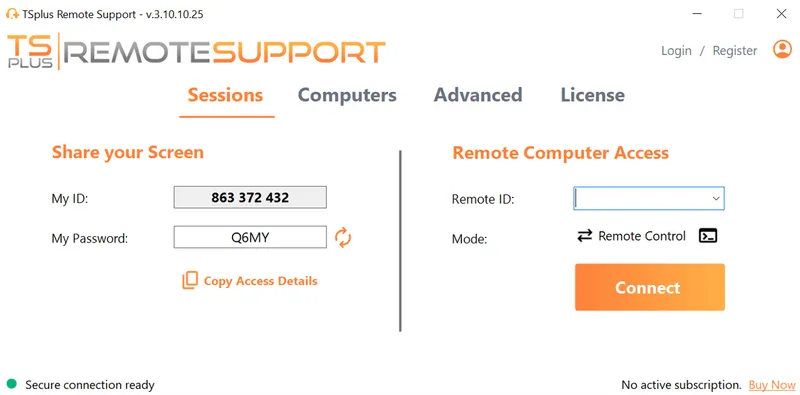
TSplus Remote Support Free Trial
Cost-effective Attended and Unattended Remote Assistance from/to macOS and Windows PCs.
)
)
)
