








)
)
A digital workspace gives users secure access to the applications, desktops, data and tools they need to work from any location. For IT teams, the real value is beyond the buzzword. Rather, it is controlled access, simpler administration and a reliable way to support work without rebuilding the whole environment.
For many IT teams and businesses, a digital workspace should not require a full virtual desktop infrastructure project, a cloud migration or a complex enterprise suite. Instead, practical digital workspaces can start with solid remote access to existing Windows applications, supported by secure protection, monitoring and remote assistance.
What Is a Digital Workspace?
A digital workspace is the user-facing environment where employees open business applications, access desktops, connect to data and complete daily work. It can include Software as a Service applications, published Windows applications, remote desktops, internal web apps, collaboration tools and support channels.
For IT admins and managed service providers, the digital workspace is also an administration model. It defines who can access which resource, from which device, through which security controls and under which monitoring rules. This makes the digital workspace more than a portal. It becomes a controlled access layer between users and business systems.
This distinction matters because many organizations already have useful infrastructure in place. They may run accounting software, enterprise resource planning tools, customer databases, industry applications or file resources on Windows servers. A digital workspace should make those resources easier to reach and safer to manage, not force a complete replacement.
Digital Workspace vs Digital Workplace vs VDI
The terms digital workspace, digital workplace and virtual desktop infrastructure are often used together. They are related, but they do not mean the same thing.
|
Concept |
Typical meaning |
Practical IT focus |
|
Digital workplace |
A broader strategy covering tools, culture, collaboration and employee experience |
How people work across the organization |
|
Digital workspace |
The user environment for apps, desktops, data and access |
How users securely reach work resources |
|
VDI or DaaS |
Hosted virtual desktops delivered from servers or cloud platforms |
Ways desktops are virtualized and managed |
Digital Workplace
A digital workplace is broader. It includes communication practices, employee engagement, digital culture and business processes. A virtual workplace has a similar history, describing a work environment that is not tied to one physical office and relies on digital communication and platforms.
Digital Workspace
A digital workspace is more technical and more focused. It is the place where the user interacts with the tools needed to do the job. For digital workspace sysadmins, the key question is simple: how can IT provide secure, reliable access to applications and desktops while keeping administration manageable?
VDI, DaaS, SaaS…
VDI and Desktop as a Service can be part of a digital workspace, but they are not always required. Some organizations need full hosted desktops. Others only need to publish specific Windows applications, provide browser-based access to a server desktop or give external users a controlled remote access workspace . This is part of the choices ahead.
Why Do Digital Workspace Projects Become Too Complex?
Vendor packages
Digital workspace projects often grow because vendors package many layers into one platform:
- endpoint management,
- identity,
- single sign-on,
- virtual apps,
- virtual desktops,
- SaaS access,
- file sharing,
- analytics,
- automation and
- employee experience features
may all appear in one proposal.
That model can be useful for large enterprises with distributed IT teams and complex compliance requirements. However, it can be excessive for those which mainly need secure access to a few business-critical applications. Complexity can increase licensing costs, slow deployment and create dependency on a single vendor ecosystem.
The gap
The result is a gap between what many articles describe and what numerous IT teams need. Generic definitions focus on flexibility and productivity. Meanwhile, real implementation work focuses on servers, users, authentication, ports, policies, application compatibility, session performance and support.
A fresh approach
A better approach is to start with the issue of access.
- Which users need which applications?
- Which applications must stay on existing infrastructure?
- Which sessions must be monitored?
- Which security controls are mandatory?
These questions keep the digital workspace project grounded.
What Do IT Teams Actually Need from a Digital Workspace?
A secure digital workspace should support real work without adding unnecessary friction. For IT admins, MSPs and managers, the core requirement is controlled delivery of applications and desktops.
Secure access to applications and desktops
Users need a reliable way to connect from home, branch offices, customer sites or temporary locations. IT needs authentication, encryption, session control and clear access rules.
A practical digital workspace should allow users to connect through a secure web portal or compatible client. It should also help IT avoid exposing unmanaged remote access paths. Thus, with access centralized, administrators can apply policies consistently instead of relying on scattered shortcuts, VPN exceptions or unmanaged tools.
Support for Windows applications and legacy software
Many businesses still depend on Windows applications which were not designed as SaaS products. These applications may run well on a server, but they create problems when users need remote access from personal devices, thin clients or distributed offices.
A digital workspace should include SaaS, but it should also make existing Windows applications available securely . This is especially important for accounting firms, healthcare providers, retailers, manufacturers, legal teams and vertical software users. Therefore, in these environments, modernization often means safer access to what already works.
Central control without full infrastructure replacement
IT teams should be able to publish resources, assign users and remove access without rebuilding every endpoint. Additionally, they need visibility into server health, user sessions and performance issues.
This is where a lightweight digital workspace model can help. Instead of replacing the whole environment, IT can add a secure access layer, strengthen authentication, monitor remote servers and support users when sessions fail. The organization improves remote work without turning the project into a full platform migration.
A Practical Digital Workspace Architecture for IT Admins
A practical architecture does not have to be complicated. Generally, the goal is to separate user access, authentication, application delivery, security, support and monitoring into clear layers.
User access layer
The user access layer is the front door . Users connect through a secure web portal, Progressive Web App or remote desktop client. The access layer should be simple enough for employees, contractors and managers to use without repeated help desk tickets.
For many organizations, browser-based access is attractive because it reduces endpoint configuration. That way, users can reach assigned applications or desktops without installing a full workspace client on every device. This can be useful for unmanaged laptops, temporary staff and external users.
Authentication and access policy layer
Authentication protects the workspace before a session starts, therefore zero trust has to be the upstream norm. Strong passwords are not enough for modern remote access. Multi-factor authentication, user group assignments and least privilege policies should define who can open each application or desktop.
Also, access policies should be mapped to business roles. A finance user may need accounting software. A warehouse user may need an inventory application. A contractor may need one published app and nothing else. Such a role-based model reduces unnecessary exposure.
Application and desktop publishing layer
The publishing layer delivers the work environment. It can provide a full remote desktop, individual Windows applications, internal web apps or a combination of resources.
Application publishing is often the most efficient option when users do not need a complete desktop. Here, the user sees the business application, while the application still runs on the controlled server. This model can reduce endpoint dependency and help IT keep data and software management centralized.
Security, support and monitoring layer
The final layer protects and operates the digital workspace. Security tools should help block suspicious access, apply IP rules, defend against brute force attempts and reduce ransomware risk. Additionally, support tools should let technicians assist users when they cannot connect or when an application behaves unexpectedly.
Monitoring closes the loop. Indeed, a workspace which cannot be measured is difficult to manage. IT teams need visibility into server load, application usage, user activity, session performance and alerts which in turn point to problems before users report them.
Curious about secure, affordable app publishing without the Citrix complexity? Start your free TSplus trial today.
How Digital Workspace Solutions Compare - by Complexity and Limitations
Not every digital workspace solution has the same operational weight. Before selecting a platform, you should match the solution type to your actual business need.
|
Approach |
Best fit |
Risk or limitation |
|
SaaS-only workspace |
Cloud-native teams using mostly web apps |
Does not solve access to Windows applications |
|
Full VDI or DaaS |
Organizations needing managed virtual desktops |
Higher cost and architecture complexity |
|
Enterprise workspace suite |
Large environments needing endpoint, identity and app orchestration |
Potential overbuying for SMBs or tight budgets |
|
Lightweight app and desktop publishing |
Lean IT teams, MSPs and larger companies on tight budgets needing secure access to existing apps |
Requires disciplined server and access management |
A SaaS-only model works when most applications already live in the cloud. A full VDI or DaaS model works when users need complete hosted desktops. Enterprise workspace suites work when IT needs a broad ecosystem with deep integration across endpoints and identity.
Many businesses, however, sit in the fourth category. They need secure digital workspace solutions, but they do not need to replace every endpoint or migrate every application. For these organizations, lightweight secure app and desktop publishing can deliver the most direct value.
How Does TSplus Provide Lightweight Digital Workspace Alternatives?
The TSplus Suite helps IT teams build a practical digital workspace around secure access, protection, support and monitoring. The approach is especially relevant when the organization wants to keep existing Windows applications and servers while improving remote access. And what’s more, the solution can take different shapes according to need and usage.
TSplus Remote Access
TSplus Remote Access enables IT teams to publish Windows applications and full desktops to users. Users can connect through HTML5 browser access, compatible Remote Desktop Protocol clients or a web application portal , depending on the deployment model.
This makes our software a strong fit for a remote workspace. Instead of deploying a full VDI platform, administrators can centralize applications on servers and assign them to users or groups. Users get access to the tools they need, even long worn legacy apps, while IT keeps applications under control.
TSplus Advanced Security
A digital workspace expands the access surface, so security must be part of the design. TSplus Advanced Security helps protect remote access environments with 360° controls such as IP filtering, threat protection, malware defense and other features designed for remote desktop infrastructures.
This layer supports secure digital workspaces by reducing exposure and helping administrators enforce access boundaries. Nonetheless, it does not replace good identity management, patching or backup practices. Rather consider how it adds practical protection around the remote access environment.
TSplus Remote Support
Remote work increases support distance. Users may be outside the office, on different networks or working from devices that IT cannot physically inspect. TSplus Remote Support helps support teams connect to user sessions and resolve issues without travel.
For MSPs, this is important because workspace uptime is not only a server issue. It is also a user experience issue. A digital workspace succeeds when employees can get help quickly and return to work without long troubleshooting loops.
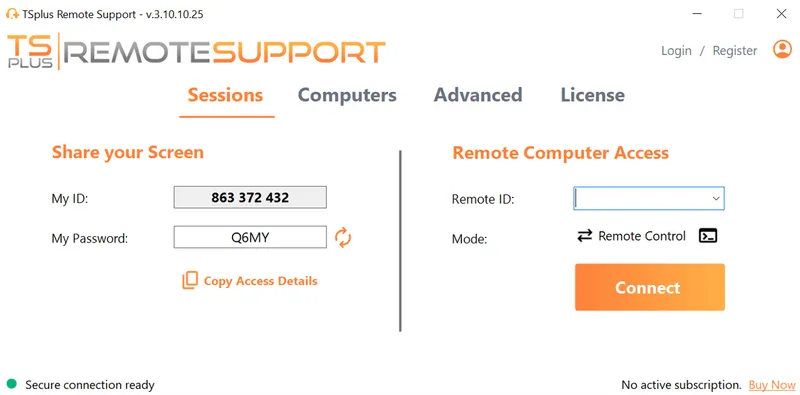
TSplus Remote Support Free Trial
Cost-effective Attended and Unattended Remote Assistance from/to macOS and Windows PCs.
TSplus Server Monitoring
TSplus Server Monitoring gives IT teams visibility into servers, websites, applications and user activity. Real time monitoring helps administrators rapidly identify performance problems, capacity trends and availability issues which would affect digital workspace reliability.
This is especially useful when published applications become the primary way users work. If the access server is overloaded or an application consumes excessive resources, user experience suffers. Monitoring thus gives IT the data needed to act before productivity drops.
A comprehensive software suite
Together, these products support a lightweight digital workspace model. Deliver applications and desktops, protect your app servers, assist users, operate the infrastructure with better visibility, all with simple well thought out admin consoles and great UX.
Digital Workspace Deployment Roadmap
A digital workspace project should start with work patterns, not with platform features, and avoid trying to modernize every workflow at once. IT teams therefore need to understand how employees, administrators, contractors and support teams move through applications during a normal day. These checks keep the project focused on useful access rather than engineering another large environment redesign.
Start by mapping the workspace around real application needs:
- Identify the main work scenarios, such as office work, remote work, branch access, contractor access and IT support.
- Classify resources by type: SaaS applications, Windows applications, full desktops, internal web apps, data sources, file shares and administration tools.
- Decide which Windows applications should be published individually and which users still need a full desktop.
- Define the main entry point, such as a secure web portal, browser access or remote desktop client. Configure web access, HTTPS and session controls.
- Group applications by role so users see a clean workspace instead of a full server environment.
- Review user and group access rights regularly.
- Keep business data on controlled infrastructure where possible, especially for legacy software and sensitive applications.
- Around the workspace, add security controls based on least privilege: including multi-factor authentication, session rules and IP-based restrictions.
- Connect remote support workflows so technicians can help users when access, performance or application issues appear.
- Monitor servers, sessions, application usage, and performance trends to understand how the workspace behaves in production.
- Pilot the workspace with one department before expanding it to more users, applications or locations.
This roadmap keeps the digital workspace practical. Instead of replacing every application or endpoint, IT teams can publish the tools people already use, secure the access path and expand the environment step by step.
Business Impact: What Changes for Users, IT Teams and Managers?
For employees
Employees enjoy a digital workspace which reduces the dependency on a specific office desk or device. Users can open the applications they need from a secure entry point. Our solution supports hybrid work, travel, branch operations and continuity in spite of disruptions.
For IT teams and systems administrators
Sysadmins and IT teams gain the benefit of control.
- Applications stay on managed infrastructure.
- Access is assigned centrally.
- Support is easier to deliver remotely.
- Monitoring provides evidence when performance issues appear.
For MSPs and systems administrators
MSPs and sysadmins find a lightweight digital workspace creates a repeatable service model. Instead of designing a new enterprise workspace stack for every customer, MSPs can deploy secure remote access, apply security policies, monitor servers and support users through a consistent toolkit. Sysadmins regain control over larger farms and deployments in much the same manner.
For managers
Managers maintain business continuity. Shifty workers can keep working when offices are unavailable, when hiring expands beyond one location or when external contractors need limited access. A secure digital workspace helps a business stay flexible without giving up control.
Conclusion
A digital workspace should help people work securely from anywhere, but it should also remain realistic for the IT teams that must deploy and maintain it. The best solution is not always a full VDI platform, a DaaS environment or an enterprise workspace suite.
For many businesses, IT managers and their teams and MSPs, the practical path is a lightweight remote access workspace which publishes existing Windows applications, protects remote connections, supports users and monitors the infrastructure. With TSplus, organizations can build a simple secure digital workspace around what they already use, then steadily expand at the pace their business actually needs.

TSplus Remote Access Free Trial
Ultimate Citrix/RDS alternative for desktop/app access. Secure, cost-effective, on-premises/cloud
)
)
)
