








:quality(80)/m/filters:format(webp))
:quality(80)/m/filters:format(webp))
Splashtop alternatives range from straightforward remote-control tools to full remote-support, endpoint-management and self-hosted platforms. The right replacement depends first on whether you need employee remote access, attended support, unattended device management or a broader IT operations platform.
This guide compares seven alternatives to Splashtop for IT teams, MSPs and system administrators. Before comparing products, however, we separate the different use cases now covered by the brand's platform so that you can better compare like with like.
Why Are IT Teams Looking for Splashtop Alternatives in 2026?
Looking for an alternative does not necessarily mean that Splashtop no longer meets its intended use case. It may simply mean that an IT team's requirements have changed around one or more pillars such as licensing, deployment, platform support, management capabilities or infrastructure control.
Since Splashtop itself has evolved from the single-purpose remote desktop product it used to be, the difference matters. Its current portfolio separates Splashtop Remote Access for users accessing their own computers, Splashtop Remote Support for IT technicians, Autonomous Endpoint Management for device management and Enterprise editions for additional administration and security requirements. What used to be Splashtop Business Access has been renamed Remote Access, while Splashtop SOS has become Remote Support.
As a result, the search for alternatives to Splashtop should start with the workload being analysed for replacement, rather than with a list of product names.
Which Type of Splashtop Alternative Do You Actually Need?
Are You Replacing Splashtop for Employee Remote Access?
Splashtop Remote Access is designed primarily for people who need to connect remotely to computers they use for work. An appropriate replacement therefore needs to prioritise
- dependable workstation access,
- cross-platform clients,
- display performance and features such as
- file transfer or
- remote printing.
This is different from a helpdesk workflow where technicians connect to devices belonging to customers or employees.
Do You Need Attended Helpdesk Support?
Attended support requires the person at the remote device to initiate or approve a temporary connection. IT helpdesks should therefore compare:
- session creation
- user consent,
- privilege elevation
- file transfer
- multi-monitor control and
- how quickly a technician can begin troubleshooting.
Splashtop Remote Support uses on-demand support workflows for this purpose. An alternative therefore needs to measure up against this technician-to-user workflow rather than employee remote access alone.
Do You Need Unattended Endpoint Access?
Unattended access allows administrators to reconnect to configured computers without anyone being present at the remote end. It is essential for servers, out-of-hours maintenance tasks, branch-office systems and endpoints which require recurring support.
Here,
- persistent device agents,
- authentication
- permissions
- Wake-on-LAN and
- bulk deployment
become more important than the expedience of a one-time support session.
Are You Looking for an MSP or Support Platform?
MSPs and larger support teams need more than screen control.
- Technician concurrency,
- device organization,
- multi-user administration
- session records,
- customer separation
- branding and
- helpdesk integrations
can all affect operational efficiency.
This is one area where Splashtop competitors can differ considerably even when their basic remote-control features appear similar.
Do You Need Endpoint Management and Automation?
Remote control and endpoint management are related but separate requirements. Splashtop offers Autonomous Endpoint Management for capabilities including
- patching
- software deployment
- automation
- policies and
- device visibility.
If those features are part of your current workflow, replacing only the remote-support component may leave a management gap. Decide whether the new tool itself must provide management functions or whether it should integrate with another RMM or endpoint-management platform.
Do You Need Cloud Hosting, Self-Hosting or Both?
Deployment architecture can narrow the shortlist immediately. A vendor-managed cloud service reduces infrastructure administration, while self-hosting gives IT teams greater control over relay infrastructure, data location and network configuration.
If on-premises deployment is mandatory, establish that requirement before comparing individual session features. Several of the products below offer self-hosted or on-premises options, while others are primarily cloud services.
Your choice of products from may thus be directed by your need for:
- cloud hosting
- self-hosting
- or both.
What Should You Compare Before Replacing Splashtop?
Base environment
Once the workload is clear, compare products against the environment they will effectively support. Important criteria include:
- attended and unattended connection workflows;
- supported technician and endpoint operating systems;
- technician, endpoint and concurrent-session licensing;
- cloud, on-premises and self-hosted deployment options;
- session recording, logs and access controls;
- mass deployment and device organisation ;
- PSA, helpdesk, API or other integrations;
- endpoint management and automation requirements.
Tight security controls
Security controls should be assessed alongside these operational criteria rather than treated as an isolated checkbox.
- Authentication,
- role separation,
- session permissions,
- auditability and
- the security of unattended access
all become pivotal as the number of technicians and managed endpoints increases.
Splashtop Remote Access and TSplus Remote Access: A Naming Difference
Note the important terminology difference when considering alternatives to Splashtop.
Splashtop Remote Access provides remote control of computers so an individual or employee can use a remote workstation. TSplus Remote Access addresses a different architecture: it publishes centralised Windows applications and full desktops to remote users through RDP-compatible clients or an HTML5 web portal.
Therefore, TSplus Remote Support is the closer alternative product when the requirement is remote assistance or control of individual endpoints. Meanwhile, TSplus Remote Access becomes relevant when the underlying requirement is instead to centralise Windows applications or desktops and deliver them remotely to multiple users.
7 Splashtop Alternatives to Consider in 2026
The following seven products cover different parts of the Splashtop use-case spectrum. They should therefore be treated as a shortlist to match against requirements rather than as interchangeable products.
1. TSplus Remote Support
Make Remote Support simple
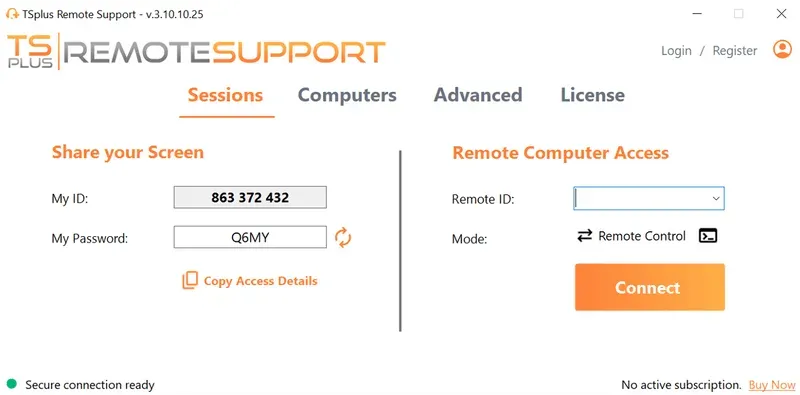
TSplus Remote Support is aimed at attended and unattended IT assistance. It supports unlimited licensed users and remote devices under its current plan, with licensing based on concurrent support connections. Windows and macOS devices can be controlled from Windows or macOS, while Android can be used by support agents to connect to computers, troubleshoot, maintain systems. send command lines and more .
Cloud hosting is the standard model, while self-hosting is available for larger deployments from 50 concurrent connections. This, combined with a sleek admin console, makes TSplus Remote Support particularly relevant to IT teams and MSPs looking for straightforward professional remote support software without heavy licensing for every technician or individual endpoint.
)
2. TeamViewer Remote
“Secure remote access and IT support that scales with your business”
TeamViewer Remote covers both attended assistance and unattended access across a broad set of desktop and mobile operating systems. TeamViewer also provides browser-based access and centralised device-management features, making it suitable for organisations needing remote connectivity across heterogeneous environments.
Rather than comparing remote control capacity alone, teams considering TeamViewer should evaluate the required edition against their technician count, managed-device estate and enterprise administration requirements.
3. AnyDesk
We connect you from where you are to where you need to be
AnyDesk combines interactive support, unattended access and remote work capabilities across Windows, macOS, Linux, mobile and other supported platforms. Features include permission management, two-factor authentication, Wake-on-LAN, custom clients and API access.
AnyDesk also offers both cloud and on-premises deployment. That makes it worth considering when a Splashtop replacement must support conventional remote-control workflows while retaining the option to host the remote infrastructure internally.
4. ScreenConnect
"Fix IT Faster"
ScreenConnect is particularly oriented toward IT support teams and MSP-style workflows. Its remote support platform combines attended connections with persistent unattended agents, while features such as Backstage allow technicians to use PowerShell, Command Prompt, file management and Windows administration tools without taking over the user's visible desktop.
ScreenConnect also offers cloud and on-premises deployment plus an extensive extension and integration ecosystem. It is therefore relevant when remote control needs to fit into a broader helpdesk or managed-services workflow.
5. Zoho Assist
“Enterprise-grade remote support and unattended remote access software”
Zoho Assist is a cloud-based remote support platform covering on-demand support and unattended device access. Technicians can support Windows, macOS, Linux, Android and other supported platforms, while unattended access can be deployed across managed device groups.
Zoho Assist deserves consideration where fast attended support and cloud administration are more important than self-hosting. It may also be attractive to organizations already using other Zoho services and looking to keep support workflows within that ecosystem.
6. ISL Online
Connect to any device.
ISL Online combines attended remote desktop support with permanent access to unattended computers. It supports mass deployment of its unattended-access component and provides a self-hosted option through ISL Conference Proxy for organisations wanting the service running on their own infrastructure.
That deployment flexibility makes ISL Online relevant for organisations comparing alternatives to Splashtop where data location or infrastructure control is the important selection factor.
7. RustDesk
The Fast Open-Source Remote Access and Support Software
RustDesk takes a different approach as an open-source remote-control platform with self-hosting at the centre of its proposition. RustDesk Server OSS provides the basic ID and relay infrastructure, while RustDesk Server Pro adds capabilities such as a web console, API, OIDC, LDAP, two-factor authentication and centralised device management.
RustDesk also supports unattended access through permanent credentials and service deployment. It is especially relevant to technical teams prepared to manage more of the remote-access infrastructure themselves.
How Do These Splashtop Alternatives Compare?
Let us match up these key differences more clearly by mapping each product to the type of requirement it addresses. The aim is a better match rather than any sort of ranking.
| Alternative | Consider it when you need | Attended + unattended | Deployment emphasis |
|---|---|---|---|
| TSplus Remote Support | IT support, helpdesks and concurrent technician workflows | Yes | Cloud; self-hosting for larger deployments |
| TeamViewer Remote | Broad cross-platform and enterprise remote connectivity | Yes | Vendor-hosted platform |
| AnyDesk | Cross-platform access with cloud or private deployment choices | Yes | Cloud or on-premises |
| ScreenConnect | MSP/helpdesk workflows, integrations and advanced technician tools | Yes | Cloud or on-premises |
| Zoho Assist | Cloud-based helpdesk support and unattended administration | Yes | Cloud |
| ISL Online | Remote support with a self-hosting option | Yes | Cloud or self-hosted |
| RustDesk | Open-source remote control and infrastructure ownership | Yes | Public infrastructure or self-hosted |
A company replacing employee workstation access has a different problem from an MSP managing hundreds of unattended devices, and both differ from an organization whose primary requirement is infrastructure sovereignty. What clarity has pierced through so far?
How Does the TSplus Suite Fit as a Splashtop Replacement?
For a conventional remote-support requirement, TSplus Remote Support is the closest match within the TSplus product family and can easily be completed with other products or add-ons from the suite. Stand-alone, it enables attended and unattended control, multi-session support, reporting, file transfer, session recording, command lines, workload and device management and Freshdesk integration, with cloud and self-hosted deployment choices depending on scale.
The wider TSplus suite addresses adjacent requirements rather than bundling everything into one product. TSplus Remote Access publishes centralised Windows applications and desktops, manages endpoints and farms, TSplus Advanced Security protects Windows server environments, TSplus Server Monitoring provides server and website monitoring, and the 2FA add-on speaks for itself. All this is worthy of note for IT teams searching for an alternative to Splashtop Remote Access and who actually need secure application delivery and maintenance capacity as well as direct control of physical workstations.
Need a simpler way to provide attended and unattended assistance to remote users? Compare your support requirements with TSplus Remote Support and test it in your own environment.
Choosing an Alternative to Splashtop
The most useful Splashtop alternatives are not necessarily the products with the longest feature lists. The right choice depends on what Splashtop currently does in your environment and what you expect the replacement to do the same and what it may need to do differently.
Start by identifying and separating employee remote access, attended support, unattended administration, MSP workflows, endpoint management and hosting requirements. Once those boundaries are clear, comparing licensing, security, deployment and support features becomes considerably more meaningful.
TSplus Remote Support Free Trial
Cost-effective Attended and Unattended Remote Assistance from/to macOS and Windows PCs.
:quality(80)/m/filters:format(webp))
:quality(80)/m/filters:format(webp))
:quality(80)/m/filters:format(webp))
