










)
)
Service help desk software spans simple ticketing platforms and full IT service management suites. This guide compares six core tools for IT teams and MSPs, adds two lighter alternatives, and shows which capabilities are standard, which require higher tiers and where dedicated remote support software fits into the helpdesk stack.
Ranging from straightforward ticketing platforms to broader IT service management tools, service help desk software can incorporate automation, asset management and service-level agreement capabilities. The right choice depends on whether your team mainly needs to organize support requests or manage wider IT service processes.
This guide explains the difference, compares leading help desk tools and shows where remote support software fits when technicians need to move beyond ticket management and work directly on a user's device.
What Are the Differences? Help Desk Software vs Service Desk Software
Help desk software and service desk software overlap, but they do not necessarily serve the same purpose. A help desk primarily organizes user incidents and support requests, while a service desk generally extends into broader IT service management (ITSM) processes.
| Help Desk Software | Service Desk Software | |
|---|---|---|
| Primary focus | User issues and requests | Wider IT service delivery |
| Core function | Ticketing and support workflows | ITSM processes and service management |
| Typical capabilities | Tickets, SLAs, knowledge base, routing, reporting | Incident, problem, change, asset and configuration management |
| Typical users | Support teams, SMB IT teams, customer service | IT departments, service-management teams, larger environments |
| Complexity | Usually lighter | Usually broader and more structured |
The distinction is not absolute. Many platforms now sit between the two categories, combining accessible ticketing with selected ITSM capabilities such as asset tracking, service catalogues or more advanced SLA management.
For you as systems administrator or MSP, the practical question is therefore not simply whether a product calls itself a help desk or service desk. The important question is whether its capabilities match the support processes your organization actually needs.
)
What Should Help Desk Software Actually Provide?
Core capabilities
At minimum, helpdesk software should give support teams a structured way to receive, prioritize, assign and track user requests. Common capabilities include ticket management, SLA tracking, knowledge bases, automation, self-service and reporting.
Advanced options
More advanced platforms may add asset management, configuration data, change management and wider ITSM workflows. Those capabilities can be valuable for complex IT environments but may add unnecessary administration for teams that mainly need efficient incident and request handling.
Balancing features and requirements
All six main products in this comparison cover the core help desk functions of ticket or request management, knowledge or self-service, and some form of workflow automation. However, these capabilities are not always included at the same subscription level: entry plans may limit public knowledge bases, workflow rules, SLA management or automation volumes.
Organizations still deciding how their IT help desk services should be delivered in-house, outsourced or through a hybrid model may do well making that operating-model decision first. Software selection becomes easier once responsibilities and support processes are clear.
Where Does Remote Support Fit Within a Help Desk Toolset?
Help desk software manages the support workflow, but some tickets eventually require direct intervention on a user's computer. Remote support software provides that additional layer by allowing an authorized technician to view or control an endpoint and troubleshoot the problem remotely.
The two categories therefore perform different jobs. Ticketing and service-management platforms record, route and track the request; remote support software helps the technician act on the affected device. The distinction between remote support and remote access is particularly important when defining those workflows.
For IT teams and MSPs, this separation can also provide flexibility. A help desk platform can be selected for its workflow and ITSM capabilities while a dedicated remote support tool provides attended or unattended endpoint assistance.
What Are the 6 Best Service Help Desk Tools for 2026?
The tools below span different levels of service management maturity. Freshdesk, Zendesk and Zoho Desk focus primarily on ticketing and customer-support workflows, while Freshservice, ManageEngine ServiceDesk Plus and Jira Service Management move further into IT service management.
The right choice therefore depends on whether your organization mainly needs an efficient help desk or broader capabilities such as asset management, problem and change management, configuration data and structured IT service workflows.
1. Freshdesk
Accessible Support Ticketing
Freshdesk provides cloud-based ticketing, shared inboxes, a customer portal, knowledge management, reporting and automation. Its current plans also integrate Freddy AI capabilities, while higher tiers add features such as intelligent routing and multiple SLA policies.
Freshdesk is particularly suited to teams wanting an accessible support platform without moving immediately into full ITSM. “Growth” includes ticketing, a customer portal, knowledge base and automation, while multiple SLA policies and more advanced routing enter at “Pro”.
Best fit:
SMBs and support teams prioritizing ticketing, self-service and automation.
Main consideration:
Freshdesk focuses more on practical customer-support workflows than on deeper ITSM capabilities such as integrated asset, problem or change management.
Pricing:
“Growth” currently starts at $19 per agent/month when billed annually, followed by “Pro” at $55 and “Enterprise” at $89. Freshworks maintain current Freshdesk plan details on their pricing page.
2. Zendesk
Omnichannel Customer Support
Zendesk combines ticketing, routing, automation and analytics with broad AI and omnichannel capabilities. Support Team covers core email ticketing, routing and automations, while Zendesk Suite adds knowledge management, messaging, live chat, telephony and omnichannel routing.
This breadth makes Zendesk useful for organizations managing high volumes of support interactions across multiple channels. However, it remains primarily a customer-service platform rather than a dedicated ITSM suite.
Best fit:
Growing and enterprise support organizations needing scalable multichannel customer service.
Main consideration:
Some capabilities users may assume to be baseline are here tier dependent. SLA management, for example, is available in higher “Support” and “Suite” tiers rather than the entry plans.
Pricing:
“Support” Team currently starts at $19 per agent/month billed annually, while “Suite” Team starts at $55.
3. Zoho Desk
Integrated Support Ecosystem
Zoho Desk combines ticket management, knowledge bases, SLA workflows, automation, analytics and multichannel support. Zoho's Zia AI capabilities assist with support processes, while APIs, custom functions and integrations make the platform adaptable to broader business workflows.
The free edition already includes ticket handling, a client portal, basic SLA functionality, two macros and a private knowledge base for up to three agents. More advanced SLA policies, public self-service and workflow capabilities expand through the paid tiers.
Best fit:
SMBs and organizations already using the wider Zoho ecosystem.
Main consideration:
Zoho Desk has its place in this comparison because remote support is not wholly absent from its ecosystem. Zoho Assist can integrate with Zoho Desk so technicians can initiate attended or unattended remote sessions from support workflows.
Pricing:
A free edition supports three agents, followed by paid tiers with additional support, automation and service-management capabilities.
4. Freshservice
IT-Focused Service Management
Freshservice shifts the view firmly toward internal IT service management. “Starter” includes incident management, knowledge management, task management and a support portal, while Growth adds service catalogue and SLA management. Pro introduces problem management, change management, major incident management and release management.
This makes Freshservice more appropriate than Freshdesk when the requirement extends beyond user-facing support tickets into structured IT service processes.
Best fit:
Internal IT teams that want an IT-focused service desk with a path from basic incident management toward broader ITSM.
Main Consideration:
Freshservice also has a dedicated MSP offering with multi-client management, knowledge bases, workflow automation, self-service and multiple SLA management.
Pricing:
“Starter” currently begins at $19 per agent/month billed annually, “Growth” at $49 and Pro at $99.
5. ManageEngine ServiceDesk Plus
ITSM and Asset Management
ManageEngine ServiceDesk Plus combines help desk functionality with deeper IT service management and IT asset management. “Standard” includes the service desk, self-service, knowledge management, SLA management and automation; “Professional” adds IT asset management; “Enterprise” extends the platform into problem, change and release management, project management and CMDB capabilities.
ManageEngine also offers ServiceDesk Plus MSP for service providers managing multiple customer environments.
Best fit:
IT departments and MSPs requiring help desk, IT asset management and structured ITSM capabilities.
Main Consideration:
Unlike most customer-support products in this selection, ServiceDesk Plus supports cloud and on-premises deployment.
Pricing:
Editions currently start at $13 per technician/month for “Standard”, $27 for “Professional” and $67 for “Enterprise”.
6. Jira Service Management
ITSM for DevOps Teams
Jira Service Management is built around IT service management and technical operations rather than traditional customer-service ticketing alone. It supports request, incident, problem and change management alongside knowledge management, automation and, on eligible tiers, asset and configuration management.
In 2026, Atlassian positions Jira Service Management within its broader Service Collection alongside Customer Service Management and Rovo capabilities. The platform remains particularly relevant where IT operations, software development and DevOps workflows already intersect.
Best fit:
Technical IT, DevOps and software-oriented organizations needing service management integrated with the Atlassian ecosystem.
Main Consideration:
Best suited to teams already comfortable with the Atlassian ecosystem; broader ITSM features can add configuration complexity compared with lighter help desk tools.
Pricing:
The “Free” plan supports up to three agents and already includes workflows, automation and an embedded knowledge base. Assets is available from “Standard” upward, while “Premium” adds deeper asset, incident and problem-management capabilities.
How Do Those 6 Service Help Desk Tools Compare?
All six platforms cover ticket or request management, knowledge or self-service and some form of workflow automation, central to many helpdesk and support environments. Though they are not specifically detailed, IT teams should nonetheless remember their depth and subscription availability vary just like any other features.
Other useful differences concern SLA tiers, ITSM processes, asset management, deployment, MSP requirements and how remote support is added to the workflow.
| Capability | Freshdesk | Zendesk | Zoho Desk | Freshservice | ManageEngine ServiceDesk Plus | Jira Service Management |
|---|---|---|---|---|---|---|
| Primary orientation | Help desk / customer support | Customer support / omnichannel | Help desk / customer support | IT service management | IT help desk / ITSM | IT service management |
| SLA management | Growth; multiple policies Pro | Support Professional / Suite Professional | Free basic; advanced by tier | Growth+ | Standard+ | Free+ |
| Problem & change management | Not core | Not core | Not core | Pro+ | Enterprise | Yes; deeper capabilities by tier |
| IT asset management / CMDB | No native ITAM/CMDB | Not in core Customer Service; Employee Service adds ITAM | No native ITAM/CMDB | Available by plan / add-on | ITAM Professional; CMDB Enterprise | Assets Standard+ |
| Automation & AI | Freddy AI + workflows | Zendesk AI + automations | Zia + workflows | Freddy AI + IT workflows | Zia + no-code automation | Rovo / Atlassian AI + automation |
| Remote support approach | Dedicated integrations, including TSplus Remote Support | Marketplace integrations | Zoho Assist integration | Marketplace integrations | ManageEngine remote-control options | Marketplace integrations |
| Deployment | Cloud | Cloud | Cloud | Cloud | Cloud or on-premises | Cloud; Data Center for existing self-managed environments |
| MSP-specific offering | No dedicated edition | No dedicated edition | No dedicated edition | Freshservice for MSPs | ServiceDesk Plus MSP | No dedicated MSP edition |
| Entry pricing model* | From $19/agent/month | $19 Support / $55 Suite | Free for 3 agents + paid tiers | From $19/agent/month | From $13/technician/month | Free for 3 agents; Standard from $20/agent/month |
*Indicative vendor pricing at the time of writing. Plans, included capabilities, regional pricing and promotional offers can change.
Those of you needing remote control may already have noticed how this type of intervention tool may be provided through a vendor's own companion product, an add-on or a marketplace integration rather than being embedded directly in the core help desk platform.
Also, note tier availability matters for various capabilities. FreshService, for example, moves SLA management to Growth and problem/change management to Pro, while ServiceDesk Plus introduces IT asset management at Professional and deeper ITSM at Enterprise. Jira Service Management includes substantial workflow capabilities in Free but adds Assets from Standard.
What Other Help Desk Tools Are Well Worth Considering?
Not every support team requires asset management, change workflows, configuration management or other deeper ITSM capabilities. Organizations primarily concerned with customer communication and straightforward ticket handling may therefore find lighter help desk platforms more appropriate.
Two additional products are worthy of consideration for those requirements.
Help Scout
Collaborative inboxes
Help Scout focuses on straightforward customer support built around collaborative inboxes. It also provides Docs knowledge bases and Beacon, which can combine self-service content, contact forms and live chat within a website or application.
Its lighter approach can suit smaller and growing support teams who value customer-facing communication and fast onboarding over formal IT service-management processes. SLA functionality is also available, but policy depth again varies by plan.
Best fit:
Support teams prioritizing shared inboxes, knowledge management and straightforward customer communication rather than deeper ITSM.
LiveAgent
Real-time communication channels
LiveAgent combines ticketing with a broad range of real-time customer communication channels. Its entry plan includes ticketing, live chat, a knowledge base, customer portal and automation, while higher tiers add call-centre functions, reporting, service levels and additional communication channels.
That makes LiveAgent relevant where fast multichannel customer interaction matters more than IT asset management, CMDB functionality or structured change and problem management.
Best fit:
Customer-support teams who prioritize live chat, voice and multichannel communication alongside conventional ticketing.
Where Does TSplus Remote Support Fit a Help Desk Stack?
Dealing with IT tickets, remotely:
While help desk or service desk platforms manage the support process, TSplus Remote Support provides the remote intervention layer for resolving certain tickets: namely when issues require technician intervention directly on an endpoint.
Support teams can use attended assistance for interactive troubleshooting and unattended access for pre-authorized maintenance and support. This allows organizations to select their ticketing or ITSM platform according to workflow requirements while using a dedicated IT tool for technician-to-endpoint support.
Freshdesk integration:
For teams using Freshdesk, the connection is particularly direct. Our Freshdesk integration links a TSplus Remote Support session with an open Freshdesk ticket. When the session ends, information including the chat log, downloaded-file details and remote system information can be added to the ticket as a private note.
This positioning also applies beyond a single help desk platform. TSplus Remote Support complements ticketing and service-management software rather than attempting to replace the ticket, knowledge, SLA or ITSM functions those systems provide.
So How Should You Choose Service Helpdesk Software?
Start with the support process rather than the longest feature list. A small IT team handling user incidents may value straightforward ticketing, automation and rapid onboarding, while a larger IT operation may require asset management, structured change processes and deeper ITSM functionality.
Then compare the tier that actually contains the capabilities you need. An inexpensive entry plan may be sufficient for ticketing and self-service but become less relevant when the requirement includes multiple SLA policies, asset management, problem management or more extensive automation.
Finally, consider how the platform connects with the rest of your support environment. Ticketing, identity, monitoring, asset information and remote support may come from different systems, so integration and workflow continuity can be as important as individual features.
Conclusion
Service help desk software can range from basic ticketing tools to comprehensive ITSM platforms. The best fit depends on the processes your team needs to manage, the complexity of your environment and the subscription tier required to access those capabilities.
As a related but distinct requirement, remote support enters when a ticket requires direct endpoint intervention. This is when TSplus Remote Support can complement the chosen help desk platform by giving technicians the tools to troubleshoot and assist users remotely. Helpdesk software organizes and tracks needs for support. Embedded in your own software, TSplus Remote Support simplifies the gap between ticket and technician, so agents can get stuck in and accomplish each job.
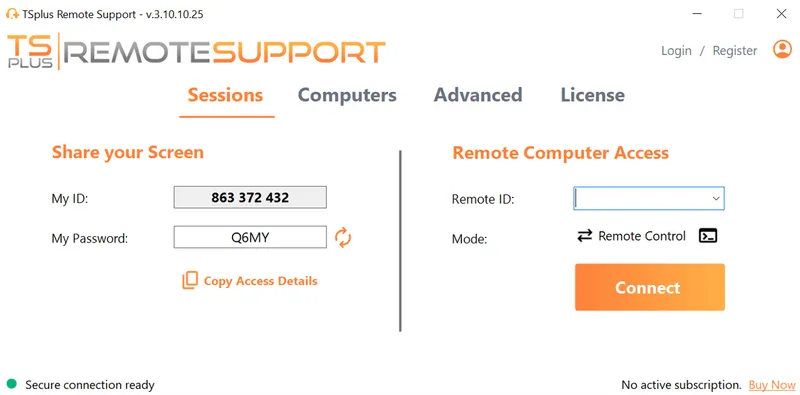
TSplus Remote Support Free Trial
Cost-effective Attended and Unattended Remote Assistance from/to macOS and Windows PCs.
)
)
)
