










)
)
Introduction
Delivering fast, secure, 24/7 remote support is now a baseline expectation for modern IT teams and MSPs. However, traditional VPN-centric architectures struggle under real-time performance needs, distributed workforces, and flexible support workflows. New VPN-free models solve these issues by offering controlled, encrypted, on-demand access without exposing networks. This guide explains how IT teams can deliver reliable, scalable remote support without relying on VPNs.
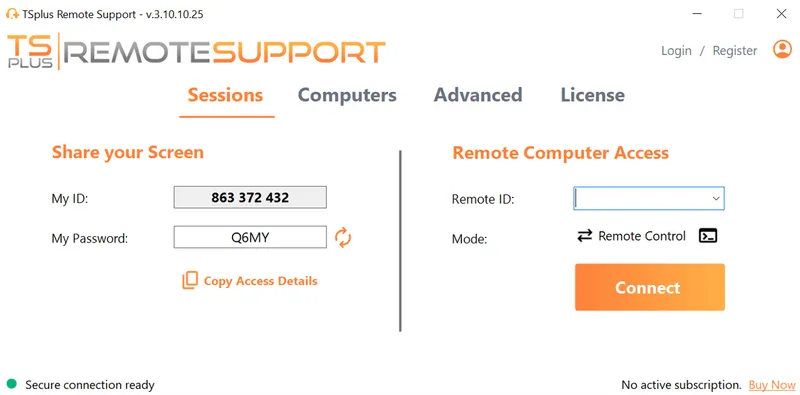
TSplus Remote Support Free Trial
Cost-effective Attended and Unattended Remote Assistance from/to macOS and Windows PCs.
Why VPNs Limit 24/7 Remote Support?
Traditional VPN setups introduce several technical and operational constraints that make them poorly suited for real-time, around-the-clock support.
Performance bottlenecks in real-time support
VPN tunnels route all traffic through centralized gateways, adding latency and congestion during screen-sharing or remote control operations. When combined with global teams, inconsistent networks, or mobile endpoints, responsiveness suffers. Continuous support across time zones becomes difficult because VPN gateways naturally form single choke points.
Security gaps and lateral movement exposure
A VPN session typically exposes an entire subnet once authenticated. If a technician’s device is compromised, attackers can pivot internally. Split tunnelling, outdated clients, and user misconfigurations also widen the attack surface. This model is incompatible with modern zero-trust expectations, where least privilege and session-level permissioning are essential.
Limited granular access control
VPNs authenticate the user, not the session. They lack precise controls such as per-device authorization, time-bound access, or context-aware rules. Support engineers often receive broad access to network zones rather than a specific target system, increasing operational risk and complicating compliance.
Operational overhead
Maintaining VPN infrastructure—certificates, ACLs, client updates, firewall configurations—creates friction for support teams. Deployments with BYOD devices or external contractors become slow and inconsistent. For 24/7 on-demand support, these dependencies reduce agility and increase cost.
What are The Modern VPN-Free Architectures for Remote IT Support?
Newer remote access models address the weaknesses of VPNs by offering secure, controlled, and highly responsive ways to reach endpoints without exposing networks.
Browser-based encrypted remote support
Modern HTML5-based support tools connect devices using outbound-only agents or reverse proxies. Technicians initiate sessions from a browser, and endpoints establish secure TLS tunnels without opening inbound ports. This reduces firewall complexity and enables fast, clientless support to any device with internet access.
Zero Trust Network Access
Zero Trust Network Access (ZTNA) applies identity- and context-based verification to each session. Access is granted to a specific resource, not an entire network. Policies can evaluate device posture, geolocation, user role, and time of day. ZTNA fits organizations that need strict control and continuous verification.
Cloud-brokered remote desktop platforms
Cloud relays or session brokers sit logically between technicians and endpoints. They orchestrate secure connections for remote desktop control, file transfer, and auditing without requiring direct network exposure. This model is effective for MSPs and teams managing diverse environments.
RD Gateway and reverse proxy models
Remote Desktop Gateway (RDG) and reverse proxy patterns expose RDP-based access securely over HTTPS. Hardened gateways using modern TLS configurations and MFA reduce internet exposure while preserving native RDP workflows. This method is ideal for Windows-heavy infrastructures.
What are The Key Scenarios Where VPN-Free Support Excels?
Certain environments and support conditions benefit significantly from VPN-free workflows, especially when flexibility and speed are essential.
Supporting global and mobile workforces
Distributed employees often require assistance from multiple regions. VPN latency and location-based congestion slow remote sessions, while browser-based access provides faster startup times and more consistent performance worldwide.
With VPN-free architectures, routing is optimized through globally distributed relays or direct browser-to-agent communication. IT teams no longer rely on a single overloaded VPN concentrator, and remote workers benefit from predictable session performance even on unstable Wi-Fi or mobile connections.
Assisting BYOD and unmanaged devices
Enable Secure Support Without Client Installation
Installing VPN clients on personal or third-party devices is risky and introduces compliance challenges. VPN-free support tools operate through outbound connections, enabling secure, temporary control without client installation requirements.
Maintain Strict Network Separation
These models help reduce friction for users who may be less technical or who lack admin rights to install VPN software. Support engineers can initiate sessions easily while maintaining a strict security boundary around corporate systems, ensuring unmanaged devices never gain network-level access.
After-hours and emergency support
When a server crashes during off-hours or an executive needs immediate help, technicians cannot waste time troubleshooting VPN logins or expired certificates. On-demand secure links remove dependencies on pre-configured VPN clients.
This enables IT teams to provide predictable service levels, even during nights, weekends, or holidays. Because access is just-in-time and browser-based, technicians can assist from any device capable of running a modern browser, maintaining operational resilience.
Sites, kiosks, and restrictive networks
Operate Reliably Behind NAT and Strict Firewalls
Retail branches, kiosks, and industrial devices often sit behind strict firewalls or NATs. Outbound-only agents ensure these devices remain reachable without reconfiguring network infrastructure.
Reduce Network Complexity in Constrained Environments
By leveraging outbound connections, VPN-free support avoids the complexity of port forwarding or VPN tunnelling in constrained networks. With this, IT teams can:
- Maintain visibility
- Control over remote endpoints without altering existing security postures
This reduces operational overhead and accelerating troubleshooting.
What are The Best Practices for A 24/7 VPN-Free Remote Support?
To maintain strong security and reliable performance, teams must implement a structured set of controls and safeguards tailored to VPN-free operations.
Role-based access control
Enforce Least-Privilege Access by Role and Scope
Assign permissions per technician, per device, and per support tier. Limit control capabilities to what is necessary for the job and enforce least-privilege access. RBAC ensures that no user has more permissions than required, reducing the attack surface and preventing accidental misuse.
Standardize Support Tiers and Responsibilities
A granular RBAC model also helps standardize workflows across teams. By defining clear access tiers—such as helpdesk, advanced support, and administrator—organizations can align technical privileges with responsibilities and compliance policies. This supports both operational efficiency and regulatory oversight.
Multi-factor authentication
Strengthen Identity Verification for Every Session
Require MFA for support engineers and, when appropriate, end users. Combining strong credentials with identity verification mitigates unauthorized access. MFA also protects remote sessions when passwords are weak, reused, or compromised.
Centralize Authentication Without VPN Dependencies
VPN-free platforms benefit from MFA because the authentication layer becomes centralized and easier to enforce. Instead of distributing VPN certificates or managing device-based trust, IT teams can rely on unified MFA policies that apply consistently across browsers, devices, and remote support sessions.
Session logging and recording
Maintain Full Audit Trails for Compliance and Accountability
Comprehensive logs help meet compliance standards and enable post-incident reviews. Recording support sessions improves auditability and provides valuable material for technician training. Proper logging ensures that every action is:
- Attributable
- Traceable
- Defensible.
Improve Incident Response and Operational Oversight
Enhanced visibility also simplifies security monitoring and forensic analysis. When incidents occur, recorded sessions provide an exact timeline of activity, reducing uncertainty and accelerating remediation. Logs additionally support quality assurance by helping managers assess troubleshooting approaches and identify recurring issues.
Endpoint hardening and patching
Reduce Risk Through Consistent Endpoint Security
Even with VPN-free access, endpoints must be securely maintained. Regular patching, endpoint protection, and standardized configurations remain essential for reducing overall risk. Hardened endpoints resist exploitation attempts and ensure remote support sessions take place on secure footing.
Improve Reliability and Support Consistency
Adopting a consistent endpoint baseline across devices also improves the reliability of support operations. When operating systems, drivers, and security tools are up to date, remote control sessions perform more smoothly, and technicians encounter fewer unpredictable variables during troubleshooting.
Temporary and just-in-time session links
Minimize Exposure with Time-Bound Access
Ephemeral access links limit exposure windows and reduce the risks associated with persistent access. Technicians receive access only for the duration needed to resolve the issue, and sessions expire automatically once completed. This model aligns directly with modern zero-trust requirements.
Simplify Governance for Distributed and MSP Teams
Just-in-time (JIT) access also simplifies governance for distributed teams. Instead of maintaining static access lists or managing long-term entitlements, IT departments provide time-bound, event-driven access. This results in:
- Stronger overall security
- Cleaner operational workflows (especially for MSPs managing diverse customer environments).
How Do I Select the Right VPN-Free Architecture for Remote Support?
Different deployment models serve different use cases, so choosing the right approach depends on your team’s support style, regulatory needs, and technical environment.
Ad-hoc employee support
Browser-based remote support tools provide fast access for troubleshooting issues without requiring preinstalled clients or complex authentication setups. They enable technicians to initiate sessions instantly, allowing support teams to resolve problems quickly for users who may be working from home, traveling, or using temporary devices.
This approach is especially effective for organizations with dynamic or unpredictable support needs. Because sessions rely on outbound connections and disposable access links, IT teams can deliver help on demand while maintaining strict separation from internal networks. The simplicity of browser-based access also reduces onboarding and training requirements.
Enterprise-grade access control
Enforce Context-Aware and Policy-Driven Access
ZTNA or hardened RD Gateway deployments suit organizations needing policy-driven, identity-centric controls and detailed governance. These models allow security teams to enforce:
- Device posture checks
- Role-based restrictions
- Time-based access
- Multi-factor authentication
This ensures that each session meets specific compliance standards.
Centralize Visibility Without VPN Complexity
For larger enterprises, centralized policy engines significantly improve visibility and control. Administrators gain insights into session behaviour and can adjust access rules dynamically across departments or regions. This creates a unified security perimeter without the operational complexity of managing VPN credentials or static access lists.
Third-party and contractor support
Isolate External Access Without Network Exposure
Cloud-brokered platforms eliminate the need to onboard vendors into the corporate VPN. This isolates contractor access, contains the exposure surface, and ensures every action is logged and audit ready. IT teams maintain strict control without modifying firewall rules or distributing sensitive credentials.
Improve Accountability for External Interventions
This model is particularly valuable for MSPs or organizations relying on multiple external service providers. Rather than granting broad network access, each contractor receives session-specific permissions and short-lived access paths. This improves accountability and reduces the security risks commonly introduced by third-party relationships.
Windows-centric environments
RD Gateway or RDP-over-TLS models integrate well with existing administrative workflows and Active Directory. These architectures provide secure remote access without exposing RDP directly to the internet, leveraging modern TLS encryption and MFA to strengthen authentication.
For Windows-heavy infrastructures, the ability to reuse native tools reduces complexity and supports familiar operational patterns. Administrators can maintain Group Policy Objects (GPOs), user roles, and session policies while upgrading from an outdated VPN model to a more controlled gateway-based approach.
Global 24/7 teams
Design for Availability, Redundancy, and Scale
Reverse-proxy architectures and distributed session brokers support high availability, optimized routing, and continuous support coverage. These solutions provide resilience during peak hours and help avoid single points of failure, ensuring remote systems remain reachable regardless of location.
Organizations with around-the-clock support operations benefit from globally distributed relay nodes or multi-region gateways. By reducing latency and improving redundancy, these solutions enable consistent response times for technicians working across continents. This creates a reliable foundation for modern follow-the-sun support models.
Why Does TSplus Remote Support Deliver Secure VPN-Free Assistance?
TSplus Remote Support enables IT teams to deliver secure, encrypted, on-demand remote desktop assistance without maintaining a VPN infrastructure. The platform uses outbound-only connections and TLS encryption to ensure endpoints stay protected behind firewalls. Technicians connect through a browser, reducing deployment friction and providing immediate access to remote systems.
Our solution also includes session recording, multi-user support, file transfer, and role-based access controls. These capabilities create a controlled support environment aligned with zero-trust principles while remaining simple to deploy and cost-effective for SMBs and MSPs.
Conclusion
Modern IT teams no longer need to rely on VPNs to deliver reliable, secure, 24/7 remote support. VPN-free architectures provide stronger control, lower latency, and improved scalability for distributed organizations. Browser-based access, ZTNA models, and cloud-brokered platforms offer safer, more efficient paths for real-time support. With TSplus Remote Support, IT professionals gain a streamlined, secure solution designed specifically for on-demand remote assistance, without the overhead of VPN infrastructure.
TSplus Remote Support Free Trial
Cost-effective Attended and Unattended Remote Assistance from/to macOS and Windows PCs.
)
)
)
