










:quality(80)/m/filters:format(webp))
:quality(80)/m/filters:format(webp))
IT help desk services give users a central point for reporting incidents, requesting assistance and resolving technical problems. Help desks and support can be delivered by an internal IT team, an external provider or a combination of both, with software increasingly shaping how efficiently each model operates.
The important distinction is that in-house and outsourced describe who provides support, while software-led describes how support is delivered. IT leaders, sysadmins and MSPs should therefore evaluate people, processes and technology together rather than treating outsourcing and software as competing or independent choices.
What Do IT Help Desk Services, Help Desks and Support Cover?
Help desk services
IT help desk services provide a structured route between users experiencing a technical problem and the people or systems capable of resolving it. According to PeopleCert's ITIL Service Desk guidance the service desk acts as a point of contact between service providers and users and supports activities including incident resolution and service requests.
Help desks and support software
Depending on the organization, help desks and support may handle password and account problems, software faults, device configuration, connectivity issues, application questions and escalation to infrastructure or security specialists. A help desk can also coordinate requests which require another team rather than resolving every ticket directly.
This lends the help desk both a communication function and an operational one. Ticketing and knowledge tools organise requests, while technicians need diagnostic and remote support capabilities when Direct intervention on a user's device is required.
In-House vs Outsourced IT Help Desk Services: What Actually Changes?
The main difference between in-house and outsourced IT help desk services is ownership of the people delivering support. Both models can use the same ticketing, automation, knowledge-management and remote support technologies.
The better model depends on
- workload
- internal expertise,
- support hours,
- business-specific knowledge,
- security requirements and
- the amount of control the organization wants to retain.
When Does an In-House Help Desk Make Sense?
An in-house team develops detailed knowledge of the organization's applications, infrastructure, users and business processes. Direct access to colleagues can make troubleshooting easier where issues depend on specialist internal systems or organisational context.
The trade-off is capacity. Maintaining appropriate coverage means recruiting, training and retaining enough people to manage normal workloads, absences and demand peaks. Specialist skills may also be difficult to justify internally when they are required only occasionally.
Internal help desks therefore make particular sense when
- support demand is predictable and substantial,
- systems are highly organisation-specific
- or close coordination with other internal IT functions is essential.
When Does Outsourcing IT Help Desk Services Make Sense?
Outsourcing transfers some or all support functions to a managed service provider (MSP) or specialist help desk provider. This can give organizations access to
- broader technical skills,
- additional support hours and
- capacity that can expand without increasing internal team numbers.
For MSPs specifically, outsourced or white-label services can also extend Tier 1 and Tier 2 capacity. Current managed help desk offerings commonly combine ticket handling, remote monitoring and management (RMM), professional services automation (PSA) integrations, reporting and round-the-clock coverage.
However, outsourcing does not remove the need for governance. Responsibilities, escalation paths, access permissions, response targets and service-level agreements (SLAs) need to be clearly established.
What Is a Hybrid or Co-Managed Help Desk?
Many organizations do not need to make a binary choice between internal and external support. A hybrid or co-managed model divides responsibilities between an internal IT team and an MSP.
For example, an external provider may handle Tier 1 requests, routine maintenance or out-of-hours coverage while internal specialists retain responsibility for business-critical applications, infrastructure and escalations. Current help desk guidance increasingly presents this model as an alternative where companies need external breadth without giving up internal expertise.
The same approach works in reverse for MSPs. An MSP can retain the customer relationship while using additional service capacity for high-volume or specialist workloads.
What Is a Software-Led Help Desk?
A software-led help desk does not mean replacing technicians with software. It means using technology to reduce certain tasks, such as repetitive manual tasks, and give technicians the information and tools needed to resolve issues efficiently.
Help desk and support software can manage the process from initial request through triage, diagnosis, resolution and reporting. Modern environments may combine several categories of tools rather than rely on a single platform.
Which Tasks Can Help Desk Software Improve?
Ticketing platforms are able to centralise requests, assign priorities, automate routing and track SLA performance. Knowledge bases and self-service resources can resolve repetitive user questions before passing onto a technician, and sometimes without technician intervention even becoming necessary.
Automation can also categorize requests, trigger standard workflows or collect diagnostic information. These functions free technicians to spend more time on problems requiring investigation or direct action.
However, a ticketing system does not necessarily provide the tools needed to interact with the affected computer. This is where remote support becomes a bona fide part of the help desk technology stack.
Where Does Remote Support Software Fit?
Remote support software steps a support request into direct technical intervention. Once a technician determines access to an endpoint is required, remote support can allow the technician to view or control the device without travelling to the user's location.
Thus, help desk software organizes the support process, while remote support software helps technicians perform the work on remote endpoints.
For IT teams and MSPs, this can upscale both attended troubleshooting, where the user participates in the session, and unattended maintenance on pre-authorised devices where no user needs to be present.
How Do the Different IT Help Desk Models Compare?
No single help desk model covers every organization. Let us therefore compare responsibility, capacity and operational requirements. These weigh more than the lowest apparent cost.
| Requirement | In-House | Outsourced | Hybrid / Co-Managed | Software-Led |
|---|---|---|---|---|
| Direct organizational knowledge | High | Depends on provider | High internally | Depends on team |
| Staffing responsibility | Internal | Provider | Shared | Unchanged |
| Scaling support capacity | Requires hiring | Provider-led | Flexible | Improves efficiency |
| Out-of-hours coverage | Requires staffing | Often available | Can be shared | Requires people or automation |
| Control over processes | High | Contract-dependent | Shared | High when self-managed |
| Specialist expertise | Must be maintained internally | Broader provider pool possible | Combined | Tools support existing expertise |
| Remote issue resolution | Requires appropriate software | Provider-dependent | Shared tools/processes | Core technology benefit |
Therefore, to a point, all three sourcing models draw on software-led support. An internal team, MSP or hybrid help desk can all become more software-led without changing who ultimately owns and carries out the service.
What Should IT Teams Measure Beyond Cost?
Cost matters, but it should not be the only criterion for comparing IT help desk services. A lower-cost service which generates slow resolutions, repeated escalations or poor user experiences may simply move costs elsewhere in the business.
IT leaders should consider indicators such as response time, resolution time, first-contact resolution, escalation rates, SLA compliance, ticket backlog and user satisfaction. MSPs may additionally need to measure technician utilisation and service performance across multiple customers.
Such metrics also reveal whether the limitation is staffing, process design or technology. A large ticket backlog, for example, may require more capacity, better automation or faster remote diagnosis rather than an entirely different sourcing model.
How Should Security Factor Into Help Desks and Support?
Help desks and support teams often require privileged information and access to user devices and business systems. This makes access control and accountability important whether technicians are employees or external providers.
Remote support tools should therefore form part of the organization's security policy rather than being installed informally whenever a technician needs access. With the world of cyber security appearing as unpredictable as quicksand, organisations and companies all need to tighten their web-facing IT security in all areas including remote access, email and user awareness.
IT teams should define who can initiate remote sessions, which endpoints may be accessed and how unattended connections are managed. Outsourcing additionally requires clear rules around provider identities, privileges and revocation of access when responsibilities change.
How Does TSplus Remote Support Fit Into IT Help Desk Services?
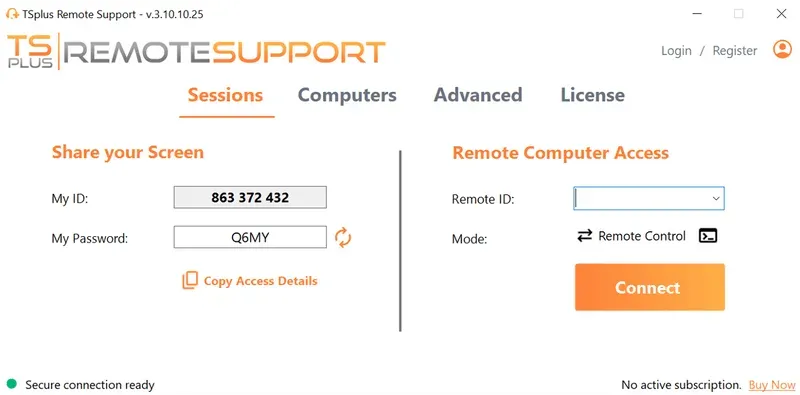
TSplus Remote Support provides the remote intervention layer for help desks and support teams needing to troubleshoot or maintain endpoints from a distance. It supports both attended and unattended remote access to Windows PCs, thus allowing internal technicians, customer-support teams and MSPs to assist users without being physically present.
Support agents can take remote control, access unattended devices, work with multiple monitors, transfer information, send commands and record sessions where required. TSplus documentation also provides customisation and embedding options for organisations that want remote assistance to fit more closely into their existing support workflows.
TSplus Remote Support does not replace ticketing, IT service management or the technicians themselves. Instead, it complements those systems by giving support agents a simple and practical way to move from identifying a problem to working directly on the affected device.
How Can the Wider TSplus Suite Support IT Operations?
While TSplus Remote Support is most directly associated with IT help desk services, other TSplus products address adjacent requirements.
TSplus Remote Access publishes Windows applications and desktops for remote users. TSplus Advanced Security provides additional protection for Windows server environments, while 2FA brings essential extra credentials security. TSplus Server Monitoring provides monitoring and reporting for servers and websites. Together, these tools can support broader remote IT operations without changing the central role of Remote Support in technician-to-endpoint assistance.
Choosing the Right Help Desk and Support Model
The decision between in-house, outsourced and hybrid IT help desk services is primarily a decision about people, responsibility and capacity. The software-led question is different: it asks how technology can make whichever support model you choose more efficient.
For IT teams and MSPs, the strongest model is therefore not necessarily one category alone. Help desks and support work best when sourcing, processes, security and remote-support tools are designed together, giving technicians a clear path from the initial request to effective resolution.
TSplus Remote Support Free Trial
Cost-effective Attended and Unattended Remote Assistance from/to macOS and Windows PCs.
Some Frequently Asked Questions:
What are IT help desk services?
IT help desk services provide users with a central point for reporting technical incidents, requesting assistance and receiving troubleshooting support. Services may be delivered by internal IT staff, an MSP or a combination of both.
Is it better to outsource an IT help desk?
Neither model is universally better. Outsourcing can add capacity, specialist expertise or extended time-zone or geographic coverage, while an in-house help desk provides direct organisational knowledge and control. Many organisations combine both through a hybrid or co-managed model.
What is a software-led help desk?
A software-led help desk uses ticketing, automation, knowledge management, monitoring and remote support tools to streamline service delivery. Software is meant to support technicians rather than replacing the people responsible for diagnosing and resolving complex problems.
What is the difference between help desk software and remote support software?
Help desk software manages requests, workflows, tickets and service levels. Remote support software enables technicians to interact directly with remote devices when troubleshooting or maintenance requires endpoint access.
Can TSplus Remote Support be used by MSPs?
Yes. TSplus Remote Support is designed for IT professionals providing remote assistance and support , whether as attended and unattended access. Customisation options can also help MSPs and software providers adapt the remote-support experience to their organisation.
:quality(80)/m/filters:format(webp))
:quality(80)/m/filters:format(webp))
:quality(80)/m/filters:format(webp))
