








)
)
How Does TeamViewer Pricing Actually Work?
Subscriptions:
TeamViewer uses a subscription-based licensing model built around named users and concurrent sessions. Pricing tiers are designed to match usage volume, feature access, and the number of simultaneous connections allowed under a single account.
According to TeamViewer, entry-level plans typically allow a single active session at a time, while higher tiers unlock multiple concurrent connections and advanced features. This structure is straightforward at small scale but becomes complex as usage patterns diversify.
What Is Licensed in TeamViewer: Users, Channels or Devices?
TeamViewer licenses are primarily user-based, not device-based. Each licensed user can initiate sessions from multiple endpoints, but only a limited number of concurrent sessions are allowed per subscription.
For SMBs, this means that adding technicians or supporting multiple clients often requires upgrading plans rather than simply adding lightweight access. For MSPs, this model can feel misaligned with real-world workflows, where session concurrency fluctuates daily.
How Do Concurrent Sessions Impact Cost?
Concurrency is the main pricing accelerator. Even if technicians are not connected all day, overlapping support sessions can push an organization into a higher pricing tier.
As a result, SMBs often pay for peak usage that occurs only sporadically. MSPs supporting multiple clients across time zones experience this effect even more strongly.
Why Does TeamViewer Become Expensive for SMBs?
TeamViewer pricing tends to scale non-linearly with business growth. Costs increase not only with more users, but also with how and when the tool is used.
Why Does SMB Growth Trigger Pricing Thresholds?
As SMBs grow, remote support becomes more frequent and more distributed. Supporting additional endpoints, after-hours access and parallel troubleshooting sessions all increase concurrency pressure.
At this stage, SMBs often move from an entry plan to mid or high-tier subscriptions. This results in noticeable and generally uncomfortable cost jumps rather than warranted incrementation.
How Do MSP Usage Patterns Inflate Licensing Needs?
MSPs face a different challenge. Supporting multiple customers under a single TeamViewer account concentrates session load into the same concurrency pool.
This generally forces MSPs into enterprise-grade plans even when individual client usage remains modest. Licensing thus becomes disconnected from the actual value delivered per customer.
What Are the Hidden Cost Drivers in TeamViewer Licensing?
While TeamViewer pricing is publicly documented, several cost drivers only become visible after deployment.
Add-Ons and Feature Gating Increase Spend
Advanced security features, centralized management, and compliance-oriented controls are often tied to higher-tier plans. SMBs with security-conscious clients may find that baseline plans lack necessary controls.
Over time, the cost gap between “what is included” and “what is required” widens.
Multi-Tenant MSP Environments Pay More
TeamViewer is not inherently designed for MSP-style tenant separation. Managing multiple customers under one account can complicate access control, auditing and billing attribution.
This limitation also tends to push MSPs toward higher tiers or parallel subscriptions, both of which increase operational cost.
How Does TeamViewer Compare to Other Remote Support Models?
Remote support tools differ significantly in how they price access, scale usage and support MSP workflows.
Comparison Table: TeamViewer vs SMB-Focused Alternatives
| Criteria | TeamViewer | TSplus Remote Support |
|---|---|---|
| Licensing model | Named users + concurrency | Flat, transparent |
| Cost scaling | Increases sharply with growth | Predictable |
| MSP multi-client use | Limited tenant isolation | Designed for MSP workflows |
| Security controls | Tier-dependent | Included by design |
| Budget predictability | Low for growing teams | High |
This contrast explains why SMBs and MSPs increasingly evaluate alternatives as their environments mature.
Why Else Do MSPs Start Looking for TeamViewer Alternatives?
Cost is rarely the only driver. Security, governance and operational clarity matter just as much:
- Security
- Predictability
- Client isolation concerns
MSPs working with regulated or security-sensitive clients need consistent access controls, clear audit trails and predictable pricing. Licensing uncertainty complicates client billing and long-term planning.
As a result, many MSPs explore tools that align more closely with how support is actually delivered, rather than how licenses are counted.
How TSplus Remote Support Addresses SMB and MSP Constraints
TSplus Remote Support has been developed specifically for SMBs and service providers seeking simplicity and control which makes no compromise.
Licensing Built for Predictable Growth
TSplus Remote Support avoids concurrency-based pricing traps. Licensing is straightforward, transparent and aligned with real usage rather than peak scenarios.
This allows MSPs to onboard new clients without recalculating licensing thresholds each time demand spikes.
Uncompromising Security and Control Designed Without Per-Session Inflation
Security features are built into the core product rather than gated behind premium tiers. This is especially valuable for MSPs managing heterogeneous client environments with varying compliance requirements.
The result is operational consistency which avoids escalating subscription costs.
Features Picked With Care and In Collaboration
The carefully picked and chosen feature set in the TSplus Remote Support menus aims to equip any IT agent or team with all the essentials for the job. Client and partner feedback is central to this ongoing process.
Indeed, as a mature product, persistently pushed forwards by users and their ensuing demands, TSplus Remote Support leaves no space to chance, preferring simple high quality technical efficiency.
How to Migrate Away from TeamViewer Without Disruption
Simplicity of Migration to TSplus
Forget operational reset: switching to TSplus Remote Support takes a few clicks. Use and features are quite intuitive, still, for those wanting to get the marrow from it, discovery and use can be accompanied by bitesize, self-paced online training whenever needed.
Migration for MSPs Managing Multiple Clients
Implementing migration gradually is generally recommended if you have not set up a test environment first. Most migrations follow a phased approach:
- Deploy the alternative tool alongside TeamViewer for a transition period
- Train technicians on parallel usage
- Gradually migrate clients based on renewal cycles and phase out TeamViewer
This approach minimizes disruption while giving teams time to validate security, usability and performance.
TSplus Academy as a Step Up Into Skilled Remote Support
With TSplus Academy each person enrolled can “See”, “Try” then “Do” just about every action possible with the software, all in a completely enclosed training context.
What’s more, each person does so individually and at their own pace. While some may steadily work through the whole set of modules from start to finish, other will skip around according to need and even ignore the See (discovery) or Try (guided) phases of modules they already master and go directly to testing themselves with the validating Do stages.
TSplus Academy badges obtained are genuine, certified and easy to share.
Practical Migration Steps from TeamViewer to TSplus Remote Support
Step by Step from TeamViewer to TSplus:
- Download the needed connection client according to your target devices: Windows, mac, Android. No installation is needed.
- Deploy alongside TeamViewer for your chosen transition period.
- Discover TSplus Remote Support for yourself and/or let your technicians and agents do so.
- Inform your clients of the new simple connection steps.
- Cancel and remove TeamViewer as required.
You're done and all set.
Admin and Management Features:
Our trial version has the full range of potential offered by TSplus Remote Support and you can easily try other TSplus software. Once licensed, entry tiers are less complete. For full account management possibilities, entreprise-grade provides great organisation tools. Thus, with the full version of our software you will access the following features and capabilities:
- Create user accounts for your support agents.
- Agents can set up personal logins with passwords to manage records of user information and PC IDs, including unattended computers.
- Add devices to your list of known PCs for easy future access.
- For devices that require unattended support, set up unattended access within TSplus Remote Support.
Conclusion
TeamViewer remains a capable remote support platform, but its pricing model often conflicts with how SMBs and MSPs actually operate and scale. Concurrency-based licensing, tier-driven features and limited MSP alignment contribute to rising costs over time.
For organizations seeking predictable growth, clear security controls and licensing adapted to real-world usage, exploring alternatives is a rational step rather than a reactive one. To simplify remote support for your business, your SMB or MSP clients and your colleagues, we invite you to explore TSplus Remote Support without delay.
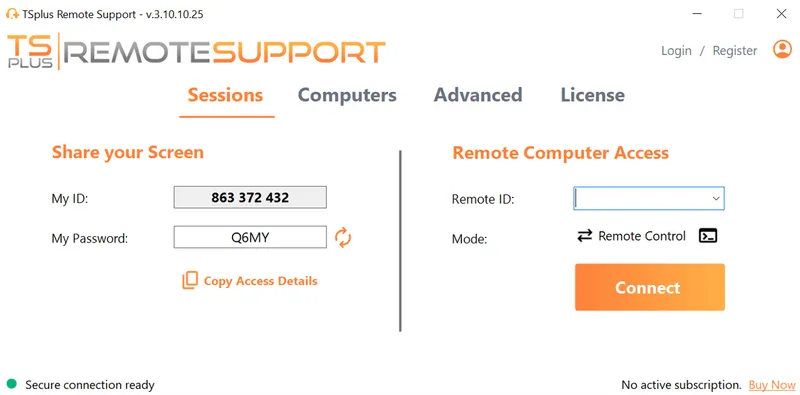
TSplus Remote Support Free Trial
Cost-effective Attended and Unattended Remote Assistance from/to macOS and Windows PCs.
)
)
)
