








)
)
Introduction
Remote support software affects more than connection speed. IT teams must assess how users start sessions, how unattended devices are governed, which platforms are controlled, how technicians collaborate and how licensing expands with usage.
TeamViewer, AnyDesk and TSplus Remote Support answer those needs differently. This comparison examines workflows, deployment choices, administration and commercial models so buyers identify the right operational fit without relying on feature counts or simplistic better-than claims.
TeamViewer vs AnyDesk vs TSplus: Quick Comparison
| Comparison area | TeamViewer | AnyDesk | TSplus Remote Support |
|---|---|---|---|
| Typical fit | Enterprises and integrated service desks | Cross-platform teams needing flexible administration | SMBs, MSPs and lean helpdesks |
| Attended support | Session links, Quick Support modules and ID-based connections | Addresses, invitations and interactive requests | Temporary client using an ID and password |
| Unattended access | Assigned devices through TeamViewer Host | Password-based access and managed endpoints | Registered computers organised into searchable groups |
| Platform breadth | Broad desktop, mobile and specialised-device coverage | Major desktop and mobile platforms | Windows and macOS targets controlled from Windows, macOS or Android |
| Integrations | Broad enterprise and IT service management ecosystem | REST API and enterprise administration options | Native Freshdesk integration |
| Hosting | Primarily cloud-delivered | Cloud or on-premises through Ultimate | Managed cloud or self-hosted from 50 concurrent connections |
| Licensing focus | Experts, channels, devices and add-ons | Users, connections and managed devices | Concurrent connections with unlimited users and devices |
| Main trade-off | Greater operational and licensing complexity | Advanced controls require higher plans | Narrower platform and integration scope |
All three products handle core support tasks, but the surrounding operating model creates the meaningful differences. A business supporting specialised devices and integrated workflows may value TeamViewer. A cross-platform department may prefer AnyDesk, while a Windows and macOS helpdesk with limited simultaneous activity may find TSplus easier to size.
Use the table as a purchasing filter, not a ranking. Confirm plan limits, endpoint compatibility and required integrations before requesting quotes.
What Should Business Teams Compare First?
A feature checklist rarely shows whether a product will work efficiently in production. Two tools may both provide unattended access while differing in:
- deployment
- device limits
- identity controls
- offboarding
Define the support operation before comparing vendors.
Attended and Unattended Workflows
Attended support helps a user who is present and can authorise the session. It is common in employee helpdesks, customer assistance, application support and one-off troubleshooting.
Test how many steps a non-technical user needs, whether a download is required, how consent appears and whether the technician can reconnect after a reboot or elevation request.
Unattended access serves approved devices that technicians maintain without waiting for an end user. Typical cases include:
- servers
- managed workstations
- overnight remediation
- recurring maintenance
Here, device organisation, permissions, deployment and access removal matter more than session launch. Large estates also make endpoint limits important.
Endpoint Coverage
Businesses should separate technician devices from controlled devices. A mobile application may allow a technician to connect from a phone without supporting full control of that mobile platform.
List Windows, macOS, Linux, Android, iOS, server, point-of-sale, embedded and operational technology requirements separately. This prevents the phrase “cross-platform” from hiding a critical limitation.
Platform scope should reflect planned growth because a desktop-focused tool may become restrictive when mobile or specialised devices are added.
Concurrency and Collaboration
Technicians may handle one case or several simultaneous sessions. Buyers should test multi-technician access, transfers and parallel connections because these features affect productivity and licensing.
Commercial plans commonly count named technicians, simultaneous sessions, managed endpoints or connection channels. A team with twenty technicians and four active sessions has a different cost profile from five technicians who each maintain several connections.
Governance
Remote support provides privileged access to business devices. Buyers should therefore review:
- multi-factor authentication
- single sign-on
- roles
- policies
- logging
- deployment tools
- technician removal
A global enterprise may require conditional access and audit integration, while a smaller helpdesk may need straightforward account management, session history and dependable offboarding.
How Does TeamViewer Fit Business Remote Support?
TeamViewer Remote covers attended support, unattended access and remote device administration. Its wider portfolio extends into endpoint management, digital employee experience, operational technology and specialised enterprise connectivity.
For attended sessions, technicians can share a session link, use an ID-and-password connection or distribute a customised Quick Support module. For unattended support, TeamViewer Host can be installed and assigned to the correct company account or device structure.
In-session functions can include:
- file transfer
- recording
- scripting
- multi-monitor access
- chat
- handover
Availability depends on the licence and product tier.
Best-Fit Use Cases
TeamViewer is most relevant when remote support must connect with a wider enterprise environment. Its integration ecosystem includes major service management, collaboration and endpoint platforms. Enterprise offerings add identity, policy, deployment and application programming interface capabilities.
TeamViewer can therefore fit:
- Global enterprises with heterogeneous endpoint estates
- Service desks using major IT service management platforms
- Organizations supporting mobile, embedded or specialised devices
- Teams requiring mature identity and access policies
- Businesses combining reactive support with endpoint operations
The value comes from using that ecosystem. Integrated service workflows can reduce context switching and manual ticket updates. TeamViewer’s specialized-device coverage can also matter in retail, manufacturing and field operations.
Trade-Offs to Validate
TeamViewer's breadth can make product selection and cost modelling more involved. Buyers may need to account for licensed experts, channels, managed devices, integrations and add-ons.
That complexity may be justified for a multinational service desk. For a smaller internal team, part of the ecosystem may remain unused.
The practical question is whether the organization will deploy enough capabilities to justify the commercial and administrative structure.
How Does AnyDesk Fit Business Remote Support?
AnyDesk combines interactive remote access with unattended endpoint control. Users can connect through an address, accept an incoming request or join through an invitation. Features include file management, Wake-on-LAN, remote printing, recording and permission profiles.
For unattended access, an authorised password is configured on the endpoint. AnyDesk also provides address books, a management console, custom clients, REST APIs, MSI deployment and Windows Group Policy administration.
Best-Fit Use Cases
AnyDesk is a strong candidate for businesses that prioritise cross-platform access and configurable administration. Native applications cover major operating systems, while higher tiers expand identity, deployment and integration options.
AnyDesk can suit:
- Teams supporting several desktop and mobile platforms
- Businesses needing configurable or branded support clients
- IT departments using REST APIs for workflow integration
- Windows administrators requiring MSI or Group Policy deployment
- Enterprises seeking an on-premises option
This position suits organisations that need client and deployment flexibility without a broader digital-workplace platform. Custom clients can apply different settings, branding or permissions to employees, customers and managed devices.
AnyDesk also offers an on-premises path through Ultimate. Buyers should include infrastructure, maintenance and resilience in that evaluation.
Trade-Offs to Validate
AnyDesk plans combine licensed users, concurrent connections, managed endpoints and advanced administration features. This gives businesses several scaling paths, but cost forecasting requires more than counting technicians.
Buyers should estimate the number of session initiators, simultaneous connections, registered endpoints and controls that require a higher plan. A low entry price may not represent the final production configuration.
Teams with formal evidence requirements should also test recording. AnyDesk recordings use a proprietary format opened through an AnyDesk client, which may suit internal review but be less convenient for external archiving or training.
How Does TSplus Remote Support Fit Business Teams?
TSplus Remote Support focuses on internal and customer-facing helpdesk activities. It provides attended assistance, unattended maintenance, screen control, file exchange, recording and technician collaboration without positioning itself as a full endpoint-management suite.
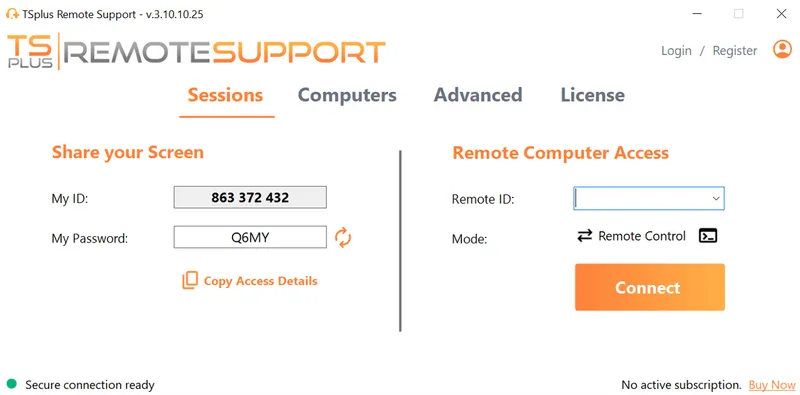
For attended support, the user downloads and runs a small client, then shares an ID and password. The client can be branded and simplified for a more controlled customer experience.
For unattended access, technicians register computers, organise them into groups and locate them through search. They can connect to the desktop, open a remote command prompt or use Wake-on-LAN with compatible devices.
Best-Fit Use Cases
The clearest commercial distinction is concurrent-session licensing. TSplus includes unlimited users, unlimited unattended devices and unlimited devices to connect to, while the subscription is sized around active connections.
This model can work well when many employees may provide support but only a smaller number of sessions normally run at once. An MSP may authorise numerous technicians and register many customer devices while buying capacity around observed peak concurrency.
TSplus can fit:
- SMBs and mid-sized organisations with lean IT teams
- Internal helpdesks managing Windows and macOS estates
- MSPs with many technicians or registered endpoints
- Software vendors supporting customers remotely
- Teams that value branded support clients
- Organizations whose costs follow simultaneous workload
Multiple technicians can join the same remote computer, while one technician can maintain sessions with several computers. Session history can be exported, system information reviewed and clipboard synchronization disabled.
Recordings can be saved as video files. This may simplify training, quality review and documentation because a proprietary session player is not required.
Freshdesk integration connects tickets with remote sessions. The integration scope is narrower than TeamViewer’s, but it can be useful for support teams already working in Freshdesk.
Platform and Deployment Boundaries
TSplus supports Windows and macOS endpoints, while Android can act as the technician controller. Businesses requiring Linux, iOS, Android device control, embedded systems or operational technology should confirm compatibility before selection.
The standard service uses TSplus-managed cloud infrastructure. Self-hosting is available from 50 concurrent connections and requires the customer to operate the centralized API and relay components.
This threshold matters. A smaller organisation may prefer managed cloud delivery, while a larger operation may consider self-hosting for infrastructure control. Self-hosting also adds responsibility for availability, patching, monitoring and resilience.
TSplus has a smaller integration and enterprise-governance scope than TeamViewer or AnyDesk. Organizations requiring extensive single sign-on, conditional access, compliance certifications or complex identity hierarchies should validate those requirements during a proof of concept.
Which Product Fits Each Support Use Case?
A use-case comparison is more useful than a general ranking because feature value changes with the operating environment.
Attended Support for Employees and Customers
TeamViewer is suitable when session links, Quick Support modules, and integrated service workflows are central. It can be particularly relevant when the company already uses TeamViewer in other endpoint processes.
AnyDesk fits teams wanting several connection methods, configurable clients and permission profiles. These options can support different workflows for employees, external customers and temporary cases.
TSplus fits organizations that prefer a simple download, run, share and approve sequence. Branding can create a consistent customer experience, although browser-only support is not its primary model.
The best choice depends on user confidence, required branding and the systems through which sessions are launched.
Unattended Maintenance
TeamViewer fits large estates requiring assigned devices, policies, enterprise deployment and broader endpoint services. Its value increases when Remote Access forms part of a larger management strategy.
AnyDesk fits cross-platform estates where address books, permission profiles, configurable clients and deployment tools matter. Managed-device allowances should be compared across plans.
TSplus fits direct maintenance of many registered Windows and macOS computers without per-device expansion costs. It supports searchable groups and recurring access but does not replace a complete endpoint-management platform.
The key question is whether the business needs remote maintenance alone or a broader governance layer around every endpoint.
Enterprise Integration and Governance
TeamViewer fits purchases driven by service-management integration, conditional access, enterprise identity or specialised endpoints. These requirements can justify a more structured contract.
AnyDesk becomes relevant when the organization needs APIs, single sign-on, mass deployment, Group Policy or on-premises hosting within a cross-platform model. Several capabilities require higher tiers.
TSplus suits helpdesks needing reporting, recording, User Account Control compatibility, automatic updates and practical session controls without a broad integration landscape. More complex identity and compliance requirements require direct validation.
MSP and Multi-Technician Operations
TeamViewer may suit MSPs serving enterprise customers with integration, identity and specialised-device requirements.
AnyDesk may fit providers managing varied platforms and customer-specific configurations. User, connection and endpoint limits need careful calculation.
TSplus may fit MSPs with many technicians and devices but stable simultaneous usage. Unlimited users and devices simplify some scaling decisions, although greater concurrency still increases the required subscription.
The best MSP product therefore depends on customer diversity, peak activity and service scope rather than headline pricing.
How Do Security and Deployment Options Compare?
Security depends on identity, permissions, device trust, technician actions and offboarding, not only encryption.
TeamViewer offers plan-dependent policies, user management, single sign-on, audit logs, conditional access and mass deployment. This model fits organisations that need remote support to align with mature enterprise identity and compliance processes.
AnyDesk documents encrypted connections, two-factor authentication for unattended access, whitelisting, permission management, privacy mode and session profiles. Its Ultimate offering also provides on-premises deployment .
TSplus documents encrypted connections, automatic updates, reporting, User Account Control compatibility, recording and the option to disable clipboard synchronization. These controls address common helpdesk needs, while advanced identity or certification requirements should be confirmed directly.
Deployment can be decisive. TeamViewer is primarily cloud-delivered. AnyDesk offers cloud and enterprise on-premises deployment. TSplus provides managed cloud services with self-hosting from 50 concurrent connections.
Self-hosting does not automatically make a deployment safer. It transfers responsibility for availability, updates, monitoring, backups and network protection to the customer.
Pricing Models and Their Impact on the Decision
The lowest displayed monthly price rarely reflects the production configuration. Buyers should calculate the cost of required users, sessions, endpoints, controls and integrations.
TeamViewer sells annual subscriptions and generally licenses the experts initiating professional support. Plans determine available users, channels, managed devices and management features. This structure can suit organisations that will use its enterprise ecosystem, but add-ons should be priced separately.
AnyDesk combines licensed-user allowances, concurrent connections and managed-device limits. Higher plans expand administration, deployment and identity capabilities. Purchasing teams must track more than one dimension as usage grows.
TSplus uses concurrent connections as its primary commercial unit while including unlimited users and devices. This is easier to forecast when peak workload is stable. Unlimited users do not mean unlimited active sessions, so teams should size around observed concurrency.
A fair three-year model should include:
- subscriptions
- add-ons
- deployment
- migration
- administration
- training
- self-hosting infrastructure
- expected growth
This prevents an attractive entry price from hiding later expansion costs.
How Should IT Teams Test the Three Products?
A proof of concept should reproduce real support conditions. Test TeamViewer, AnyDesk and TSplus Remote Support with the same users, devices and network constraints.
-
Test attended session initiation.
Ask a non-technical user to start a session without direct help.
Measure the number of steps and the time required to connect.
Note any instructions or actions that cause confusion. -
Test reconnection and elevated actions.
Restart the remote device and check whether the session reconnects.
Open a User Account Control prompt and test administrative access.
Confirm that the technician can continue without restarting the workflow. -
Test unattended device management.
Register several workstations, servers or customer endpoints.
Evaluate device grouping, search, permissions and naming options.
Remove one device and confirm that unattended access is revoked. -
Test demanding support tasks.
Transfer a large file and work across multiple monitors.
Test clipboard use, diagnostic tools and simultaneous sessions.
Check whether performance remains practical during complex troubleshooting. -
Test poor network conditions.
Introduce latency, limited bandwidth and temporary connection loss.
Observe image quality, input delay and automatic reconnection.
Check whether technicians can adjust performance settings when needed. -
Test collaboration and reporting.
Invite another technician and share or transfer the active session.
Review session history, recordings, reports and export formats.
Disable a technician and confirm that all access is removed. -
Test deployment and total cost.
Deploy the client using the tools already used in production.
Calculate pricing for technicians, devices, sessions and required features.
Repeat the calculation using expected growth over three years.
Include technicians, security administrators and procurement teams in the evaluation. Finish with a weighted decision matrix that prioritises mandatory workflows, endpoint compatibility and governance requirements.
Conclusion
TeamViewer, AnyDesk and TSplus Remote Support address support needs through different operating models. TeamViewer fits complex enterprise ecosystems and specialized endpoints. AnyDesk suits cross-platform teams requiring configurable administration and deployment choice.
TSplus serves helpdesks that value straightforward workflows and concurrent-session licensing. The best decision comes from matching endpoint scope, governance, integrations and peak activity to a production scenario, rather than choosing a vendor through better-than claims or headline pricing alone.
TSplus Remote Support Free Trial
Cost-effective Attended and Unattended Remote Assistance from/to macOS and Windows PCs.
)
)
)
