





)
)
Introduction
Remote support has evolved from an informal convenience into a core operational function for environments, each interaction involves privileged access and measurable risk. Designing a secure remote support workflow therefore requires clearly defined processes for request validation, access control, session governance, traceability, and compliance rather than reliance on tools alone.
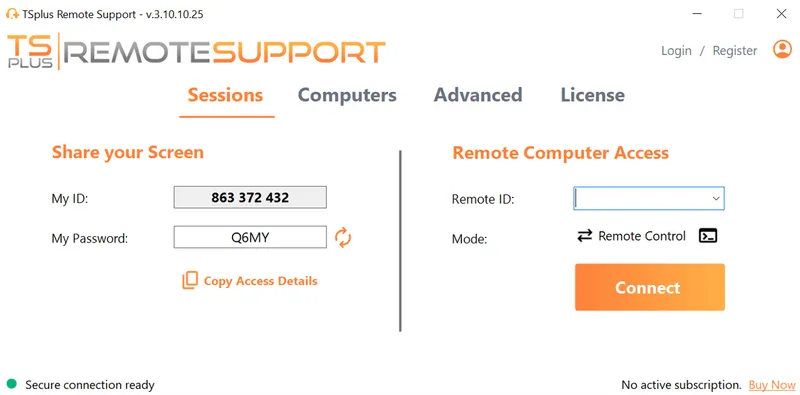
TSplus Remote Support Free Trial
Cost-effective Attended and Unattended Remote Assistance from/to macOS and Windows PCs.
Why Does Secure Remote Support Workflows Matter?
Hybrid work has changed how internal IT support operates. Technicians now connect to endpoints outside the corporate perimeter, often with elevated access and less direct oversight.
Without a defined workflow, remote support quickly becomes inconsistent and hard to audit. A secure remote support workflow introduces clear rules for access, session handling, and documentation, helping teams work consistently while supporting security and governance requirements.
Common Risks in Unstructured Remote Support
Organizations that lack a formal workflow tend to experience recurring issues:
- Support sessions initiated without a verified business request
- Technicians granted broad administrative access by default
- No reliable record of actions taken during support sessions
- Inconsistent approval for sensitive or disruptive operations
- Difficulty reconstructing events during incidents or audits
These risks usually stem from time pressure, unclear responsibilities, or missing procedures. A process-driven workflow addresses them systematically.
How Can You Define the Secure Remote Support Lifecycle?
A secure remote support workflow should be designed as a lifecycle with clearly defined phases. Each phase introduces specific controls that limit risk while maintaining operational efficiency.
The following sections describe this lifecycle from request to closure.
Phase 1: Request Validation and Authorization
Every secure remote support workflow starts with a validated request. Sessions must originate from a documented business need tied to an identifiable user, typically through a service desk or ITSM platform. Authorization should be explicit, defining which requests justify remote access and which can be resolved through guidance, reducing unnecessary exposure and improving consistency.
Phase 2: Scope Definition and Access Planning
Once a request is approved, the workflow must define the scope of the support session. Clear scope definition prevents privilege creep and sets expectations before access is granted.
The workflow should specify:
- Which system or device will be accessed
- What level of interaction is required
- Whether administrative privileges are necessary
- Any actions that are explicitly prohibited
This scope provides a reference point for both execution and later review.
Phase 3: Role-Based Assignment and Separation of Duties
Support tasks should be assigned based on predefined roles rather than individual discretion. Limiting access by role reduces error impact and simplifies compliance mapping. The workflow should also prevent conflicts of interest, such as technicians approving their own privileged access, reinforcing governance and accountability.
Phase 4: Identity Verification at Session Initiation
Identity verification is the final control before access is granted. Both technicians and users must be authenticated according to organizational standards, with explicit user confirmation required at session start. This step reduces impersonation risk and limits human error, especially under social engineering pressure.
Phase 5: Controlled Session Execution
During the session, the workflow must enforce behavioral boundaries aligned with the approved scope. Acceptable actions should be predefined, deviations restricted, and idle sessions terminated automatically. Clear execution rules reduce ambiguity and protect both the organization and the technician.
Phase 6: Privileged Action Handling and Escalation
High-impact actions require additional control. The workflow should define escalation paths for privileged operations, such as configuration changes or service restarts. Built-in escalation ensures sensitive actions are deliberate and justified, rather than performed reflexively during support.
Phase 7: Logging, Monitoring, and Traceability
A secure workflow must generate consistent, reliable records. Session metadata such as identities, timestamps, duration, and authorization context should always be logged. Traceability supports audits and investigations while encouraging adherence to procedures through accountability.
Phase 8: Session Closure and Post-Session Review
Session closure is a formal workflow step. Access should be revoked automatically once support ends, and technicians must document actions taken and outcomes. Consistent closure reduces lingering access risk and completes the support lifecycle with clear operational records.
How Can You Integrate the Workflow into Daily IT Operations?
A secure remote support workflow must be embedded into everyday IT operations to be effective. When workflows feel separate from real support work, they are often bypassed under time pressure.
Standardize Procedures and Training
Standard operating procedures should cover the full remote support lifecycle and be taught as the default way of working. Clear documentation and regular refresh training help technicians apply the workflow consistently as environments evolve.
Reinforce Workflow Adoption Through Governance
Workflow adoption must be reinforced through operational governance rather than informal expectations. Key integration practices include:
- Aligning remote support workflows with ITSM processes and ticket categories
- Including workflow adherence in technician performance reviews
- Running periodic internal reviews to identify friction or bypass patterns
When secure workflows become routine, compliance improves without slowing support delivery.
How to Measure Workflow Effectiveness?
Measuring workflow effectiveness requires balancing operational efficiency with security outcomes. Focusing only on speed can hide risky behavior, while excessive rigidity can slow legitimate support activity.
Combine Quantitative and Qualitative Signals
Metrics should be reviewed alongside operational context to identify structural issues rather than individual errors. Recurring escalations may indicate unclear scope definition, while incomplete session records often point to workflow fatigue or friction in execution.
Track Actionable Operational Indicators
Effective measurement relies on consistent, meaningful indicators, including:
- Average resolution time for remote support requests
- Percentage of sessions requiring privilege escalation
- Completeness and consistency of session documentation
- Number of workflow deviations identified during reviews
These indicators help IT leadership refine processes while maintaining accountability.
How To Support Compliance and Audit Readiness?
Compliance and audit readiness are natural outcomes of a process-driven remote support workflow. When access, actions, and approvals follow defined steps, evidence collection becomes part of normal operations rather than a reactive task.
Design for Traceability and Control
Auditors focus on traceability, authorization, and data handling. A mature workflow provides this clarity by design, showing how each support session was justified, controlled, and documented, which reduces audit disruption.
Embed Compliance into Workflow Controls
To support audit readiness, workflows should:
- Enforce consistent identity verification and approval steps
- Retain session metadata and documentation according to policy
- Clearly map workflow phases to internal security controls
This level of discipline strengthens governance and incident response, even outside regulated environments.
Why TSplus Remote Support Fits a Process-Driven Workflow?
Secure remote support is primarily a process challenge, but the supporting solution must reinforce workflow discipline rather than introduce friction. TSplus Remote Support aligns with process-driven designs by enabling clear session initiation, explicit user consent, and consistent traceability without adding unnecessary operational complexity.
Its lightweight deployment and predictable session controls reduce the temptation to bypass defined workflows under time pressure. This allows internal IT teams to focus on enforcing how remote support is delivered securely, instead of compensating for tooling limitations.
Conclusion
Designing a secure remote support workflow for internal IT teams is fundamentally a process design exercise. Tools may enable access, but workflows define control, accountability, and trust.
By structuring each phase of the support lifecycle—from request validation to session closure—organizations can deliver efficient assistance without compromising security or compliance. A process-oriented approach ensures that remote support remains scalable, auditable, and aligned with long-term IT governance objectives.
TSplus Remote Support Free Trial
Cost-effective Attended and Unattended Remote Assistance from/to macOS and Windows PCs.
)
)
)
