





How Can You Find The Best Remote Desktop Software for Your Budget?
Whether you are an IT professional providing technical support, a business managing remote employees or a freelancer accessing your work computer from anywhere, the right remote tool can make all the difference. Additionally, with IT brands and products constantly evolving, finding the best software to meet your remote desktop needs is likely to be a task you repeat. So, why not get some systems and pointers planned out to make it simple and lighten the process, whatever your line of work.
Break down with us key considerations, a comparison on pricing and main features, recommendation per business type and some great reasons to try out our software suite.
What Are The Key Factors to Consider in Remote Desktop Software Pricing?
Clearly, with so many options on the market, finding a balance between pricing and features can be tricky. Some platforms offer affordable plans for limited functionality, while others have premium features at a high cost. So, how do you choose the best remote desktop software to fit your needs and budget?
When comparing remote desktop software pricing, it is not just about the cheapest option, but rather about finding the best value for your specific needs. Here are the key pricing factors to evaluate before making a decision:
- One-off payment vs spreading costs
- Unlimited for high numbers of concurrent users or per user licensing
- Necessary or extra features balance
- All-inclusive broad provision or simple basics
Subscription Model vs. One-Time Payment
- Subscription-based Pricing (SaaS - Software as a Service): Most modern remote desktop tools operate on a monthly or annual subscription model. While this provides continuous updates and cloud-based features, costs can add up quickly - especially for businesses with multiple users.
- Flexible Licensing: Choosing a subscription and either paying per month or with annual billing, or yet again a perpetual license which would then only incur ongoing support cost are three very different budgeting stances for a business. For certain products in our range we have kept all open so our customers can choose what best fits them. This also explains why we include the first year of updates and support with perpetual licenses.
Per-User Pricing vs. Unlimited Access
- Per-User Licensing: Many providers charge per user, per month, which can be costly if you need access for multiple team members but ideal for individuals and SMBs.
- Unlimited Licensing: Other solutions offer flat-rate plans covering multiple users. Depending on thresholds, this can better suit the budget of many businesses and enterprises.
Feature-Based Pricing
Not all remote desktop tools offer the same features at every pricing level. Key features to impact pricing include:
- Unattended Access – Ability to connect to a computer without the remote user’s presence.
- Multi-Session Support – Whether multiple users can connect to a single device at once.
- File Transfer & Remote Printing – Essential for IT support and remote work.
- Security & Encryption – High-end security features often come at a premium price.
- Mobile & Cross-Platform Access – Some tools charge extra for access on mobile devices.
Scalability & Enterprise Plans
- Small Business Plans: Look for cost-effective solutions with basic remote access and support.
- Enterprise Plans: Larger businesses may require bulk licensing, multi-admin controls and advanced security features, and it is likely these will come at a higher cost.
Understanding these pricing models and feature variations will help you choose a remote desktop solution that matches your budget and operational needs.
How Does The Top 10 Remote Desktop Software Compare In Price?
Now that we have covered the key pricing considerations, let us take a closer look at ten leading remote desktop software solutions and their current pricing.
We compared each tool based on pricing structure, affordability, target audience and key features, so you can quickly identify the best option for your needs.
Prices checked on October 29, 2026. Figures are based on publicly advertised US prices. Annual billing, promotional offers and licensing conditions may affect the final amount.
Pricing & Features Table: A Quick Overview
Subscriptions audited on 5 November 2026 give the following baseline prices. (Please note non-business starter prices have been left aside in this comparison.)
See individual pricing pages for how teams benefit from grouped licences. For instance our starting price of 7€ per concurrent technician ($8) decreases with 3 then 5 users to reach 4€ from 10 concurrent connections upwards. Other variables are whether subscriptions are billed monthly or annually. For ease of reading, this table is based on annual billing prices. Billed monthly, prices rise for many of our competitors.
| Software | Updated starting price | Note | Best For | Key Features |
|---|---|---|---|---|
| TSplus Remote Support | From $8 or €7 per concurrent connection/month to as little as €4 | Annual billing; Cloud or on-premises. Unlimited users and unlimited devices. | Systems administrators, IT technicians. Simple, secure, scalable support. | Multi-screen remote control, Windows, iOS & Android multi-device support, unattended access, file sharing, robust security, Freshdesk integration. |
| AnyDesk Standard | $49.90 or €49.90/user/month | Annual billing. Max number of devices not specified. Promotional annual rate of approx 20% off. | IT Teams & SMBs | Fast performance, mobile-friendly, remote printing, tight security |
| TeamViewer Business | $50.90 or €35.90/3devices/month | Annual billing. Max 200 devices. | Enterprises | Cross-platform, remote meetings, file sharing, mobile as extra. |
| Zoho Assist Standard | $10 or €10 /technician/month | Annual billing. Unlimited devices | IT Support Teams | Cloud-based, unattended access, browser support. |
| Splashtop Remote Support SOS | $22 or €21 per user/month | Annual billing. Max 10 devices. | Small Businesses | High security, fast connections. |
| RemotePC Pro | $8.29 (€ not available) per user/month | Annual billing. No € pricing available. Max 10 devices. | Budget Users | Web-based access, remote printing, file transfer. |
| GoToMyPC Pro | $41.50 or €38.75 /computer/month | Max 2-50 devices. | Remote Workers | Web-based, easy to use, high-speed connections. |
| Windows App / Remote Desktop Connection | Native client | Host licensing separate. | Windows Users | Native Windows integration, RDP protocol. |
| ISL Online Starter | $16.90 or €14.90 per user/month | Annual billing. Max 10 devices. | Security-Focused Users | End-to-end encryption, multi-platform support. |
| ScreenConnect Standard | $47 (€ not available) per concurrent technician/month | Annual billing. Max 3 concurrent connections. | IT Service Providers | Multi-user sessions, integrations, automation. |
Key Takeaway
When comparing current remote desktop software pricing, it is clear that some tools offer better value than others according to need and usage and that brands have evolved their positioning to open up the starting subscriptions to individual technicians and IT support needs. While ScreenConnect One and GoToMyPC Personal are now among the most expensive options, solutions like TSplus, Splashtop Remote Access Solo and Zoho Assist Standard provide highest affordability without sacrificing performance.
How Can You Choose the Right Remote Desktop Software for Your Needs?
With so many remote desktop tools available, choosing the right one can be overwhelming. Here’s a simple guide to help you find the best solution for your specific needs.
For IT Support Teams & MSPs:
- Best Choice:
TSplus Remote Support, Zoho Assist, AnyDesk
- Why?
IT teams need unattended access, multi-session support and high security. TSplus Remote Support offers affordable licensing and welcome simplicity.
For Small & Medium Businesses:
- Best Choice:
TSplus Remote Support, RemotePC, Splashtop
- Why?
Businesses need cost-effective solutions that support multiple users and devices. TSplus Remote Support provides a scalable alternative to expensive VPN setups minus the complexity.
For Enterprise-Level Remote Access:
- Best Choices:
TSplus Remote Support, TeamViewer, ConnectWise, ScreenConnect
- Why?
Enterprises require load balancing, multi-user management and high security. TSplus Remote Support enables secure and simple professional screen control while reducing the bill mainly by avoiding building in any surplus features.
NB: For companies wanting access as well as control, TSplus Remote Access delivers secure, high-performance enterprise access to remote application servers which you can parameter on a granular level.
For Individual Remote Workers & Freelancers:
- Best Choice:
TSplus Remote Support, Microsoft Remote Desktop, GoToMyPC
- Why?
Individuals need simple, reliable access to their home or office PC. TSplus Remote Access offers browser-based remote connections without monthly fees. TSplus Advanced Security comes alongside all three solutions to protect application servers.
- Pro Tip:
Due to the nature of the software, TSplus Remote Support is available on subscription and can be self-hosted as well as embedded for your staff and customers to use.
In the next section, let's dive deeper into why TSplus Remote Support and our other products stand out as cost-effective, high-performance alternatives.
Why Choose TSplus Remote Support?
TSplus: The Affordable Alternative to High-Priced Remote Desktop Software
When businesses look for remote desktop solutions, they often feel limited to expensive, subscription-based software like TeamViewer or AnyDesk. But what if you could get the same (or even better) remote support and remote access functionalities without being locked into high monthly costs?
That’s where TSplus Remote Support stands out. Unlike overpriced competitors, TSplus offers a cost-effective, high-performance alternative with flexible licensing options, advanced security, and multi-device compatibility.
Here’s why TSplus is a smarter choice compared to traditional remote desktop solutions:
TSplus Remote Support: Secure & Simple IT Assistance
For IT professionals and support teams, TSplus Remote Support provides a powerful yet user-friendly solution for assisting clients and employees remotely.
Key Features of TSplus Remote Support:
Simple: First and foremost, we aim to make IT simple, so we want our products to be as straightforward and easy to use and that they will make your tech-day simpler too.
Browser-Based Remote Support: No need for complex software installations.
Unattended Access: IT admins can access devices even when users are offline.
End-to-End Encryption: Secure remote sessions with strong authentication.
Multi-User Sessions: Multiple support agents can collaborate on a single session.
File Transfer & Clipboard Sharing: Easily send files and copy-paste between local and remote devices.
Affordable Pricing: Subscriptions start at $8 per month for one concurrent connection, billed annually, with lower per-connection rates for larger packages.
Ideal For:
IT support teams, managed service providers (MSPs), customer support teams.
In case you wanted to publish desktops and apps remotely, not only control them!
A remote desktop solution can also mean desktop and app access, whether instead of screen control or as well as. In that case, TSplus Remote Access provides a high-performance alternative to traditional RDP-based solutions and can also save you VPN setups. It is a professional-grade scalable yet simple solution for remote app and desktop access which makes your chosen items available from anywhere on any device via your Web browser.
TSplus vs. Competitors: Key Benefits
| Feature | TSplus Remote Support & Access | TeamViewer | AnyDesk | GoToMyPC |
|---|---|---|---|---|
| Starting Price | €7/user/month, degressive | €15.90/user/month | €23.12/month (promotion) | €35/device/month (promotion) |
| Unattended Access | ✅ Yes | ✅ Yes | ✅ Yes | ✅ Yes |
| Browser-Based Access | ✅ Yes | ❌ No | ❌ No | ❌ No |
| Multi-Device Compatibility | ✅ Yes | ✅ Yes | ✅ Yes | ❌ No |
| Web-Based Remote Support | ✅ Yes | ❌ No | ❌ No | ❌ No |
| File Transfer & Clipboard | ✅ Yes | ✅ Yes | ✅ Yes | ✅ Yes |
| Security & Encryption | ✅ Advanced | ✅ Standard | ✅ Proprietary | ✅ Standard |
| macOS and Android | ✅ Standard | Add-on | ✅ Standard | ✅ Standard |
Why TSplus?
TSplus provides carefully chosen core features, leaving competitor set their prices high for extras. This makes TSplus Remote Support one of the best value remote desktop solutions on the market.
Conclusion
If you’re looking for a powerful, secure and budget-friendly remote desktop solution, TSplus Remote Support is the simple alternative to overpriced competitors.
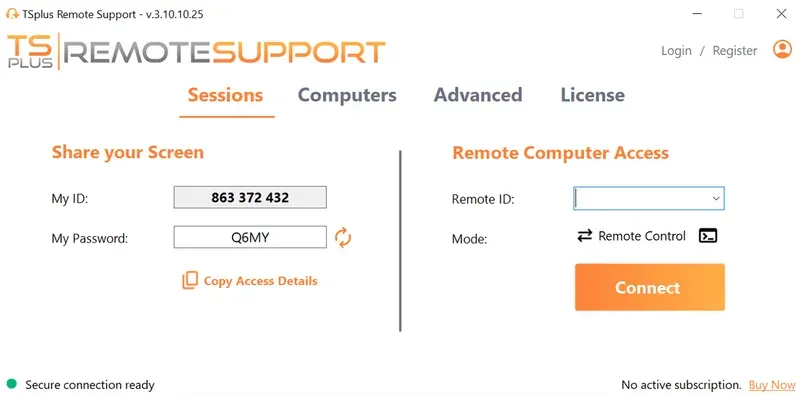
TSplus Remote Support Free Trial
Cost-effective Attended and Unattended Remote Assistance from/to macOS and Windows PCs.
Frequently Asked Questions
What’s the best value remote desktop software?
Microsoft's RDP clients are available without a separate client license, although hosting and business licensing may add costs. Among paid options, RemotePC starts at €2.95/month for an individual plan, while Anydesk starts at €23/month for up to 3 users with annual billing. TSplus Remote Support starts at €7/month per concurrent connection, going to €4 above 10 concurrent technician connections. The best value depends on what you need.
Is there a free remote desktop software option?
Yes, Microsoft Remote Desktop is native and free for Windows users, but it lacks key features like multi-user access, file transfer and enterprise security.
How does TSplus pricing compare to competitors?
Unlike TeamViewer and AnyDesk, which have expensive monthly fees, TSplus offers both affordable subscriptions and lifetime licenses—giving you the best long-term value.
Can I try TSplus before purchasing?
Yes! TSplus offers a no-purchase fully-featured 15-day trial of its software suite so you can experience the power of TSplus Remote Support and more.


