










)
)
What Is ISL Online?
Remote Access and Control
ISL Online is a remote access and control platform that enables technicians and users to connect securely to computers. It supports attended sessions for on-demand help and unattended access for persistent administration across fleets. The service brokers encrypted connections through gateways to route traffic over the public internet without exposing internal networks.
Organizations use ISL Online to troubleshoot endpoints, manage systems, and perform remote tasks from various devices. Client applications or browser components handle display streaming, input control, clipboard sync and file transfer features. Policy settings and authentication flows govern who can connect, when they can connect, and what actions they may perform.
Balancing governance, control and speed
Deployments typically combine accounts, agents and optional relay servers to reach devices behind NAT or firewalls. Logs, session recordings and permissions support overview, while integrations extend identity and workflow coverage. The end goal is dependable remote access which balances speed, control and governance.
Why Find an Alternative to ISL Online?
Flexibility, variety of needs, scalability
Teams often seek alternatives when administration effort, licensing flexibility or governance controls become pain points. Some environments want application publishing via an HTML5 portal instead of pure remote control. Others want predictable TCO with clear tiers, perpetual options or simpler scaling as seat counts grow.
Standards, compliance, requirements
Security and compliance requirements can also drive change when deeper policy, MFA or web-only access is preferred. Certain organizations aim to minimize client roll-out and support overhead by standardizing browser access. Self-hosting, reverse proxy needs or tighter integration with Windows apps may also influence product choice.
Deployment, infrastructure, cost
Finally, strategic shifts like hybrid work, contractor enablement, or application-centric delivery can reframe requirements. If daily demand increases or user experience suffers under existing constraints, a focused platform can better align. capabilities and cost An effective alternative can reduce friction while preserving necessary control.
What to look for in this type of alternative?
Define your needs and usage:
We recommend you start with access control and security, then validate manageability and total cost. Define whether you need application publishing, full desktops or remote control across only targeted devices. Test real workflows over typical WAN conditions, including VPN-less access via an HTTPS gateway to reflect daily usage.
Use this focused checklist to compare options:
- Access & security: MFA or SSO role-based policies, auditing, hardened gateways and protocol hardening.
- Delivery model: Native HTML5 browser access, RemoteApp-style delivery, peripherals and printing which “just work.”
- Management & deployment: Fast installs, clear policy templates, steady patch cadence and actionable monitoring alerts.
- Performance & scale: Stable sessions on variable bandwidth, brokering, load balancing or farms and gateway high availability.
- Interoperability: AD or external IdP integration, file and device redirection, scanners and webcams, seamless client updates.
- Licensing & TCO: Transparent pricing, perpetual or subscription options, and SLAs aligned to business risk and budgets.
Check requirements vs provision:
If a platform matches delivery needs, reduces daily toil, and meets security requirements within budget, it is a strong candidate. Pilot with representative users and apps to validate UX, resilience and operational clarity. Favour solutions that simplify governance without sacrificing necessary depth.
Example of a Checklist in table format:
| Areas | Criteria | Criteria | Criteria | Criteria | Criteria |
|---|---|---|---|---|---|
| Access & security | MFA, SSO | role-based policies | auditing | hardened gateways | protocol hardening |
| Delivery model | native HTML5 browser access | RemoteApp-style delivery | peripherals and printing | ||
| Management & deployment | fast installs | clear policy templates | steady patch cadence | actionable monitoring alerts | command line |
| Performance & scale | stable sessions on variable bandwidth | brokering | load balancing or farms | gateway high availability | multi-OS |
| Interoperability | AD or external IdP integration | file and device redirection | scanners and webcams | seamless client updates | |
| Licensing & TCO | transparent pricing | perpetual or subscription options | SLAs aligned to business risk and budgets | on-premises or cloud hosting |
The Best 10 Alternatives to ISL Online
1. TSplus Remote Support
)
TSplus Remote Support, Powerful yet Simple Remote Support Platform
TSplus Remote Support delivers attended and unattended control with secure, auditable sessions. Yet, we have made sure to keep it simple.
Our troubleshooting and control software installs quickly, supports multi-monitor workflows, and streamlines file transfer and chat for help-desks. Customisable branding and straightforward policy controls keep administration simple for any administrator or full IT team.
Easily coupled with TSplus Remote Access and more to create a full secure application publication environment or other remote possibilities.
Pros
- Unattended and attended access out of the box
- Session recording, screenshots and logging for audits
- Multi-monitor support and clipboard sync
- Branding options at all tiers and a clean technician console
- Predictable licensing suited to growing teams
- iOS capability for iPhones and iPads from iOS 13
Cons
- Not a full VDI or broad app-publishing suite
- Fewer native third-party integrations than large incumbents
- Windows-first focus for technician tools
Pricing
- Per-technician or tiered plans; cloud or self-hosted, perpetual and subscription options by edition.
- Features scale with editions to match governance needs.
- Free 15-day trial available.
- Simple upfront pricing structure helps keep total cost predictable.
Reviews/Ratings
- Frequently praised for fast setup and value.
- Users highlight straightforward browser-based workflows.
- Feedback notes the low admin overhead in comparison to heavier stacks.
2. TeamViewer
)
TeamViewer, The Support-First Remote Control for Helpdesks and MSPs
TeamViewer Tensor focuses on robust support sessions across diverse devices and networks. It offers strong integrations and granular controls that fit structured service desks. TeamViewer is not designed for publishing Windows apps to the browser.
Pros
- Broad cross-platform coverage, including mobile
- File transfer, session recording and diagnostics
- Mature ecosystem and ITSM integrations
- Reliable connectivity at global scale
Cons
- Subscription costs rise with endpoints and seats
- Some advanced capabilities only in higher tiers
- Not positioned for app publishing workflows
Pricing
- Subscription plans sized by seats, endpoints and features
- Trials available for evaluation
- Choose tiers that correspond to ticket volume and compliance needs.
Reviews/Ratings
- Praised for reliability and rich session tooling.
- Administrators value integrations and policy depth.
- Cost at scale is a common consideration.
3. Splashtop
)
Splashtop, The Smooth Streaming Choice for Creative and Education
Splashtop delivers responsive sessions with consistent audio/video performance. It is popular in labs and studios where peripherals and media fidelity matter. Splashtop remains a remote desktop tool rather than an app-publishing platform.
Pros
- Stable HD streaming and low perceived latency
- Wide device coverage and simple deployment
- Good fit for classrooms and creative teams
Cons
- Advanced policy features tied to higher plans
- No HTML5 app-publishing stack
- Plan selection varies across use cases
Pricing
- Subscription plans for business, education and enterprise.
- Trials available to validate peripherals and media.
- Confirm device counts and needed add-ons up front.
Reviews/Ratings
- Users highlight smooth audio/video and stable sessions.
- Educators cite straightforward rollout.
- Creative teams value responsiveness with drawing tablets.
4. AnyDesk
)
AnyDesk, the low-latency remote desktop for fast support
AnyDesk emphasizes a lightweight client and responsive streaming. It suits quick, frequent connections across mixed fleets. Anydesk does not offer browser-based app publishing.
Pros
- Snappy connection setup and control
- Cross-platform coverage, including mobile
- Light footprint and easy installation
Cons
- Enterprise policy depth varies by tier
- Not designed for app publishing
- Certain features reserved for higher plans
Pricing
- Subscription tiers with feature-based upgrades.
- Trials available for evaluation.
- Validate unattended policies and whitelisting during pilots.
Reviews/Ratings
- Regularly praised for speed and responsiveness.
- Users note its simple setup and low overhead.
- Requests for deeper governance appear at scale.
5. ConnectWise Control (ScreenConnect)
)
ConnectWise Control, The MSP-Grade Toolkit with Deep Controls
ConnectWise Control offers advanced technician tools, scripting, and extensibility. It fits managed services workflows that need role-based policies and auditing. ConnectWise Control focuses on remote support rather than app publishing.
Pros
- Powerful technician console with scripts and toolbox
- RBAC , auditing and granular policies
- Extension ecosystem and automation options
Cons
- Rich interface can require training
- Pricing scales with features and usage
- Support-centric rather than app delivery
Pricing
- Subscription plans for business and MSP environments.
- Cloud and self-host deployment options may differ.
- Trials available to validate governance and scale.
Reviews/Ratings
- Well regarded for control depth and extensibility.
- MSPs value integrations and automation.
- Learning curve noted for new operators.
6. RemotePC
)
RemotePC, The Straightforward Remote Access with Competitive Pricing
RemotePC provides always-on access and file transfer with a clean interface. It targets businesses that want dependable control without complex setup. RemotePC is a remote desktop control rather than an app-publishing platform.
Pros
- Unattended access across devices
- Simple deployment and intuitive UI
- Attractive pricing for small teams
Cons
- Advanced reporting and policies in higher tiers
- Fewer enterprise integrations than larger suites
- Not built for browser-based app delivery
Pricing
- Subscription plans by devices or users; business and enterprise editions.
- Trials available to confirm fit.
- Check SSO and reporting needs before committing.
Reviews/Ratings
- Users value ease and cost effectiveness.
- Admins note quick on-boarding.
- Larger organisations request deeper enterprise features.
7. LogMeIn Pro
)
LogMeIn Pro, The Dependable 1:1 Access Solution for Professionals
LogMeIn Pro focuses on secure access to individual desktops with remote printing and file transfer. It suits professionals who need dependable connections to key machines. LogMeIn is not positioned for app publishing.
Pros
- Stable machine-level access
- Remote printing and robust file transfer
- Mature client experience and tooling
Cons
- Costs can rise with many devices
- Limited app-publishing capabilities
- Governance features vary by plan
Pricing
- Subscription by user and devices with feature bundles.
- Trials available to validate workflows.
- Confirm printing policies and MFA requirements.
Reviews/Ratings
- Praised for stability and simplicity.
- Power users note predictable performance.
- Pricing at scale is a typical concern.
8. GoToMyPC
)
GoToMyPC, The Simple One-to-One Remote Access
GoToMyPC focuses on straightforward, end-user-friendly remote access. It offers reliable performance for single-machine connections but is not built for RDS farms or app publishing.
Pros
- Simple experience for non-technical users
- Stable sessions and dependable connectivity
- Well-known brand with mature support
Cons
- Limited depth in enterprise management
- Costs scale with seats and devices
- Not an app-publishing solution
Pricing
- Subscription plans by users and computers
- Trials available for quick evaluation
- Verify admin and security features for business use
Reviews/Ratings
- Users appreciate ease of use and reliability
- Admins highlight predictable rollout for small teams
- Feature requests cluster around governance at scale
9. BeyondTrust Remote Support
)
BeyondTrust Remote Support, The Enterprise Choice for Compliance and Control
BeyondTrust targets regulated environments that require strong governance. It provides granular policies, auditing, and integrations aligned to enterprise standards. BeyondTrust is tailored to support rather than app publishing.
Pros
- Enterprise-grade security and comprehensive auditing
- Fine-grained RBAC and approval workflows
- Deep integrations for compliance needs
Cons
- Premium pricing reflects security focus
- Complex deployments may need expert onboarding
- Over-featured for smaller teams
Pricing
- Enterprise subscriptions with advanced security options.
- Evaluations arranged through sales.
- Expect formal procurement and security reviews.
Reviews/Ratings
- Recognised for compliance and policy depth.
- Security teams value the completeness of the audit trail.
- Complexity aligns with large, regulated organisations.
10. RustDesk
)
RustDesk, The Open-Source Option with Self-Hosting Control
RustDesk offers open-source remote desktop with relay and server components you can host. It appeals to teams that prioritise data residency and platform control. Operating at scale requires planning for patching, certificates and incident response.
Pros
- Open-source transparency and flexibility
- Self-hosting for policy and data control
- Cross-platform coverage including mobile
Cons
- Enterprise features require effort to implement
- Operational burden for hosting and updates
- Limited vendor-backed support versus commercial tools
Pricing
- Free software; infrastructure and admin time apply.
- Optional services or community resources may assist.
- Budget for monitoring, backups and certificate management.
Reviews/Ratings
- Praised for flexibility and ownership.
- Technically inclined teams value autonomy.
- Larger organisations often seek turnkey features and SLAs.
How Do These Remote Support and Maintenance Solutions Compare?
| Software | Best For | Platforms | Self-Hosted Option | Security / MFA | Pricing Model |
|---|---|---|---|---|---|
| TSplus Remote Support | versatile from IT agents/sys admins to MSPs and education | Windows, iOS (clients), Android at all tiers | Yes On demand | MFA, policies, logging, tokens | Subscription (/users) (perpetual available) |
| TeamViewer | Support desks at scale | Win/macOS/Linux/iOS/Android | Limited | MFA, policy controls | Subscription |
| Splashtop | Education and creative | Win/macOS/Linux/iOS/Android | No | MFA, SSO options | Subscription |
| AnyDesk | Performance-focused teams | Win/macOS/Linux/iOS/Android | No | MFA options | Subscription |
| ConnectWise Control | MSPs needing depth | Win/macOS/Linux | Available | MFA, RBAC, auditing | Subscription |
| RemotePC | Cost-conscious teams | Win/macOS/Linux/iOS/Android | No | MFA options | Subscription (devices/users) |
| LogMeIn Pro | Pros needing device access | Win/macOS | No | MFA, policy basics | Subscription |
| GoToMyPC | Simple 1:1 access | Win/macOS | No | MFA options | Subscription |
| BeyondTrust Remote Support | Security-sensitive enterprises | Win/macOS/Linux | Appliance/cloud variants | Granular RBAC and audits | Enterprise subscription |
| RustDesk | Open-source and self-hosting | Win/macOS/Linux/iOS/Android | Yes | Depends on deployment | Free (infrastructure costs) |
Conclusion
Choosing the right ISL Online alternative depends on your goals, security posture and delivery model. A adapt our criteria table to your needs then you see the product summaries and comparison table to shortlist options. Whether your needs focus on unattended access, governance, platform coverage, cost or simplicity, what about trying TSplus for simplicity and ease-of-use. With our 15-free trial, you can run a small pilot on real networks to validate performance, policies and administration before a broader roll-out.
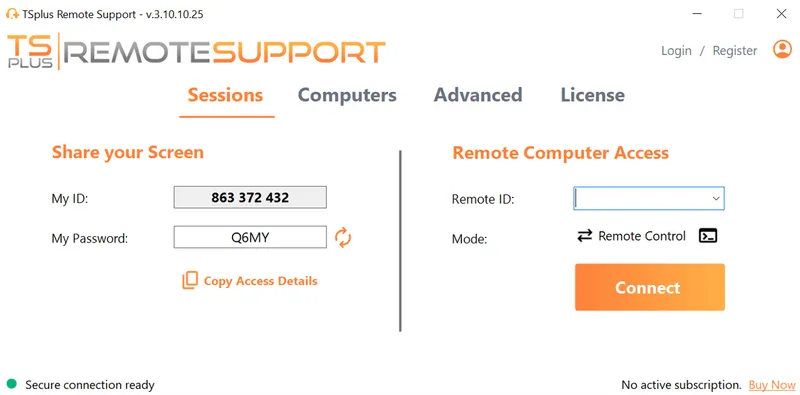
TSplus Remote Support Free Trial
Cost-effective Attended and Unattended Remote Assistance from/to macOS and Windows PCs.
Frequently Asked Questions
What are the main reasons teams look for ISL Online alternatives?
Typical drivers include reducing subscription cost, adding unattended access at scale, gaining stronger admin controls or aligning with self-hosting/data residency requirements.
Which ISL Online alternatives feel most similar in day-to-day use?
TSplus Remote Support TeamViewer, AnyDesk, Splashtop, RemotePC, and ConnectWise Control offer comparable remote control workflows with file transfer, multi-monitor support and technician tools.
Do ISL Online alternatives support unattended access and session logging?
Most listed tools support unattended access and provide logging or reporting. Depth of audit trails and export options varies by edition. For full monitoring facilities as well as unattended and command line, try TSplus Server Monitoring.
How does the TSplus pricing model differ from ISL Online?
Alternatives commonly price by technician, endpoint or feature tier. Before you even click on our products, your mouse will unveil our transparent pricing for each. Amongst the Resources on our website, our in-built architecture simulator is a great way to have a clear idea of cost outlay for a TSplus set-up.
What about security features like MFA, RBAC and auditability?
Most business-grade solutions include MFA and policy controls. For complete control over your infrastructure and data, on-premises options are often most secure. Choose enterprise-focused tools which add granular role-based access, approve workflows and can provide detailed audit logs.
Can I import devices or migrate from ISL Online without major downtime?
There’s no universal importer. Migration typically uses phased deployment: install new agents, test unattended access and policies, then cut over by department or site.
What if my compliance program requires data residency or on-premises control?
Consider fully self-hosting your chosen solution. Validate logging retention, encryption and access approvals against your policy.
)
)
)
