








)
)
AI agents in IT support are moving beyond troubleshooting recommendations to performing actions on remote devices. With authorised tools, they can collect diagnostics, apply corrections and check results. For sysadmins, IT managers and MSPs, the opportunity is faster support, but practical questions arise, about permissions, supervision, reliability and accountability.
Remote troubleshooting involves more than identifying a solution. Someone must authorise the intervention, obtain necessary permission to reach the device, accomplish the task and confirm the problem is resolved. Examine with me how AI agents change that workflow, which jobs can be delegated and where technician intervention remains essential.
What Changes When AI Moves From Advising to Acting?
When AI can become a potential active participant in the troubleshooting process rather than merely providing instructions, parts begin moving. More than a chatbot explaining an error message or AI copilot merely suggesting a technician restart a Windows service: an AI agent may be able to inspect its status, execute an authorised restart and check whether the affected application works again.
This shifts part of the technician's responsibility from performing individual actions to supervising how those actions are selected, executed and verified.
Chatbots, copilots and autonomous IT agents
Amongst a variety of AI-enabled support tools, three potential approaches seem particularly relevant:
- AI chatbots: Answer questions, explain error messages and suggest troubleshooting procedures.
- AI copilots: Assist technicians with diagnosis, scripting and decision-making, while leaving execution primarily to humans.
- Action-capable AI agents: Use connected tools to investigate problems, perform authorised actions and evaluate their results, with varying levels of human supervision.
In September 2026, TeamViewer announced Tia Troubleshooting , describing an AI system capable of investigating issues, applying technician-approved fixes and validating outcomes during support sessions.
However, autonomy can be mitigated. An IT department might allow an AI agent to collect diagnostic information independently while requiring approval before making configuration changes or blocking action outright.
What new risks appear when AI can act on a device?
An AI-generated recommendation may be inaccurate, but a technician can evaluate it before execution. When an AI agent can execute the recommendation itself, errors can directly affect applications, files, system configurations and business operations.
Possible errors:
- select the wrong target;
- misunderstand diagnostic information
- repeat an unsuccessful repair;
- encounter malicious instructions embedded in tickets, logs or other information it processes;
- use unreasonable means to achieve the goal it has been set.
OWASP Top 10 for Agentic Applications , raises and addresses such security risks.
Appropriate identity controls, restricted permissions and authorisation policies are in order, as our companion article on AI agent security and non-human access to business applications examines.
For remote support teams, though, the immediate question is more operational:
- Which actions can AI perform safely?
- How should technicians control the execution process?
Which IT Support Tasks Can AI Agents Perform Remotely?
AI agents are most useful when a support problem can be translated into observable “symptoms”, tested procedures, authorised actions and measurable outcomes.
This makes repetitive diagnostics and well-understood remediation procedures better starting points than unpredictable administrative work. Complexity matters over frequency.
Diagnosis and low-risk remediation
An AI agent connected to approved diagnostic tools may be able to retrieve event logs, inspect service status, check disk capacity or identify a failed application process.
In the case of an employee reporting an internal application no longer launching, the AI agent could inspect relevant Windows events and application dependencies and compare the findings with known incidents. Within a predefined remediation procedure, it might also restart an approved noncritical service or clear designated temporary files.
Nevertheless, appropriate permissions, safeguards and validation remain paramount, so a seemingly harmless endpoint service restart doesn’t interrupt multiple users on a shared server.
Software, configuration and administrative changes
More complex interventions include installing updates, modifying application settings, restarting dependent services or changing system configurations.
Thought such operations may be technically possible through an AI agent's connected tools, their operational consequences are less predictable.
Consider a Windows application that fails after an update. AI can accelerate investigation by identifying the affected software version and preparing a remediation plan. However, executing that rollback could require a maintenance window, compatibility checks or coordination with other administrators It may not be allowed to autonomously proceed.
Tasks requiring technician involvement
Some support situations remain poorly suited to autonomous execution. These include incidents involving suspected compromise, unexpected data loss, production outages or changes affecting several dependent systems.
An AI agent may assist by gathering information and preparing an incident summary. Nevertheless, a technician should assess the wider business impact and decide how to proceed. The practical objective is not maximum autonomy. It is to delegate work when the task is sufficiently failproof, yet retain human control when consequences become difficult to evaluate.
How Do AI Agents Actually Perform Actions on Remote Devices?
Reasoning about a problem and possessing the technical means to resolve it are separate capabilities. Before it can change anything on a remote computer, an AI agent needs an execution mechanism which will define its possible actions.
APIs, scripts and endpoint management tools
An AI workflow may call application programming interfaces (APIs), invoke approved PowerShell scripts or use remote monitoring and management (RMM) tools. These methods work well when commands are predictable and results can be checked automatically.
For instance, an endpoint management tool might expose a tested repair script. Thus, the AI agent can request its execution without receiving unrestricted administrative access or privileges.
Remote sessions and graphical interaction
Some Windows applications lack usable APIs. Troubleshooting may require opening their interfaces, reproducing an error or confirming a fix worked. Computer-use tools can potentially interact through screenshots, mouse clicks and keyboard input as in AI agents interacting with legacy Windows applications Graphical automation is nevertheless sensitive to changed layouts, unexpected prompts and session state. IT teams should not assume it is as repeatable as a well-defined API call.
Unattended access does not mean autonomous support
The word “agent” itself can also create confusion. An endpoint agent, a support technician and an AI agent are different things. Likewise, unattended access means an authorised person or process can connect without the end user present, while AI reasoning or orchestration is another matter.
Remote support software needs a separately supported integration before an AI system can operate its controls. Connectivity itself does not create an autonomous troubleshooting platform.
How Should IT Teams Approve and Supervise AI Actions?
AI-assisted remote support policy should define permitted actions, those needing approval and which must remain outside AI agent remit.
Why not classify actions according to their potential impact, reversibility and importance to business operations.
Risk-based approvals
| Example intervention | Suggested control |
|---|---|
| Retrieve approved diagnostic logs | Allow within policy |
| Restart an approved non-critical service | Conditional execution, requires post-intervention check |
| Install software or change configuration | Technician approval |
| Disable security controls or delete business data | Prohibit autonomous execution |
These illustrations are starting points for a classification. Your production service may require stricter authorisation than in a test environment.
Preventing repeated or uncontrolled remediation
A failed fix should not trigger unlimited retries.
Set limits on retries, target device groups, working hours and execution identities before enabling automated intervention. If a repair fails, the agent should stop or escalate rather than repeatedly applying the same change. Human supervision means defining whenever the system must not proceed, not merely approving its first action.
What Happens When an AI-Executed Fix Fails?
A completed command does not necessarily mean the problem is resolved. A service can restart while the business application remains unavailable; an installation can finish while the original issue persists. Thus, reliable AI-assisted support demands a distinction between successful execution and successful remediation.
Verification, rollback and escalation
Before an action begins, the support workflow should establish it will measure success.
Take a malfunctioning Windows application:
- confirm the relevant service is running,
- check application logs
- and test whether an authorised user can complete the previously failing operation.
If those checks fail, the workflow should stop, restore the previous state where a tested rollback exists, or escalate to a technician. What if rollback is not available? Some operations require advance preparation of backups, snapshots or other recovery arrangements.
The AI agent should communicate uncertainty rather than treating an incomplete repair as a resolved incident.
Documenting the intervention
Support teams need to know what the AI agent observed, which actions it proposed, what was approved and what actually changed.
A useful intervention record includes
- the device identifier,
- execution identity,
- timestamps,
- commands or tool calls,
- approvals
- results
- and any escalation decision.
Session logs, command histories and recordings can provide complementary evidence, as explained in remote desktop session recording for security and compliance Indeed, for technicians explaining an intervention or investigating an unresolved incident, clear logs make the difference.
How Can Lean IT Teams and MSPs Introduce AI-Assisted Remote Support?
Organisations do not need to automate entire support workflows immediately. A limited pilot involving recurring, well-documented incidents offers a more manageable starting point.
A practical introduction can follow five steps:
- Identify repetitive incidents. Select problems with known causes, established procedures and reliable validation criteria.
- Determine available execution tools. Review existing remote support, endpoint management and scripting capabilities before introducing additional platforms.
- Define the action boundaries. Specify allowed devices, permissions, approval requirements and prohibited operations.
- Test under supervision. Evaluate the agent in a controlled environment before considering production use.
- Measure outcomes. Track resolution accuracy, technician interventions, failed changes, escalation rates and time saved.
MSPs should apply these controls separately to each customer environment. An agent authorised to inspect devices belonging to one customer should not automatically obtain access to another customer's infrastructure.
It is also important to distinguish AI-assisted support from continuous endpoint management. As our comparison of remote support versus RMM explains, troubleshooting individual devices and managing an entire endpoint estate are related but different operational requirements.
Before adopting an AI platform, organizations should establish whether the required capabilities already exist within their tools and where additional orchestration is genuinely necessary.
A successful pilot should demonstrate not only faster resolution, but also fewer unnecessary interventions and reliable escalation when automation reaches its limits.
Where Does TSplus Remote Support Fit?
As AI changes how technical issues are diagnosed and resolved, IT teams still need reliable ways to reach remote computers and intervene directly. TSplus Remote Support provides attended and unattended remote control, screen sharing, command-line access to configured unattended computers, and session recording capabilities.
These features support technician-led troubleshooting, maintenance and recovery when automated procedures are unavailable, unsuccessful or inappropriate. They do not constitute a native autonomous AI troubleshooting platform: AI-driven execution requires separately supported tools and integrations.
For sysadmins and MSPs evaluating AI-assisted support, the priority should remain a straightforward, dependable intervention workflow. TSplus helps teams retain practical remote assistance capabilities without making additional automation a prerequisite.
Conclusion
AI agents can change remote IT support by moving from recommendations to authorised actions. Their value depends on choosing suitable tasks, applying clear execution limits and verifying outcomes rather than simply increasing automation.
For sysadmins and MSPs, the most effective approach combines AI-assisted investigation with dependable remote tools, controlled remediation and human accountability when problems become unpredictable.
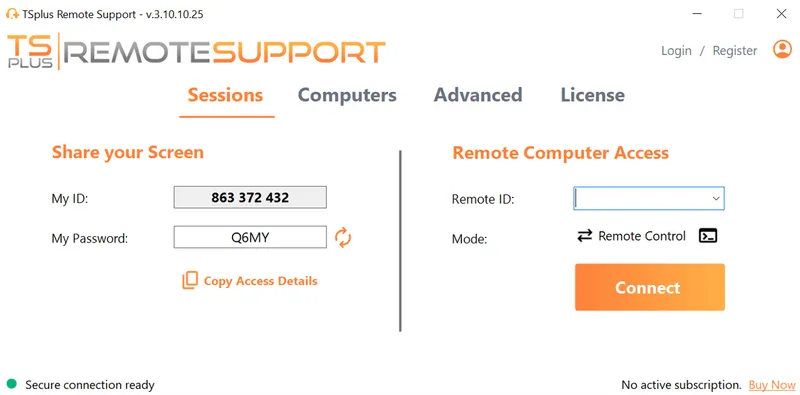
TSplus Remote Support Free Trial
Cost-effective Attended and Unattended Remote Assistance from/to macOS and Windows PCs.
)
)
)
