








:quality(80)/m/filters:format(webp))
:quality(80)/m/filters:format(webp))
Remote desktop session recording captures activity during a remote connection so IT teams can review what happened after the session ends. For sysadmins, MSPs and security-conscious teams, recordings can strengthen accountability, incident investigation and audit evidence, but they also create sensitive data which needs to be protected.
The challenge therefore goes beyond deciding whether remote sessions can be recorded. IT teams need to determine which sessions justify or necessitate recording, who should access the resulting files, how long they should be retained and what privacy obligations apply.
What Is Remote Desktop Session Recording?
Remote desktop session recording creates a record of activity which occurred during a remote desktop or support session, one you can replay as often as necessary for training, troubleshooting or auditing purposes. Depending on the software, that record may contain screen activity only or may be accompanied by information such as timestamps, commands, file transfers or session metadata.
This makes recording particularly useful when IT needs evidence of what occurred inside a session rather than simply proof that a connection took place.
However, more data is not automatically better. A recording can capture business applications, customer data, administrative consoles or other sensitive information visible on the remote screen. The recording therefore becomes an asset requiring security controls of its own .
How Is Session Recording Different From Monitoring and Logging?
Remote desktop monitoring, session logging and session recording answer different questions.
| Capability | Main question | Typical data |
|---|---|---|
| Session monitoring | What is happening across the environment? | Connected users, session state, duration, performance |
| Session logging | Who connected, when and where? | User IDs, timestamps, endpoints, session events |
| Session recording | What happened inside the session? | Screen activity and, depending on the product, additional activity data |
Since recording is usually unnecessary for routine performance monitoring, this highlights an important distinction. As discussed in our guide to remote desktop monitoring software Operational monitoring can provide visibility into servers and user sessions without capturing the contents of every interaction.
Recording should therefore solve more specific security, audit or support requirements rather than fall into becoming a default method for observing users.
When Does Remote Desktop Session Recording Improve Security?
Remote desktop session recording is most valuable where the implications of an action are significant or where several organisations or administrators share responsibility for a system.
Privileged and Third-Party Access
Administrative sessions are a strong candidate for recording because privileged accounts can modify configurations, access sensitive information and make changes which affect entire systems.
The same principle applies to MSP technicians, contractors and external vendors. Session logs may establish that a technician connected at 14:05, while a recording can provide additional evidence of the actions performed during that intervention.
For lean IT teams, this can improve accountability without requiring another administrator to supervise every remote operation.
Incident Investigation and Support Review
Recordings can also provide context after an unexpected configuration change, security incident or failed maintenance operation. Instead of reconstructing the event from memory, piecing together tickets and all important system logs Investigators able to review the relevant session can both save time and avoid potential gaps.
Recording can also help support teams document complex procedures or review difficult cases. However, troubleshooting and training alone rarely justify recording every user session indefinitely. The scope should remain targeted and proportionate to the objective. Retention time is an additional matter.
How Does Session Recording Support Compliance?
Session recording in itself does not make an organization compliant with GDPR, NIST guidance, PCI DSS, HIPAA or another framework by itself.
Its value is narrower: recordings can contribute to accountability and provide supporting evidence alongside authentication records, system logs, change records and access controls.
Where recordings are treated as audit records, retention also needs a defined policy. NIST SP 800-53 control AU-11 illustrates this principle by calling for audit records to be retained for an organization-defined period consistent with retention requirements and post-event investigations.
The central question therefore is not “Does compliance require video recording?” but “Does recording provide useful and proportionate evidence for the risks and control objectives we need to address?”
How Should Remote Desktop Session Recordings Be Governed?
A recording strategy needs to address the complete lifecycle of the data, not merely its creation.
Record Sessions Selectively
Start with risk levels. Privileged administration, third-party maintenance, sensitive infrastructure and selected support cases generally provide a clearer justification for recording than ordinary employee activity.
Define who or what triggers recording and document the purpose. Selective recording also limits storage consumption and reduces the amount of sensitive data your team has to protect.
Restrict Access to Recordings
Session recordings may contain credentials displayed on screen, customer information, internal applications or confidential business data.
Access should therefore follow least-privilege principles. Limit playback, export and deletion rights to authorised personnel. Where appropriate, keep access to recordings auditable as well.
Define Retention and Deletion Rules
Keeping every recording forever would only serve to multiply storage requirements and security exposure.
The duration of retention should instead reflect the purpose of a recording, applicable contractual or regulatory requirements and your organization's records-retention policy. Once that purpose expires, recordings should follow a defined deletion process.
Consider Privacy and User Notification
Screen recordings may contain personal data. Organizations subject to the GDPR should consider principles including purpose limitation, data minimisation, storage limitation, transparency, integrity and confidentiality when determining how recordings are collected and retained.
Local employment and privacy rules may introduce additional requirements. IT teams should therefore coordinate recording policies with the people responsible for legal, HR, privacy or compliance requirements rather than treating session recording as a purely technical configuration.
What Should Lean IT Teams Look for in a Session Recording Solution?
The right level of functionality depends on the risk being addressed. A full Privileged Access Management platform can provide detailed session forensics and policy enforcement, but not every MSP or internal IT team requires such a level of infrastructure.
For a practical remote support use case, evaluate whether the session recording solution provides:
- straightforward recording during relevant sessions;
- useful session logs alongside the recording;
- clear control over where recordings are stored;
- restricted access to recording files;
- manageable storage and retention processes;
- attended and unattended access appropriate to the support workflow.
The objective is to collect enough evidence to meet the operational or security requirement without creating unnecessary administrative overhead.
Which TSplus Tools Make Session Recording Simple?
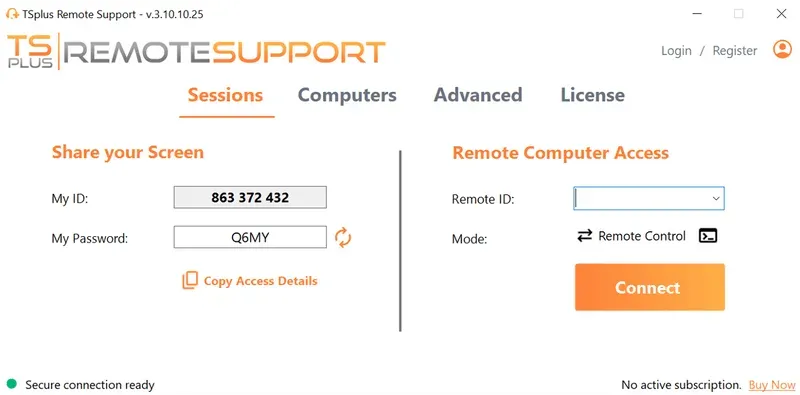
TSplus Remote Support enables screen and device control with session recording and ranges from one user to 100+ concurrent sessions. During a Remote Control session, an agent can record the session or capture screenshots directly from the session toolbar, then save or share them as necessary.
TSplus Remote Support also maintains separate session reporting with information including connected users, start and end times, session duration and the remote machine ID. This combination can help MSPs and lean IT teams document selected support interventions without deploying a broader privileged-session monitoring platform when their requirements do not justify one.
Conclusion
Remote desktop session recording is most useful when applied to defined security, audit or support requirements. It provides a richer record than ordinary connection logs, yet that additional visibility also creates new responsibilities around storage, access, privacy and retention.
For IT teams, the best approach is therefore selective and policy-driven: record sessions where the evidence has genuine value, protect the resulting data and retain it only for as long as its purpose requires.
TSplus Remote Support Free Trial
Cost-effective Attended and Unattended Remote Assistance from/to macOS and Windows PCs.
:quality(80)/m/filters:format(webp))
:quality(80)/m/filters:format(webp))
:quality(80)/m/filters:format(webp))
