










)
)
Introduction
Imagine an employee working from home who cannot access a business application, or a support technician who needs to troubleshoot a user's computer from another city. In both situations, remote login makes the connection possible.
Remote login allows users to securely access computers, servers, and business resources from a different location. Whether the goal is remote work, system administration, or IT support, remote login technologies help organizations provide access without requiring physical presence at the device.
From Secure Shell (SSH) sessions on Linux servers to Remote Desktop Protocol (RDP) connections on Windows systems and modern remote support platforms, remote login has become an essential part of today's business operations.
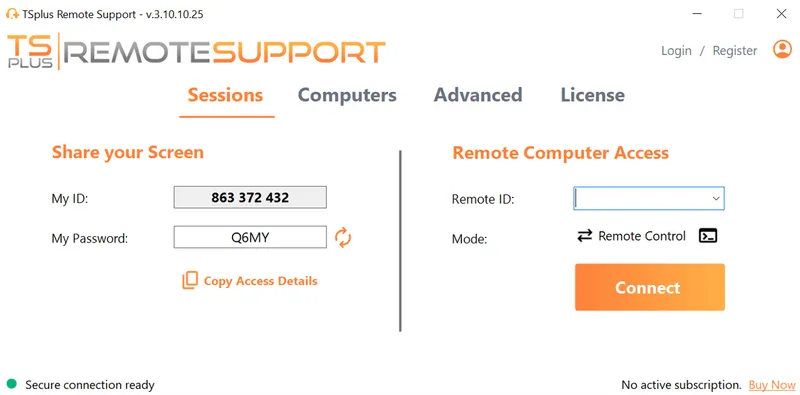
TSplus Remote Support Free Trial
Cost-effective Attended and Unattended Remote Assistance from/to macOS and Windows PCs.
What Is Remote Login?
Imagine an employee working from home who needs access to their office computer, or a support technician helping a user hundreds of miles away. In both cases, remote login makes the connection possible.
Remote login is the process of securely connecting to a computer, server, or device from another location. Once connected, the user can access applications, files, and system resources as though they were sitting directly in front of the machine.
Today, remote login supports everything from remote work and IT administration to help desk operations and managed services. Whether the connection is made through Secure Shell (SSH), Remote Desktop Protocol (RDP), or a remote support platform, the goal remains the same: provide secure access without requiring physical presence.
How Does Remote Login Work?
At first glance, remote login seems straightforward: enter your credentials, connect to a remote computer, and start working. Behind the scenes, however, several processes work together to make the connection both functional and secure.
Imagine a support technician helping an employee who cannot access a business application from home. Before the technician can view the user's screen or interact with the device, the remote login system must verify identities, establish a secure communication channel, and confirm that the connection is authorised.
Although this entire process usually takes only a few seconds, each step plays an important role in protecting systems and ensuring that only approved users can gain access.
The process typically involves:
- Initiating a connection from a local device.
- Verifying user credentials through authentication.
- Establishing a secure communication channel.
- Granting access to the remote system.
- Transmitting commands, files, or screen data between devices.
Modern remote login solutions use encryption to protect data during transmission, ensuring that sensitive information remains secure even when accessed over public networks. Many organisations also add additional controls such as multi-factor authentication (MFA), device verification, and session monitoring to further reduce risk.
Remote Login vs Remote Desktop: What's the Difference?
Although the terms are often used interchangeably, remote login and remote desktop are not exactly the same thing.
Most users encounter remote login through remote desktop software , which is why the distinction is often overlooked. However, understanding the difference can help when evaluating remote access technologies or selecting a solution for a particular business need.
Remote login is the broader concept. It refers to the process of authenticating and connecting to a remote system. Remote desktop is one specific way of doing that, providing a graphical interface that allows users to interact with the remote machine visually.
Remote Login
Remote login generally refers to accessing a remote system through credentials and interacting with its resources. Depending on the technology used, users may access a command-line interface, a web application, or a complete desktop environment.
Remote Desktop
Remote desktop solutions provide a visual representation of the remote computer's screen. Users can open applications, access files, and change settings exactly as if they were sitting in front of the device.
|
Feature |
Remote Login |
Remote Desktop |
|
Access Type |
Command-line or graphical |
Full graphical interface |
|
Resource Usage |
Lower |
Higher |
|
Typical Users |
Administrators, developers |
Employees, support teams |
|
Use Cases |
Server management, maintenance |
Remote work, support, collaboration |
In many business environments, remote desktop functionality is delivered through remote login technologies, making the two concepts closely related but not identical.
Common Remote Login Technologies
Different remote login technologies are designed for different purposes. Some prioritise lightweight administration, while others focus on delivering a complete desktop experience or simplifying technical support.
Understanding the strengths of each technology helps organisations choose the most appropriate solution for their users and IT teams.
Telnet
Telnet was one of the earliest remote login protocols and played an important role in the development of networked computing. At a time when cybersecurity threats were far less sophisticated, it provided a simple way for administrators to connect to remote systems and execute commands.
Today, however, Telnet is rarely recommended for business use because it transmits information in plain text, including usernames and passwords. Anyone able to intercept the traffic can potentially view sensitive information.
While it remains historically significant, most organisations have replaced Telnet with more secure alternatives.
SSH (Secure Shell)
For system administrators, SSH has become the standard method for remotely managing Linux servers, cloud environments, and network infrastructure. Whether restarting services, deploying updates, or troubleshooting performance issues, administrators often rely on SSH daily without needing physical access to the device.
What made SSH so widely adopted is its ability to secure the entire communication channel while remaining lightweight and flexible. Unlike older protocols, SSH encrypts both authentication credentials and session traffic.
Benefits of SSH include:
- Strong encryption
- Secure authentication
- Protection against eavesdropping
- Cross-platform compatibility
Because of its security and reliability, SSH remains one of the most widely used remote login technologies in modern IT environments.
RDP (Remote Desktop Protocol)
While SSH is ideal for command-line administration, many users need access to a complete desktop environment. Employees often need to launch applications, work with documents, or use business software that requires a graphical interface.
This is where Microsoft's Remote Desktop Protocol (RDP) becomes valuable. Rather than transmitting individual commands, RDP delivers the entire desktop experience remotely, allowing users to work as though they were sitting directly in front of the computer.
RDP is commonly used for:
- Remote work
- Technical support
- Virtual desktop environments
- Business continuity
RDP remains one of the most widely deployed remote access technologies and forms the foundation of many remote desktop and application delivery solutions used by organisations worldwide.
Benefits of Remote Login for Businesses
Remote login has evolved from a convenience into a business necessity. Organizations increasingly support remote employees, distributed teams, external contractors, and managed service providers who all require access to systems from outside traditional office environments.
As a result, businesses rely on remote login technologies not only to improve flexibility but also to maintain productivity, reduce downtime, and support growth without increasing operational complexity.
Workforce Access and Productivity
Increased Workforce Flexibility: Employees can securely access workplace systems from home, while travelling, or from satellite offices. This flexibility helps organisations support hybrid work models while ensuring users remain connected to the applications and resources they need.
Enhanced Productivity: Remote login provides immediate access to business applications, files, and systems. Users spend less time waiting for assistance or travelling to specific locations and more time focused on their work.
IT Support and Cost Control
Improved IT Support: IT teams can troubleshoot and resolve issues without physically visiting a device. Instead of relying on phone calls or lengthy email exchanges, support staff can often identify and resolve problems in real time.
Cost Savings: Organizations can reduce travel expenses, minimise on-site support requirements, and support larger numbers of users without proportionally increasing support staff.
Operational Resilience
Business Continuity: Unexpected disruptions can affect any organization. Remote login helps employees and administrators continue working during severe weather events, transportation disruptions, office closures, or other situations that prevent physical access to workplace systems.
What Are the Security Risks of Remote Login?
Remote login delivers significant operational advantages, but it also creates a direct path into business systems. For attackers, a compromised remote access account can provide access to valuable corporate resources, applications, and sensitive information.
This does not mean remote login is inherently insecure. It means organisations should treat remote access as a critical security boundary and implement appropriate safeguards.
Weak Passwords
Simple or reused passwords remain one of the most common causes of unauthorized access. Attackers frequently use automated tools to test compromised credentials against remote access services.
Phishing Attacks
Remote users are often targeted through phishing campaigns designed to steal usernames, passwords, or multi-factor authentication codes. A single successful phishing attack can provide access to critical systems.
Unpatched Systems
Outdated software and operating systems may contain known vulnerabilities that attackers actively exploit. Remote access services should be updated regularly to reduce exposure to emerging threats.
Exposed Remote Access Services
Systems that are directly accessible from the public internet often attract automated scanning and attack attempts. Exposed services can become targets for brute-force attacks, credential stuffing, and vulnerability exploitation.
Organizations should carefully evaluate which services are publicly accessible and implement additional security controls when exposure is necessary.
Unauthorized Access
Without proper controls, malicious actors or even legitimate users with excessive permissions may gain access to resources beyond what is required for their role.
How to Secure Remote Login Access?
Effective remote access security is rarely achieved through a single technology. Instead, organizations typically combine multiple layers of protection to reduce risk while maintaining a positive user experience.
The most successful remote login strategies focus on identity verification, access control, encryption, monitoring, and ongoing maintenance.
Strengthen Identity and Authentication
Use Multi-Factor Authentication (MFA): MFA requires users to provide additional verification beyond a password, significantly reducing the risk of unauthorized access resulting from compromised credentials.
Implement Strong Password Policies: Organizations should require complex passwords and encourage regular credential updates. Password managers can also help users maintain strong, unique credentials.
Protect Connections and Limit Access
Use Encrypted Connections: Secure protocols such as SSH and encrypted remote desktop solutions protect data while it travels between devices and networks.
Restrict Access Based on Need: Users should only receive access to the systems required for their role. Limiting permissions reduces the impact of compromised accounts and supports least-privilege security practices.
Apply Zero Trust Principles: Zero Trust security models verify every user and device before granting access, regardless of location or network.
Maintain Visibility and System Security
Keep Systems Updated: Regular software updates and security patches help eliminate known vulnerabilities before attackers can exploit them.
Monitor Access Activity: Logging and monitoring provide visibility into remote access activity and can help organizations identify suspicious behaviour before it develops into a larger security incident.
Choosing the Right Remote Login Solution
Not every remote login solution is designed for the same purpose. Some focus on server administration, others on employee productivity, and others on technical support.
Understanding the primary objective of the connection is often the first step toward selecting the right technology.
For Server Administration
Administrators managing Linux servers, cloud environments, or network devices often rely on SSH because it provides secure, lightweight access without requiring a graphical desktop.
For Employee Remote Access
Employees who need access to office workstations or business applications typically benefit from remote desktop technologies such as RDP or application delivery platforms.
For IT Support and Troubleshooting
When the goal is helping users solve problems quickly, dedicated remote support software often provides the best experience. Support technicians can view user screens, take control when authorised, transfer files, and collaborate directly with end users during troubleshooting sessions.
This is where specialized remote support solutions distinguish themselves from traditional remote desktop tools.
How TSplus Remote Support Simplifies Remote Login?
For many organizations, the challenge is not simply providing remote access. The challenge is helping users quickly when something goes wrong.
TSplus Remote Support allows technicians to establish secure remote login sessions directly through a web browser, without the complexity often associated with traditional remote access infrastructure.
With TSplus, support teams can:
- Access remote computers securely
- View and control user screens
- Assist employees and customers in real time
- Reduce troubleshooting time
- Support remote and hybrid workforces more effectively
Whether supporting internal employees or external customers, TSplus’ solution provides a straightforward way to deliver fast and secure remote assistance from virtually anywhere.
Conclusion
Remote login has become a fundamental technology for modern business operations. From remote work and system administration to help desk support, organizations rely on secure remote connections every day to keep employees productive and systems available.
The most effective remote login strategy depends on the use case. While SSH and RDP remain essential technologies, organisations focused on user assistance and troubleshooting often benefit from dedicated remote support solutions. By combining strong security practices with the right tools, businesses can deliver secure, efficient, and reliable remote access wherever it is needed.
TSplus Remote Support Free Trial
Cost-effective Attended and Unattended Remote Assistance from/to macOS and Windows PCs.
)
)
)
