










)
)
Introduction
Remote support software has become essential for helpdesks, MSPs, and internal IT teams. Whether supporting remote employees, maintaining unattended devices, or resolving incidents quickly, the right tool affects productivity and cost. TeamViewer and AnyDesk remain two of the most recognised options, but their strengths are not identical.
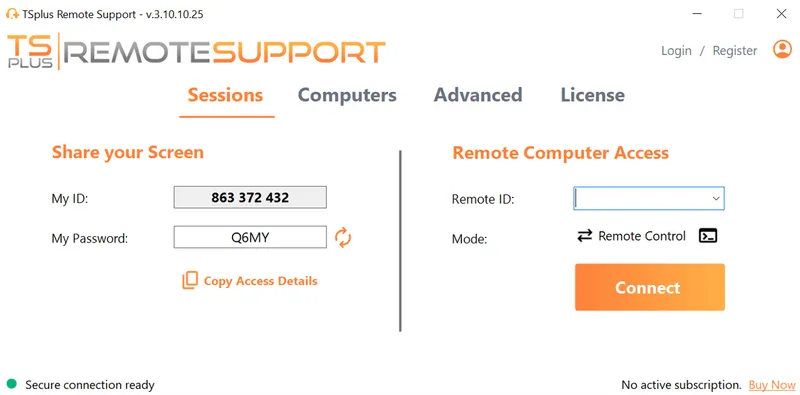
TSplus Remote Support Free Trial
Cost-effective Attended and Unattended Remote Assistance from/to macOS and Windows PCs.
What Is TeamViewer?
TeamViewer is one of the most established remote support and remote access platforms in the market. It is widely used by enterprises, managed service providers, internal IT departments, and technical support teams that need secure access to devices across multiple locations.
Over time, TeamViewer has expanded beyond simple screen sharing into a broader digital support ecosystem that includes device management, collaboration tools, remote monitoring integrations, and enterprise-grade administration controls.
How TeamViewer Is Commonly Used
Organizations typically deploy TeamViewer for several operational needs:
- Helpdesk technicians connecting to user devices remotely
- IT administrators maintaining unattended servers or workstations
- MSPs supporting multiple customer environments
- Hybrid teams accessing office computers remotely
- Guided support sessions for non-technical users
Its brand recognition often makes it one of the first tools considered during procurement.
TeamViewer Strengths for Larger Organizations
TeamViewer is often chosen by larger organisations because it offers centralised controls that simplify governance and scale.
These capabilities may include:
- User and device grouping
- Permission management
- Session logging and auditing
- Policy enforcement
- Mass deployment options
- Integration with enterprise workflows
For companies with many technicians or geographically distributed teams, these administrative tools can be valuable.
TeamViewer User Experience
TeamViewer is generally known for a polished user interface and structured onboarding. Many IT teams appreciate that it is easy for end users to join a session while still providing administrators with deeper controls in the backend.
This balance between ease of use and enterprise tooling is one reason TeamViewer remains a reference point in the remote support market.
TeamViewer Considerations
Although TeamViewer is powerful, some smaller organisations view it as more than they need. Licensing tiers, recurring subscription costs, and advanced features can feel excessive for lean IT teams with simpler support workflows.
For that reason, TeamViewer is often strongest where scale, governance, and established processes matter most.
What Is AnyDesk?
AnyDesk is a remote desktop and remote support platform known for speed, lightweight performance, and efficient deployment. It is especially popular with SMBs, consultants, freelancers, and IT teams that prioritise responsiveness and simplicity.
Its reputation has been built around delivering smooth remote sessions without heavy software overhead.
How AnyDesk Is Commonly Used
Many organizations choose AnyDesk for day-to-day support scenarios such as:
- Remote troubleshooting for employee devices
- Accessing unattended office PCs
- Supporting customers quickly
- Connecting over lower-bandwidth networks
- Providing simple cross-platform remote access
Because setup is usually straightforward, AnyDesk can be attractive for fast-moving teams.
AnyDesk Performance Reputation
AnyDesk is frequently recognized for low-latency connections and responsive screen rendering. For technicians who spend hours in remote sessions, fluid mouse control and quick keyboard response can significantly improve productivity.
This makes AnyDesk especially appealing where speed is a core buying factor.
AnyDesk Simplicity and Deployment
AnyDesk often appeals to smaller organisations because it can be easier to roll out without extensive planning. Teams that do not need a complex management stack may prefer a solution focused on core remote support functionality.
Typical advantages include:
- Fast installation
- Clean interface
- Lightweight client footprint
- Easy onboarding for technicians and users
- Efficient unattended access setup
AnyDesk Considerations
While AnyDesk is strong for many SMB and mid-market use cases, some larger enterprises may eventually need deeper governance, broader integrations, or more advanced administrative layers.
That does not make it weaker, only differently positioned. AnyDesk often wins where agility, speed, and cost-efficiency are the main priorities.
TeamViewer vs AnyDesk: Detailed Comparison
Performance and Speed
Remote support software must feel responsive under real working conditions. Slow cursor movement, delayed keyboard input, or blurry display quality can reduce technician efficiency and lengthen support sessions.
TeamViewer
TeamViewer is generally recognized for stable connections across varied business environments. It performs consistently during longer sessions and is commonly trusted for multi-site support operations where reliability matters as much as speed.
Common strengths include:
- Stable sessions over standard corporate networks
- Reliable performance during extended support calls
- Strong optimisation across many device types
AnyDesk
AnyDesk has built much of its reputation on responsiveness. Many technicians value its low-latency feel, especially when working on lower-bandwidth links or when fluid mouse movement is essential.
Common strengths include:
- Fast screen refresh rates
- Responsive keyboard and mouse control
- Efficient performance on weaker connections
Ease of Deployment and Use
Deployment time and usability directly affect adoption. A tool that is easy to roll out and simple for end users to join can reduce friction for IT teams.
TeamViewer
TeamViewer often appeals to structured organisations because it combines a polished interface with centralised management tools. It can suit companies that need formal processes and technician oversight.
Typical advantages include:
- Professional onboarding experience
- Centralized admin console
- Organized device and user management
AnyDesk
AnyDesk is often appreciated for its simplicity. Smaller teams or consultants may find it easier to deploy quickly without extensive configuration.
Typical advantages include:
- Fast installation process
- Clean interface with limited complexity
- Quick adoption for technicians and users
Security and Compliance
Security remains one of the most important criteria in any remote support purchase. Access to internal devices must be controlled, encrypted, and manageable.
TeamViewer
TeamViewer is often selected by enterprises that need governance features and stronger administrative oversight Its market presence has helped it build trust with larger organisations.
Security-related strengths often include:
- Granular permission controls
- Session logging capabilities
- Multi-factor authentication support
AnyDesk
AnyDesk also provides strong security controls and is often chosen by teams wanting protection without unnecessary complexity. It can be a practical fit for SMB environments.
Security-related strengths often include:
- Encrypted remote sessions
- Device authorization settings
- Straightforward access management
Pricing and Licensing
Licensing structure can heavily influence the final decision. Buyers increasingly compare not only starting price, but also how costs evolve as teams grow.
TeamViewer
TeamViewer is commonly viewed as a premium product. For organisations that need advanced capabilities, the value can be justified, but costs may rise as usage expands.
Pricing considerations often include:
- Additional technician licenses
- Higher tiers for advanced features
- Scaling costs for larger teams
AnyDesk
AnyDesk is often perceived as a more accessible option for smaller organisations. It can offer a lower barrier to entry while still providing core remote support functionality.
Pricing considerations often include:
- Lower starting plans in many markets
- Flexible fit for smaller teams
- Rising costs as requirements expand
Scalability for IT Teams and MSPs
A tool that works well for five devices may not be ideal for five thousand. Scalability becomes critical as organisations grow.
TeamViewer
TeamViewer is frequently used by larger enterprises and service organisations that need standardised workflows across many technicians and endpoints.
It often suits:
- Global helpdesks
- Multi-technician environments
- Large device fleets
AnyDesk
AnyDesk can scale successfully, but it is often most attractive to leaner organisations that value agility over enterprise complexity.
It often suits:
- SMB IT departments
- Regional MSPs
- Independent consultants
Cross-Platform Compatibility
Modern IT environments rarely rely on one operating system. Remote support tools must work reliably across mixed fleets of desktops and mobile devices.
TeamViewer
TeamViewer supports a broad range of platforms and is commonly used in environments where Windows, macOS, mobile devices, and mixed user hardware must be supported together.
Typical coverage includes:
- Windows
- macOS
- Linux
AnyDesk
AnyDesk also performs strongly in mixed-device environments and is often chosen by teams needing cross-platform flexibility without heavy software overhead.
Typical coverage includes:
- Windows
- macOS
- Mobile platforms such as Android and iOS
AnyDesk vs TeamViewer: Pros and Cons
Choosing between TeamViewer and AnyDesk often comes down to how your IT team works day to day. One platform may offer stronger enterprise management, while the other may provide better agility and lower operational cost. Instead of looking only at features, buyers should weigh scale, technician workflows, and budget predictability.
TeamViewer Pros and Cons
TeamViewer is often valued for its mature ecosystem and ability to support larger organisations with more structured requirements. IT departments managing many devices or technicians may benefit from its centralised controls and established reputation.
Key advantages include:
- Advanced administration features
- Strong enterprise trust and recognition
- Broad support workflows
- Scalable management capabilities
Potential drawbacks include:
- Higher pricing than many alternatives
- Licensing models that may feel complex
- More functionality than some SMB teams require
AnyDesk Pros and Cons
AnyDesk is frequently chosen by teams that want efficient remote support without heavy overhead. Its lightweight approach and fast responsiveness can be attractive for smaller IT departments or service providers focused on speed.
Key advantages include:
- Fast and responsive sessions
- Lightweight client deployment
- Easier onboarding for smaller teams
- Lower entry cost in many cases
Potential drawbacks include:
- Smaller enterprise footprint than TeamViewer
- Fewer advanced ecosystem advantages
- Some growing organizations may need more robust management later.
Which Is Better: TeamViewer or AnyDesk?
The better solution depends less on brand reputation and more on your operational needs. IT teams should evaluate how many technicians need access, how many endpoints must be supported, what level of governance is required, and how pricing scales over time.
Choose TeamViewer If You Need Enterprise Control
TeamViewer is often the stronger fit when remote support is part of a larger managed IT operation. It can be especially relevant for enterprises that need visibility, policy control, and standardised workflows across teams.
Typical reasons to choose TeamViewer include:
- Enterprise governance requirements
- Large multi-technician support teams
- Advanced centralized management
- Mature integrations and workflows
Choose AnyDesk If You Need Speed and Simplicity
AnyDesk is often attractive when organizations need practical remote support with faster rollout and lower entry cost. Smaller IT teams may prefer its straightforward approach.
Typical reasons to choose AnyDesk include:
- Fast remote sessions
- Lightweight deployment
- Lower starting cost
- Efficient SMB support operations
Beyond TeamViewer vs AnyDesk: Do You Need Another SaaS Subscription?
Many organizations comparing TeamViewer and AnyDesk are not only comparing features. They are often questioning whether another recurring software subscription is the right long-term decision for remote support. As IT budgets tighten, buyers increasingly examine total cost, operational simplicity, and licensing flexibility.
Remote Support Costs Continue to Matter
For many IT teams, remote support is essential but should remain cost-efficient. When licensing expands with more technicians, more endpoints, or additional features, subscription costs can grow quickly over time. Buyers therefore look beyond monthly pricing and assess the total long-term investment.
Simplicity and Efficiency Drive Decisions
Organizations also want tools that are easy to deploy, simple to manage, and efficient for technicians to use daily. If a platform creates unnecessary administrative overhead or requires complex licensing management, the real operational cost increases beyond the invoice itself.
More Buyers Are Evaluating Alternatives
Because of these pressures, many businesses no longer limit their search to the two best-known brands. Instead, they explore alternatives that can provide secure remote support, practical features, and better cost control without adding another expensive SaaS commitment.
How Do These Solutions Compare?
| Category | TeamViewer | AnyDesk |
|---|---|---|
| Best Known For | Enterprise remote support and brand recognition | Lightweight, fast remote access |
| Performance | Stable and consistent | Very fast and responsive |
| Ease of Use | Polished interface | Simple and efficient |
| Security | Strong enterprise controls | Strong encryption and access controls |
| Cross-Platform Support | Excellent | Excellent |
| Pricing | Premium positioning | Often lower entry cost |
| Unattended Access | Yes | Yes |
| Best For | Enterprises, global IT teams | SMBs, consultants, lean IT teams |
Best Alternative for Cost-Conscious IT Teams: TSplus Remote Support
For many SMBs, MSPs, and internal IT teams, the real need is practical remote assistance without premium recurring pricing. TSplus Remote Support is designed for organizations that need:
- Secure attended and unattended support
- Browser-based remote assistance
- Fast deployment
- Cost-effective licensing
- Practical tools for IT teams and service providers
Conclusion
TeamViewer and AnyDesk are both capable remote support tools, but they serve different priorities. TeamViewer often suits larger enterprises needing governance and scale. AnyDesk appeals to teams seeking speed and lower cost. For businesses wanting affordability, simplicity, and secure support, TSplus Remote Support is a compelling modern alternative.
TSplus Remote Support Free Trial
Cost-effective Attended and Unattended Remote Assistance from/to macOS and Windows PCs.
)
)
)
