








)
)
Remote Desktop has become a foundational capability for modern IT operations, yet it remains one of the most misunderstood. Some see it as a simple screen-sharing tool, others as a legacy Windows feature, and others still as a cloud service. In reality, Remote Desktop is an access model that can be implemented in multiple ways, each with different trade-offs. Beyond the simple definition of remote desktop how shall you decide whether and how to use it in your IT environment?
What Does “Remote Desktop” Really Mean Today?
A shared industry definition of Remote Desktop
Across authoritative sources, Remote Desktop is consistently defined as the ability to connect to and interact with a remote computer’s full graphical desktop over a network. The user can open applications, access files and control the system as if seated in front of it. Though an eponymous protocol intrinsic to Microsoft devices, remote desktop is more than a product or a single technology stack. Rather, it is a capability which can be delivered through different architectures and tools.
Remote Desktop vs Remote Desktop Protocol (RDP)
A common source of confusion is the relationship between remote desktop and RDP Remote desktop refers to what the user experiences. RDP refers to how that experience is delivered. RDP is the most widely used protocol for Remote Desktop, especially in Windows environments, but it is not the only one. Distinguishing the access model from the protocol helps avoid poor architectural and security decisions.
How Does Remote Desktop Fit Among Other Remote Access Models?
Remote Desktop vs Remote Access
Remote desktop and remote access are often used interchangeably, but they serve different purposes. Remote desktop focuses on interactive, visual control of a system through its graphical interface. Remote access, by contrast, often enables back-end or system-level access to files, services or command-line interfaces without presenting a full desktop.
This distinction matters in practice. Remote desktop is designed for end users, support teams and application interaction. Remote access is typically aimed at administrators and automation workflows. Choosing the wrong model can introduce unnecessary complexity or security exposure.
Remote Desktop vs cloud-based desktops (VDI / DaaS)
Remote desktop does not inherently mean “cloud.” Users may connect to a physical PC, an on-premises server or a cloud-hosted virtual machine. Cloud desktop services such as Azure Virtual Desktop are one way to deliver remote desktop experiences, but they are not synonymous with the concept itself. Understanding this distinction is essential for organizations which must balance legacy systems, regulatory constraints or cost considerations.
Main Ways Remote Desktop Is Implemented
Remote PC access (one-to-one desktop control)
In this model, a user connects directly to a specific physical PC. This approach is common for remote work scenarios where employees need access to their office machines. It is simple to understand but can be difficult to scale and manage across larger environments.
Server-based desktops and applications (RDS-style models)
Here, multiple users connect to centralized servers hosting desktops or published applications. This model enables better resource utilization, centralized management and consistent security controls. It is particularly effective for organizations delivering the same applications to many users.
Browser-based Remote Desktop (HTML5 access)
Browser-based access has become increasingly important. It allows users to connect from unmanaged devices without installing local clients, supporting BYOD, contractors and cross-platform environments. While often presented as optional, browser-based access is now a baseline expectation in modern remote desktop strategies.
What Is Remote Desktop Good At? What Is It Not?
Problems Remote Desktop solves well
Versatile applications of remote desktop encompass:
- Remote desktop excels when users need full interaction with applications that cannot be easily migrated to the cloud.
- It enables centralized data control, supports remote IT support and training.
- It allows legacy applications to remain usable without redesign.
For many organizations, it is the fastest path to enabling flexible and remote work without overhauling the whole architecture of their systems.
Where Remote Desktop reaches its limits
Remote Desktop is not ideal for every workload.
- Performance can depend on network quality, and multimedia-heavy applications can expose protocol limitations.
- Poorly secured deployments can also become attractive attack surfaces.
These constraints do not invalidate Remote Desktop, but they must be acknowledged during planning.
Key Decision Factors for IT Teams to Evaluate
Amongst the essentials to consider in a decision, the foremost areas are user experience requirements, infrastructure and deployment constraints, security and access control expectations, and finally cost, complexity and operational overheads.
User experience requirements
Determine whether users truly need full desktops or only access to specific applications. Application publishing often provides a simpler and more focused experience than full desktops, reducing both bandwidth usage and user error.
Infrastructure and deployment constraints
Existing servers, directory services and applications heavily influence the right approach. Remote desktop solutions integrating with current infrastructure typically deliver faster time-to-value than those requiring wholesale migration.
Security and access control expectations
Remote desktops must be protected with strong authentication, controlled exposure and session-level governance. Security should be layered and operational, not theoretical, especially in SMB environments with limited resources.
Cost, complexity and operational overhead
Licensing models, administrative effort and scalability all matter. A solution which is technically elegant but operationally complex may cost more over time than a simpler, well-scoped alternative.
When Is Remote Desktop the Right Choice? When Is It Not?
Scenarios where Remote Desktop makes sense
Remote Desktop is a strong fit for organisations with on-premises or hybrid infrastructure, legacy Windows applications or recurring remote support needs. It is also effective when data must remain centralised for compliance or security reasons.
Scenarios where alternatives may be better
If users only need file access, web-based SaaS tools or backend administration, Remote Desktop may be unnecessary. In these cases, simpler remote access methods or cloud-native applications can reduce overhead.
Bringing It Together: Choosing the Right Remote Desktop Approach
Matching access models to real-world needs
The most effective remote strategies are pragmatic. They align access models with actual user needs, avoid unnecessary architectural complexity, and evolve incrementally rather than through disruptive change.
Why pragmatic Remote Desktop implementations matter
Remote desktops should be treated as a tool, not a goal. When chosen deliberately and implemented thoughtfully, they enable productivity without locking organisations into rigid or costly frameworks.
How Does TSplus Support Practical Remote Infrastructure Decisions?
TSplus focuses on delivering remote desktop and application access in a way aligned with real-world IT constraints By supporting full desktops, application publishing and browser-based access across on-premises and hybrid environments, TSplus helps organizations adopt remote infrastructure without unnecessary complexity or vendor lock-in. With top-rated customer service and support as well as responsive teams centred on their customers, we develop more than a simple software package for any business.
How Does Each Individual TSplus Product Address Different Remote Desktop Needs?
TSplus does not treat remote desktop access as a one-size-fits-all solution. Each product in our suite is designed to address a specific aspect. Much depends on an organisation’s infrastructure uses and needs, in particular who connects, how they connect and what level of interaction is required. Understanding these specifics helps IT teams assemble the right remote access stack.
TSplus Remote Access:
Centralized desktops and application delivery

TSplus Remote Access Free Trial
Ultimate Citrix/RDS alternative for desktop/app access. Secure, cost-effective, on-premises/cloud
Uses and benefits
TSplus Remote Access is designed for organisations needing to provide users with access to full desktops or specific Windows applications hosted on centralized servers. It is particularly welcome in SMB and mid-market environments running on-premises or hybrid infrastructure, where applications cannot otherwise easily be migrated to SaaS.
By publishing applications or desktops instead of granting full machine access, IT teams retain control over data, simplify user environments and extend the life of legacy software. Remote Access also enables consistent access from any device, reducing dependency on VPNs or locally installed clients.
Top features
- Application publishing and full desktop delivery from Windows servers
- HTML5 browser-based access enabling clientless connections and any-device access
- Multi-user session support , allowing efficient resource sharing
TSplus Remote Support:
Interactive remote desktop control for assistance and troubleshooting
Uses and benefits
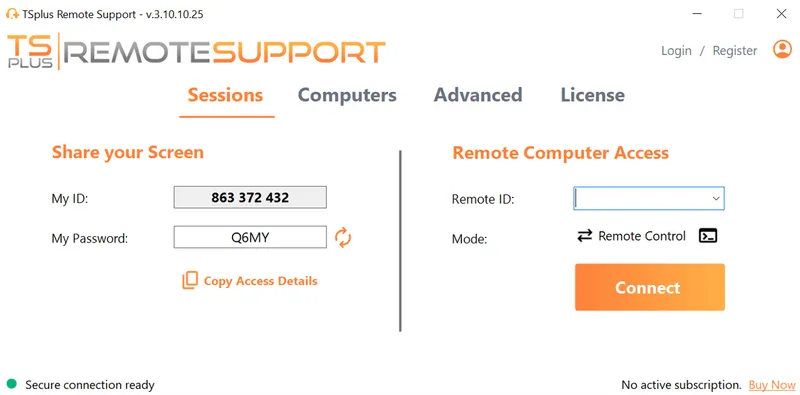
TSplus Remote Support focuses on live, interactive remote desktop control rather than persistent user access. It is intended for IT support teams, helpdesks, MSPs and internal IT department agents who need to assist users in real time, whether attended or unattended.
Unlike Remote Access, which delivers ongoing access to systems, Remote Support is session-based and task-oriented. It allows technicians to view and control a user’s desktop, diagnose issues, transfer files and guide users visually without requiring complex infrastructure or permanent exposure of systems.
Top features
- Attended and unattended remote desktop sessions
- Full mouse and keyboard control with screen sharing
- End-to-end encrypted connections using TLS
TSplus Advanced Security:
Protecting Remote Desktop environments from real-world threats
Uses and benefits
TSplus Advanced Security addresses one of the most critical challenges of Remote Desktop: exposure to attacks when access is misconfigured or insufficiently protected It is designed to harden Windows servers and Remote Desktop environments against brute-force attacks, credential abuse and unauthorized access.
Rather than relying solely on perimeter defenses, Advanced Security applies layered, behaviour-based protections directly at the server level. This makes it particularly valuable for organizations that must expose Remote Access services to the internet while maintaining a strong security posture.
Top features
- Brute-force attack detection and blocking
- IP filtering and geo-restriction policies
- Session and access control enforcement
TSplus Server Monitoring:
Visibility and operational control over Remote Desktop infrastructure
Uses and benefits
TSplus Server Monitoring complements Remote Desktop deployments by providing real-time visibility into server health, resource usage and service availability It helps IT teams ensure that Remote Desktop environments remain performant, stable and responsive as usage scales.
Monitoring is especially important in multi-user or application-publishing scenarios, where performance degradation affects many users simultaneously. With proactive alerts and historical data, IT teams can detect issues early and make informed capacity and optimisation decisions.
Top features
- Real-time monitoring of servers and services
- Customizable alerts for performance thresholds
- Historical reporting for capacity planning
How These Products Work Together
TSplus products are modular by design Organizations can start with Remote Access or Remote Support depending on their needs, then add Advanced Security and Server Monitoring as requirements grow. This modular approach supports incremental adoption, avoids over-engineering and aligns with the practical realities faced by SMB and mid-market IT teams.
Conclusion: Remote Desktop as a Tool, Not a Goal
Remote Desktop remains a powerful and relevant access model, but it is not universally applicable. Understanding what it is, how it differs from related technologies, and where it fits within your broader IT strategy is essential. When used deliberately, Remote Desktop can simplify access, extend the life of existing systems, and support modern work patterns without forcing premature architectural change.
TSplus Remote Support Free Trial
Cost-effective Attended and Unattended Remote Assistance from/to macOS and Windows PCs.
)
)
)
