










)
)
Introduction
When organisations compare remote support platforms, one of the first questions is cost. TeamViewer is a well-known option, but pricing can vary widely depending on usage needs. Understanding subscription structure, scaling costs, and required features helps IT buyers choose the most cost-effective solution.
TSplus Remote Support Free Trial
Cost-effective Attended and Unattended Remote Assistance from/to macOS and Windows PCs.
How Much Does TeamViewer Cost in 2026?
Understanding TeamViewer pricing starts with knowing that the platform uses a subscription model with several business tiers. Costs can vary by country, reseller agreements, and optional features, so many IT buyers should focus on long-term budgeting rather than only entry-level pricing.
Subscription Plans and Billing Structure
TeamViewer is generally sold as an annual subscription. Plans are usually structured around business size and usage level, with higher tiers adding more sessions, more users, and broader administrative controls.
For buyers, annual billing often means evaluating cost over a full budget cycle rather than comparing monthly figures alone.
What Influences Base Pricing
Several core factors affect the starting price of a licence:
- Number of licensed users
- Simultaneous sessions
- Included support features
- Remote management capabilities
- Device coverage
- Security and compliance options
The more complex the environment, the higher the expected subscription tier.
Why IT Buyers Should Consider Total Cost
Headline pricing rarely reflects the full financial picture. Deployment time, technician productivity, scaling costs, and renewal increases can matter more than the advertised entry plan. For growing businesses, three-year cost is often the most useful benchmark.
What Drives the Real Cost of TeamViewer?
When businesses ask how much TeamViewer costs, they usually mean the real operational expense after rollout. Licensing is only one part of the equation.
Number of Technicians and Users
A single administrator typically needs a smaller plan than a full internal IT team. As more technicians require access, licensing needs often rise quickly.
Organizations with shift-based support or multiple departments should also consider how many users need access at the same time.
Concurrent Sessions and Support Volume
Help desks and MSPs often manage several support requests simultaneously. If technicians cannot open enough sessions, productivity drops.
Higher concurrency can therefore increase subscription cost, but it may also be necessary to maintain service levels.
Unattended Access Requirements
Many organizations need remote access when no end user is present. This includes:
- Servers
- Office desktops
- Retail devices
- Shared workstations
- Kiosks
If unattended management is essential, buyers should verify that it is included in the selected plan.
Enterprise Features and Integrations
Larger companies may need features beyond Remote Access, such as:
- SSO integration
- Audit logs
- Role-based permissions
- API access
- Service desk integrations
These enterprise requirements often move pricing upward significantly.
Is TeamViewer Expensive for Small Businesses?
For solo consultants or small technical teams, TeamViewer may be practical. However, many SMBs evaluate pricing differently than enterprises because every recurring software cost affects margins.
When the Cost Feels Reasonable
For small organisations with occasional support needs, the platform may justify its price when ease of use and brand recognition are priorities.
This is especially true when only one person needs access and support volume is limited.
When SMBs Start Feeling Pricing Pressure
Costs often become more noticeable when:
- Several employees need licenses
- Multiple sessions are needed daily
- Remote support is frequent
- Budgets are tightly managed
- Other IT tools already require subscriptions
In these situations, recurring spend can become harder to justify.
The Better SMB Buying Question
Instead of asking whether the tool is expensive, SMBs should ask whether they need all included functionalities. If only core remote assistance is required, a lighter and lower-cost platform may deliver stronger value.
TeamViewer Pricing by Business Size
Pricing expectations often change depending on company size, support volume, and internal processes. A plan that feels reasonable for one technician may become expensive when several users, concurrent sessions, or administrative controls are required. That is why business context matters more than headline pricing alone.
Only IT Admin or Freelancer
If one person manages occasional support requests, TeamViewer may be a workable option when convenience and quick deployment are priorities. For independent consultants, predictable access can matter more than advanced team features.
Best suited when you need:
- Recognized brand familiarity
- Cross-platform support
- Quick ad hoc remote sessions
Small IT Team (2 to 5 Technicians)
For small internal IT departments, pricing often becomes more sensitive because multiple users may need access. Shared workloads, user permissions, and simultaneous sessions start to matter more than brand recognition alone.
Key questions to ask:
- How many sessions run at once?
- Does every technician need a full licence?
- Would another tool meet the same need at a lower cost?
MSP or Growing Support Desk
Managed service providers and expanding support teams often feel cost increases faster because technician count grows alongside customer demand. Session limits and administration features can also affect efficiency.
Look closely at:
- Technician scaling cost
- Multi-customer administration
- Margin impact
Enterprise IT
Large organizations may justify premium pricing if they require centralised governance, global deployment, and strong compliance controls. At this scale, procurement decisions usually focus on operational standardisation as much as licensing cost.
Typical priorities include:
- Advanced integrations
- Large endpoint fleets
Hidden Costs Buyers Often Miss
Many organizations compare advertised pricing but overlook indirect costs that appear after deployment. These hidden expenses can materially change the true return on investment.
Licensing Administration Time
As teams grow, managing user assignments, renewals, and usage restrictions can create internal overhead. Even small administrative tasks add cost over time.
Paying for Features That Go Unused
Some businesses subscribe to higher tiers for future needs, then only use screen sharing and remote control. Paying for unused capabilities reduces overall value.
Multi-Year Subscription Growth
Annual renewals may rise as staff numbers grow or feature needs expand. What starts as a modest yearly cost can become a significant recurring software line item.
Tool Sprawl and Overlapping Software
Some companies still need separate products for:
- Monitoring
- Device management
- Collaboration
- Ticketing
- Endpoint administration
When multiple tools overlap, total IT spend increases and operations become more complex.
TeamViewer Official Pricing Comparison
Before assessing whether TeamViewer is worth the investment, IT buyers should compare the official plans side by side. The table below summarises TeamViewer’s main business pricing tiers, user limits, device allowances, billing structure, and best-fit use cases.
| TeamViewer plan | Official price | Users / connections | Device allowance | Billing note | Best fit |
|---|---|---|---|---|---|
| TeamViewer Remote Access | £24.90/month, or £298.80/year, excl. tax | 1 user, 1 concurrent connection | 3 managed devices | Annual subscription | Single user needing basic unattended remote access |
| TeamViewer Business | £50.90/month, billed yearly | 1 licensed user | 200 managed devices | Annual subscription | Freelancer or solo IT admin needing broader device coverage |
| TeamViewer Premium | US$120.90/month, billed yearly, excl. tax | Up to 15 licensed users; 1 channel | 300 unattended devices | Annual subscription | Small IT team needing shared access and more managed devices |
| TeamViewer Corporate | £245.90/month, or £2,950.80/year, excl. tax | Up to 30 licensed users; 3 channels | 500 unattended devices | Annual subscription | Larger support team needing more users and concurrency |
| TeamViewer Tensor | Custom quote | Fully customized license | Enterprise-scale deployment | Contact TeamViewer sales | Enterprise IT needing SSO, auditability, MSI deployment, API, and integrations |
Once the official prices are clear, the next step is to assess whether the included features match your organisation’s real support needs, budget, and long-term remote access strategy.
Is TeamViewer Worth It?
Whether TeamViewer is worth the investment depends on your operational needs, team size, and long-term budget. For some organisations, the platform delivers enough value to justify the subscription. For others, the cost may outweigh the features actually used.
When TeamViewer Can Be Worth the Cost
TeamViewer may be a strong fit for businesses that need a mature platform with broad compatibility and established workflows.
It can make sense when organizations require:
- Cross-platform device support
- Large-scale deployment capabilities
- Recognized vendor reputation
- Centralized administration
- Advanced access controls
For enterprises managing diverse environments, these strengths can justify premium pricing.
When the Value Becomes Less Clear
Some SMBs and growing IT teams may find the return on investment less compelling, especially if they only need core remote support features.
This is common when priorities are:
- Fast attended support sessions
- Basic unattended access
- A limited number of technicians
- Tight operating budgets
- Straightforward deployment
In these cases, paying for broader enterprise functionality may not provide proportional value.
Comparing Cost Against Real Usage
The best way to assess value is to compare the subscription cost with how your team actually uses the software. If only a small portion of advanced capabilities are used, another platform may deliver better efficiency at lower cost.
Long-Term ROI Matters Most
Worth is not only about first-year pricing. IT buyers should review three-year spend, scaling costs, training time, and administrative overhead A lower-complexity solution can sometimes create better long-term ROI than a feature-rich premium platform.
How Can You Choose the Right Remote Support Tool?
Choosing the right remote support Platform is not only about headline pricing. IT buyers should compare how licensing, workflows, and long-term operational needs align with the organization’s actual support model.
Technician Access Requirements
Start by identifying how many technicians need access each day. Some platforms price by named user, while others are affected by simultaneous usage. A team with rotating staff may need a different model than a single in-house administrator.
Concurrent Session Needs
Busy help desks often need several remote sessions running at the same time. If multiple technicians regularly support users simultaneously, concurrency limits can become a practical and financial constraint.
Attended vs Unattended Support
Some organizations mainly provide user-assisted support sessions. Others need unattended access to servers, office PCs, kiosks, or remote endpoints. Many businesses require both, so the chosen tool should match real operational use.
Subscription vs Long-Term Cost Control
Recurring SaaS subscriptions can work well for some businesses, but others prefer more predictable spending. Reviewing total cost over several years often gives a clearer picture than monthly pricing alone.
Ease of Deployment and Daily Use
A powerful tool is less valuable if it is difficult to deploy or train staff on. Many SMBs benefit from solutions that prioritise fast rollout, simple administration, and reliable day-to-day use.
A Smart Alternative: TSplus Remote Support
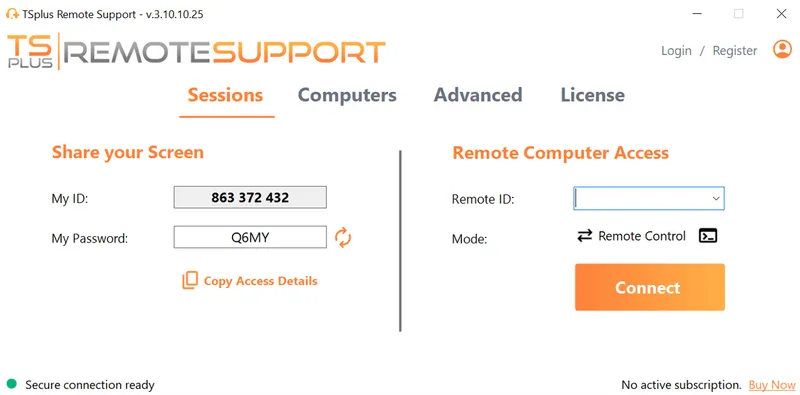
If you want a simpler and more budget-friendly remote support platform, TSplus Remote Support is worth considering. It provides secure remote assistance, unattended access, browser-based connectivity, and straightforward deployment. For SMBs and IT teams that need professional capabilities without enterprise-level pricing, it offers a practical alternative.
Conclusion
TeamViewer pricing can be reasonable for single users but grows quickly for larger teams needing multiple technicians or advanced features. The best buying decision comes from matching cost to real needs. Many organizations discover that simpler alternatives provide better long-term value and easier budgeting.
TSplus Remote Support Free Trial
Cost-effective Attended and Unattended Remote Assistance from/to macOS and Windows PCs.
)
)
)
