





)
)
Introduction
Remote support has become a core operational function for modern IT teams, especially as enterprise environments grow increasingly heterogeneous. While Windows-based infrastructures remain dominant across servers, identity services, and help desks, macOS devices are now widely adopted by executives, developers, and creative teams. This shift introduces new operational and security considerations, as macOS follows a fundamentally different permission and privacy model. Supporting macOS from a Windows environment therefore requires purpose-built tools, clear workflows, and a solid understanding of cross-platform constraints to ensure reliable and secure assistance.
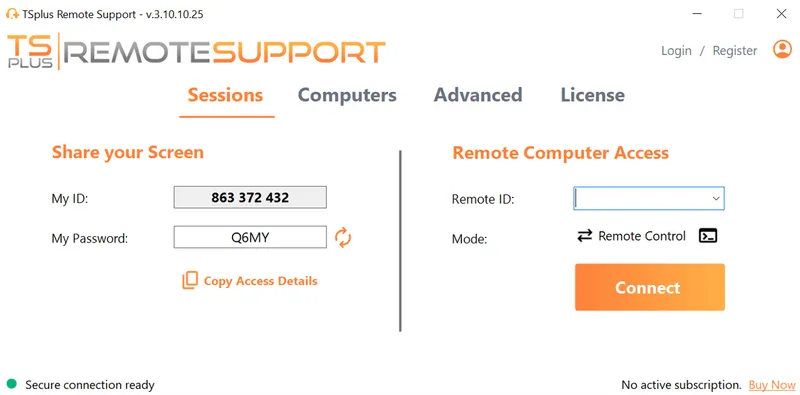
TSplus Remote Support Free Trial
Cost-effective Attended and Unattended Remote Assistance from/to macOS and Windows PCs.
Why Does Cross-Platform Remote Support Matter?
The rise of hybrid work, BYOD policies, and role-based device choice has reshaped IT support models. macOS endpoints now coexist with Windows servers, Active Directory, Microsoft Entra ID, and Windows-based help desks.
Without cross-platform remote support, IT teams face delays and fragmented workflows. Technicians may need to switch devices, depend on user-driven troubleshooting, or escalate issues unnecessarily. A unified remote support approach enables consistent assistance across operating systems while preserving security, auditing, and service quality.
Operational Impact of macOS Devices in Windows-Centric IT
Without cross-platform remote support capabilities IT teams face recurring inefficiencies that compound over time:
- Delays caused by technicians lacking direct access to macOS devices
- Increased dependency on end users to perform local troubleshooting steps
- Fragmented support workflows split across multiple tools or platforms
These friction points directly affect mean time to resolution (MTTR) and user satisfaction, particularly in distributed or remote-first organisations.
A unified remote support model allows IT teams to preserve operational consistency while accommodating device diversity, rather than forcing standardisation through policy alone.
What Are the Remote Support Options for macOS in Windows Environments?
Several technical approaches allow Windows-based IT teams to remotely support macOS devices. Each model offers different trade-offs in terms of scalability, security, and operational complexity.
Platform-Agnostic Remote Support Tools
Platform-agnostic tools provide the most straightforward path to cross-platform support. They abstract operating system differences and expose a consistent support workflow to technicians, regardless of the user’s device.
From an architectural standpoint, these tools typically rely on:
- A lightweight macOS client for session initiation and permission handling
- A centralized or browser-based technician console running on Windows
- Encrypted relay or direct peer-to-peer connections for session traffic
Because these tools do not depend on RDP or native macOS screen sharing alone, they are well suited for ad-hoc support, help desks, and MSP environments.
Persistent Remote Access Agents for macOS
Persistent agents are designed for scenarios where repeated or unattended access is required. This model prioritises availability and responsiveness but introduces additional governance considerations.
In practice, persistent access is most appropriate for:
- Executive devices requiring rapid assistance
- Shared workstations or lab machines
- Systems needing maintenance outside user working hours
However, this approach requires stricter access controls and monitoring, as always-on connectivity increases the potential attack surface if not properly governed.
MDM-Based Remote Support Workflows
MDM platforms play a complementary role in macOS remote support strategies, particularly in environments with a high percentage of managed Apple devices.
By leveraging MDM, IT teams can:
- Pre-approve screen recording and accessibility permissions
- Enforce consistent security baselines across macOS endpoints
- Reduce friction during live remote support sessions
MDM-based support alone is rarely sufficient for real-time help desk needs, but it significantly improves reliability when combined with dedicated remote support tooling.
What Are the Challenges of Supporting macOS from Windows?
While multiple technical options exist, supporting macOS from a Windows environment introduces specific challenges that IT teams must anticipate.
macOS Security and Privacy Controls
Apple’s security model relies on explicit user consent and system isolation. Screen sharing, screen recording, and input control require approval through macOS Privacy & Security settings.
If permissions are missing or misconfigured, remote support sessions may fail or be limited. Unattended access must be preconfigured carefully to avoid disruptions while remaining compliant with internal policies.
Compatibility Limitations of Remote Support Tools
Not all remote support solutions offer the same features across operating systems. Some tools provide full control on Windows but only limited functionality on macOS.
These gaps can slow resolution times and complicate support workflows. Choosing tools with native macOS support, rather than basic compatibility, is essential to maintaining consistent service levels across platforms.
Windows-Centric Infrastructure Constraints
Most IT environments are built around Windows-native technologies such as Active Directory, Group Policy, and Microsoft-based identity and management systems. macOS devices do not integrate natively into these frameworks in the same way.
As a result, remote support workflows often require:
- Additional tooling
- Separate identity handling
- Parallel management processes
Without careful planning, this can create operational silos and increase administrative overhead.
What best practices should you follow to support macOS from Windows?
Effective cross-platform remote support depends as much on process as on tooling. IT teams that perform well in mixed environments typically focus on preparation and standardization.
Key operational best practices include:
- Pre-configuring macOS permissions during device onboarding
- Standardising remote support workflows across OS types
- Training technicians on macOS-specific system behaviour
Equally important is governance. Session logging, access control, and user transparency should be applied consistently, ensuring macOS support aligns with the same compliance and audit standards used elsewhere in the environment.
How to Support macOS from Windows with TSplus Remote Support?
TSplus Remote Support enables Windows-based IT teams to support macOS devices through a single, consistent support interface. macOS sessions follow the same workflow as Windows sessions, reducing tool sprawl and technician training overhead. A lightweight macOS client respects Apple’s permission model while enabling secure screen sharing and input control. Encrypted connections, session logging, and access controls ensure compliance and operational visibility in mixed-platform environments.
Conclusion
Remote support for macOS in Windows environments is no longer a niche requirement. As device diversity increases, IT teams must adopt tools and processes that bridge operating system boundaries without sacrificing security or efficiency.
By combining platform-agnostic remote support solutions , proper macOS configuration, and well-defined support workflows, organizations can provide consistent, high-quality assistance to all users—regardless of the device they choose to work on.
TSplus Remote Support Free Trial
Cost-effective Attended and Unattended Remote Assistance from/to macOS and Windows PCs.
)
)
)
