





)
)
Introduction
As infrastructures spread across on-premises data centres, private clouds, and public platforms such as Amazon Web Services and Microsoft Azure, “remote-first operations” becomes the default. Remote server maintenance is no longer a convenience for distributed teams: it is a core control for uptime, security posture, and incident response speed. Done well, it reduces downtime and limits exposure without slowing delivery.
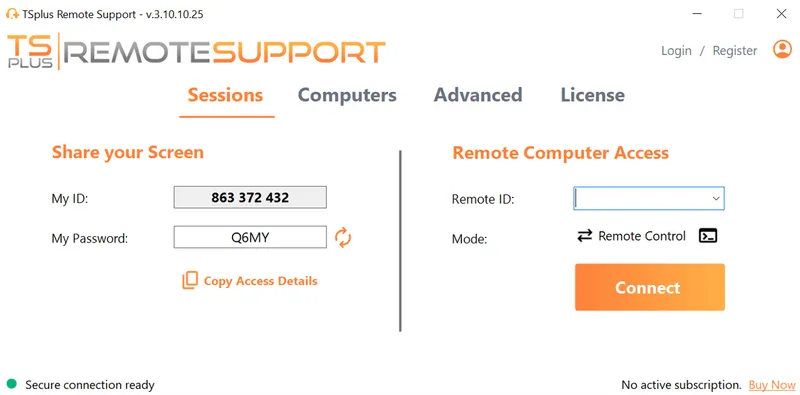
TSplus Remote Support Free Trial
Cost-effective Attended and Unattended Remote Assistance from/to macOS and Windows PCs.
What Is Remote Server Maintenance?
What "maintenance" includes in 2026
Remote server maintenance is the ongoing process of monitoring, managing, updating, securing, and troubleshooting servers without physical access to the hardware. In practice, maintenance combines operational hygiene and security controls, so the environment stays stable between changes and incidents.
Core activities usually include:
- Health and performance monitoring (OS and hardware where available)
- Patch and update orchestration (OS, middleware , firmware)
- Backup validation and restore testing
- Configuration hardening and access reviews
Centralized logging and secure troubleshooting remain part of the maintenance lifecycle, but they work best when they support repeatable routines rather than ad-hoc “check everything” sessions.
Where remote maintenance applies: on-premises, cloud, hybrid, edge
Remote server maintenance applies wherever teams must operate systems without being physically present, including data centres, cloud platforms, and remote sites. The technical approach changes based on network boundaries and tooling, but the operational goals stay the same.
Typical scopes include:
- Physical servers in data centres
- Virtual machines (VMs) and hypervisor estates
- Cloud-hosted instances
Hybrid environments and edge deployments add constraints like limited bandwidth, fragmented identity paths, and higher sensitivity to downtime. That is why consistent access patterns and standard runbooks matter more than the specific platform.
Why Does Remote Server Maintenance Matter for Uptime and Security?
Availability and performance outcomes
Servers often support authentication, line-of-business applications, databases, file services, and web workloads. When maintenance is inconsistent, outages frequently come from predictable failure modes: storage saturation, capacity drift, failed services, or certificate issues that were visible in telemetry days earlier.
A strong program reduces these risks through routines that stay consistent under pressure:
- Monitoring with actionable alerts (not alert storms)
- Defined on-call paths by severity
- Routine capacity reviews and cleanup tasks
Clear rollback and restart procedures also reduce “trial and error” recovery, which is a common driver of prolonged incidents.
Security and compliance outcomes
Remote maintenance is a security control as much as an operations practice. Attackers typically succeed when exposed services, missing patches, and weak access controls combine with low visibility. Consistent maintenance reduces that window by making the secure state repeatable.
Security-oriented maintenance usually relies on:
- Patch cadence with emergency exception handling
- Least-privilege access and strong authentication
- Continuous log review for suspicious activity
Configuration baselines and drift checks complete the loop by ensuring servers do not gradually diverge into risky states.
Cost and operational efficiency outcomes
Remote operations reduce travel and accelerate response, but only if maintenance is standardised. If each site or team uses different access methods and different “ways of working,” the result is slow triage and inconsistent outcomes.
Efficiency improves when the organization standardises:
- One way to access servers (and audit it)
- One way to patch and roll back
- One way to validate backups and restores
This consistency typically lowers MTTR and makes planning more reliable, especially when infrastructure spans multiple locations.
What Are the Core Components of Remote Server Maintenance?
How to build proactive monitoring and alerting
Monitoring is the foundation of remote maintenance. Start small with high-signal metrics and expand once alerts are calibrated. The goal is to detect meaningful change early, not to track every possible counter.
A solid baseline includes:
- CPU utilisation and load
- Memory pressure and swap/pagefile behaviour
- Disk space and disk I/O latency
From there, add service uptime, certificate expiry, and hardware health telemetry where the platform exposes it. Alert design matters as much as collection: use thresholds plus duration, route incidents by severity, and include the next step (runbook link or command) so responders do not guess.
How to run patch management with minimal disruption
Patch management is where uptime and security collide. A dependable process prevents emergency work by making patching routine, predictable, and reversible. Most mature teams use rings (pilot first, then broader rollout) and avoid patching during known peak business windows.
A practical patch process includes:
- Asset inventory and grouping (prod vs non-prod, critical vs standard)
- Regular patch windows and maintenance notifications
- Staging validation (representative workloads)
- Explicit reboot policy and service restart sequencing
Rollback planning should be treated as mandatory, not optional. When teams know exactly how to revert a problematic update, patching stops being scary and starts being reliable.
How to verify backups and prove restore readiness
Backups are only valuable if restores work under time pressure. Remote maintenance should validate restore readiness continuously, because “backup succeeded” does not prove integrity, access, or recovery speed.
Recurring checks typically include:
- Daily backup job verification (success, duration anomalies, missed jobs)
- Regular restore tests (file-level and full-system where feasible)
- Off-site or cloud redundancy checks (immutability and access controls)
RTO and RPO should be documented as operational targets, then tested with real restores. If restore tests are rare, the organization is effectively guessing during incidents.
How to harden remote access and enforce least privilege
Remote maintenance increases reach, so it must also increase discipline. The priority is to reduce exposure of management surfaces and ensure privileged access is both controlled and auditable.
Core controls include:
- Require multi-factor authentication MFA for admin access
- Enforce role-based access control (RBAC) and least privilege
- Segment admin paths (jump hosts / bastions) from user networks
- Rotate credentials and remove stale privileged accounts
Tool sprawl is also a risk. Fewer approved tools with consistent auditing usually beats a large set of overlapping utilities with unclear ownership.
How to centralise logs for investigations and audits
Centralized logging reduces blind spots and speeds incident response, especially when troubleshooting spans identity, network, and application layers. It also makes compliance audits easier because event history is searchable and consistent.
Aggregate logs from:
- Operating systems (Windows Event Logs, syslog/journald)
- Identity providers (authentication, MFA, conditional access)
- Network/security controls (firewalls, VPNs, gateways)
Retention policy should follow risk and regulatory needs, then detection rules can focus on what matters: authentication anomalies, privilege changes, and unexpected configuration shifts. Restrict who can access logs and who can change retention, because logging platforms become high-value targets.
How to troubleshoot remotely without increasing risk
but it should not bypass security controls and using a dedicated remote support tool such as TSplus Remote Support helps keep sessions encrypted, controlled, and auditable. The objective is to enable access that is encrypted, time-bound when possible, and auditable, so incident work does not create a second incident.
Required capabilities usually include:
- Encrypted remote access (GUI and CLI)
- Secure file transfer for log bundles and tooling
- Session logging and audit trails for privileged access
- Clear separation between admin sessions and user support sessions
Operationally, treat incident response as a workflow: stabilise service, collect evidence, fix root cause with change discipline, then document prevention tasks so the same failure mode does not recur.
Which Maintenance Strategy Fits Your Environment?
Preventive maintenance
Preventive maintenance uses scheduled routines to reduce failure probability. It is the easiest model to plan and standardise, and it creates a stable baseline for automation.
Typical preventive actions include:
- Weekly or monthly patching cadence (plus emergency process)
- Disk and log cleanup routines
- Certificate expiry reviews
The value comes from consistency: the same checks, at the same cadence, with clear ownership and escalation paths.
Predictive maintenance
Predictive maintenance uses trends and patterns to anticipate issues before they become incidents. It relies on good data quality, enough retention, and metrics that actually correlate with failure modes.
Common predictive signals include:
- Storage growth rate predicting saturation
- Increasing I/O latency predicting storage degradation
- Repeated service restarts indicating underlying instability
When predictive signals are trusted, teams can schedule fixes during normal windows instead of responding during outages.
Corrective maintenance
Corrective maintenance is reactive work after something breaks. It will always exist, but mature environments reduce it by improving monitoring, patch discipline, and restore readiness.
Corrective work often clusters around:
- Incident triage and stabilization
- Root-cause remediation and rollback actions
- Post-incident follow-ups (hardening, automation, documentation)
A practical maturity indicator is whether most work happens during planned windows or during outages.
What Is The Best Practices Checklist for Implementing Remote Server Maintenance?
How to standardise with runbooks and change control
Standardisation turns experience into repeatable outcomes. Runbooks should be short, operational, and directly tied to alerts so responders can act without reinventing steps. Change control should protect uptime, not slow delivery.
At minimum, standardise:
- Asset inventory and ownership (who is responsible)
- Maintenance schedules and approval paths
- Patch runbook with rollback paths
- Backup and restore runbook with test cadence
Keep runbooks updated after incidents, because that is when gaps become visible.
How to automate safely with scripts and configuration management
Automation reduces manual effort and human error, but only when guardrails exist. Start with low-risk tasks and build confidence before automating privileged operations at scale.
High ROI automation targets include:
- Patch orchestration and reboots in defined windows
- Baseline configuration enforcement (services, audit policy, firewall rules)
- Backup verification alerts and reporting
Guardrails should include version control, staged rollouts, and secrets management. A clear break-glass procedure also matters, because teams need a safe fallback when automation hits edge cases.
How to measure maintenance success (KPIs that matter)
Choose KPIs that reflect outcomes rather than activity. A smaller set of reliable KPIs is more useful than a long list nobody reviews.
Strong KPIs include:
- Patch compliance rate by tier (critical vs standard)
- MTTD and MTTR trends
- Backups restore test pass rate and frequency
- Percentage of privileged access protected by MFA
Track these monthly and review deviations. The goal is continuous improvement, not perfect numbers.
What Is Remote Server Maintenance in Hybrid and Cloud Environments?
Hybrid realities: identity, networking, and shared responsibility
Hybrid environments usually fail at the boundaries: identity paths, network segmentation, and inconsistent tooling between on-prem and cloud. Maintenance succeeds when it unifies controls across those boundaries.
Priorities include:
- Identity controls (SSO, MFA, RBAC)
- Network segmentation between admin paths and user paths
- Standard logging and time synchronization
Also align expectations with the shared responsibility model: cloud providers secure the platform, while the organization secures identity, configuration, and workload-level controls.
Cloud ops specifics: ephemeral compute, tagging, and policy
Cloud workloads change quickly, so maintenance must scale with automation and policy. Tagging becomes a control mechanism because ownership, environment, and criticality drive how patching and alerting should behave.
Cloud maintenance typically relies on:
- Tagging for ownership, environment, and criticality
- Baseline enforcement with policy-as-code
- Centralized logs and metrics across accounts/subscriptions
Where possible, immutable patterns (rebuild rather than repair) reduce drift and increase consistency, especially for autoscaled fleets.
How Does TSplus Remote Support Simplify Remote Server Maintenance?
TSplus Remote Support helps IT teams perform secure remote troubleshooting and maintenance with encrypted sessions, operator controls, and centralised management, so administrators can access Windows servers quickly without exposing unnecessary management surfaces. For maintenance workflows, this supports faster incident response, consistent session handling, and practical oversight for distributed environments.
Conclusion
Remote server maintenance is a structured programme, not a collection of remote tools. The most reliable approach combines proactive monitoring, disciplined patching, verified restores, hardened access, and audit-ready logs. When these controls become repeatable runbooks with measured outcomes, IT teams reduce downtime, strengthen security, and keep hybrid infrastructure stable as it scales.
TSplus Remote Support Free Trial
Cost-effective Attended and Unattended Remote Assistance from/to macOS and Windows PCs.
)
)
)
